- 48 -
Orus Programmable Thermostat User Manual
English
- 49 -
Orus Programmable Thermostat User Manual
• Using the
“ ”
and
“ ”
keys,
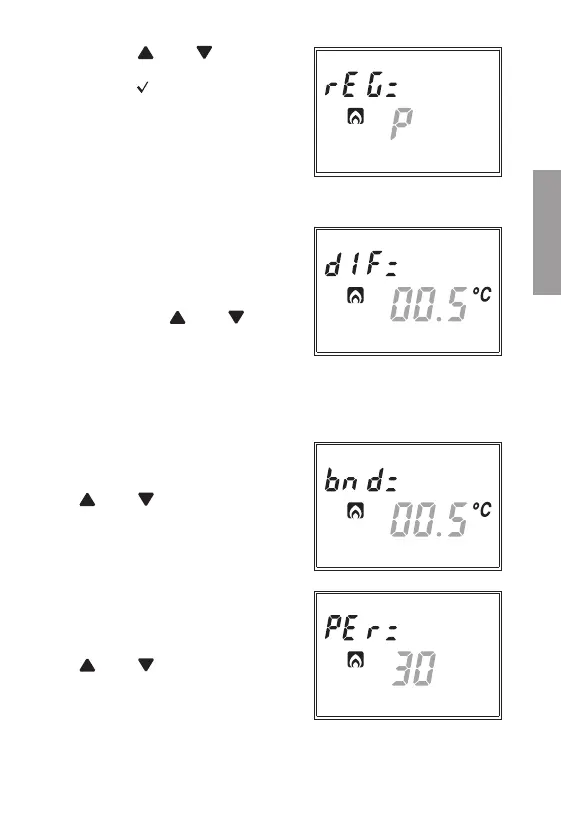
choose the desired regulation mode
and press
“ ”
to confirm and move
to the setting of the next parameter.
Parameters for the chosen regulation type (only for winter operation)
• In case of “ON/OFF” regulation
type, the only parameter to be set
is the differential. Field (22) will
display the writing “dIF=” and on
field (16) the value currently set will
flash. Press the
“ ”
and
“ ”
keys
to increase or decrease the value. The
range varies from 0.1°C to 1°C.
• In case of
PROPORTIONAL
regulation type, the parameters to be set are:
-
regulation band
-
regulation period
Field
(22
) will display the writing
“bnd=”
and on field
(16)
the value
currently set will flash. Press the
“ ”
and
“ ”
keys to increase or
decrease the value. The range varies
from 0.5°C to 5°C.
Once the band value is confirmed,
field
(22)
will display the writing
“PEr=”
and on field
(16)
the value
currently set will flash. Press the
“ ”
and
“ ”
keys to increase or
decrease the value. It is possible to
choose between 10, 20 or 30 minutes.
For a wider description on how to operate the regulation type choice,
please refer to the chapter “REGULATION TYPE” on page 56.


 To Next Page