- 52 -
Orus Programmable Thermostat User Manual
English
- 53 -
Orus Programmable Thermostat User Manual
Battery charge status
It is possible to view the battery charge status.
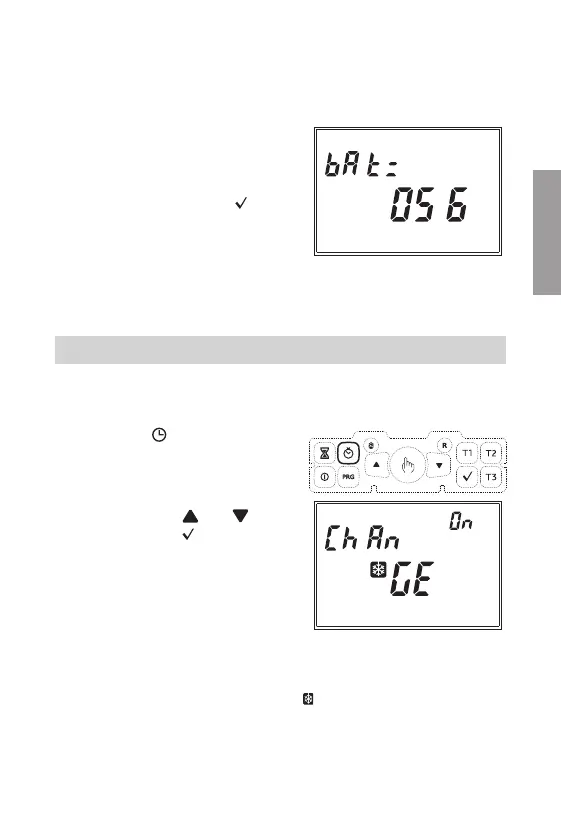
Field (22) will display the writing
“BAT=” and field (16) will show the
percentage value of the charge level.
Since this is the last parameter of
the sequence, pressing the
“ ”
key
will exit the menu and return to
automatic operation.
If no key is pressed during setting
of these parameters, automatic
operation will be restored after 45
seconds.
ADVANCED FUNCTIONS
Automatic change CET / DST
The programmable thermostat allows to automatically move from the CET
(Central European Time) to DST (Daylight Saving Time) and vice versa.
Holding the “
” key for at least
3 seconds, the display will show
the writing “Change” and field
(15) will flash the writing “On” or
“OFF”.
Choose using the
“ ”
or
“ ”
keys
and confirm with
“ ”
.
If the choice is OFF, you will exit
the menu and the programmable
thermostat will not execute the hour
change. If the choice is ON, then two
other menus will be displayed, which
define respectively the hour change
from
-
winter summer
-
summer winter (on field (20) the
“ ”
symbol will appear)


 To Next Page