English
- 54 -
Orus Programmable Thermostat User Manual
- 55 -
Orus Programmable Thermostat User Manual
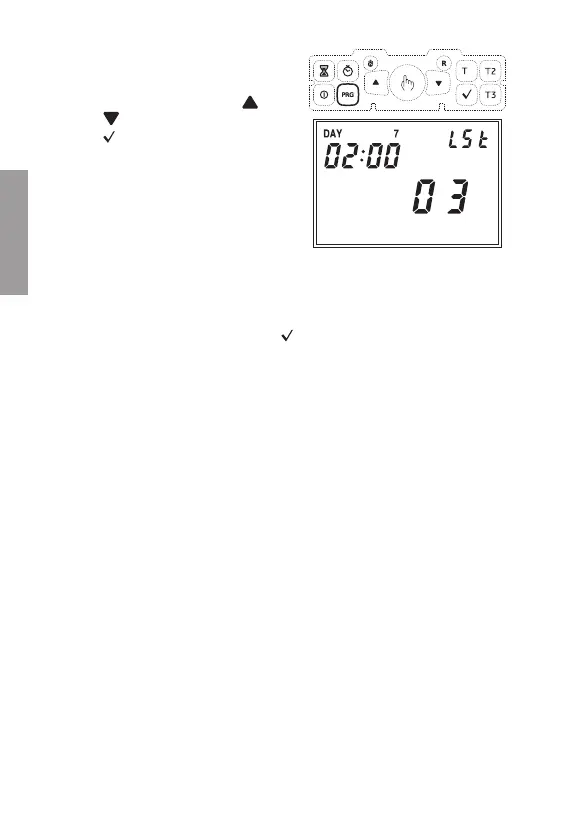
To modify the set values, press
the “PRG” key. The parameter
corresponding to the modification
will start flashing. Press the
“ ”
and
“ ”
keys to modify the values
and
“ ”
to confirm.
The settings for both menus are, in
order:
-
week of the month
(1ST first, 2ND second, 3RD third,
4TH fourth, LST last)
-
day of the week
-
month
-
changing hour
At the end of each menu, press the
“ ”
key again to access
the next menu or to exit and return to the normal view.
The default values set for the automatic time change are:
-
winter summer change: last Sunday of March at 02:00
-
summer winter change: last Sunday of October at 03:00
Telephone activator command
A telephone activator can be connected to the programmable thermostat,
allowing the remote activation/deactivation of the instrument. There are
two possible operation modes:
-
open contact normal operation
-
closed contact
the programmable thermostat is in OFF status until new
command
Note: the OFF command from keypad has priority on the OFF
command from the dial; therefore to command activations
and deactivations with the dial, the programmable
thermostat must not be off.


 To Next Page