17
during
ANUAL
INS TO
nual
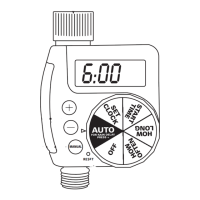
Push CONFIRM button to start the extra watering with
selected duration.
As watering begins, MINS TO RUN will alternate with the
current time and day to indicate the time left on manual
cycle.
To discontinue the manual watering mode, push + and –
together, and extra watering will end immediately.
When the extra watering is finished, the unit will resume
auto mode.
DELAY WATERING
The Orbit timer allows you to delay automatic watering for 1-24
hours.
Push MODE button to select DELAY. The word DELAY will
blink to indicate that it is selected. The unit will initiate a 24
hour delay.
Push CONFIRM button to begin delay mode. "24 Hr" will
blink and the word DELAY will appear.
WTM221395 62075-24 rB.qxd 11/1/2002 10:09 AM



 To Next Page