6
Step 4:
Step 5:
Step 6:
Step 7:
Attention:Please don’t put the power on until you make sure that all the above steps are finished
and all the bolts are tightened well. Please also read all the following instructions when you
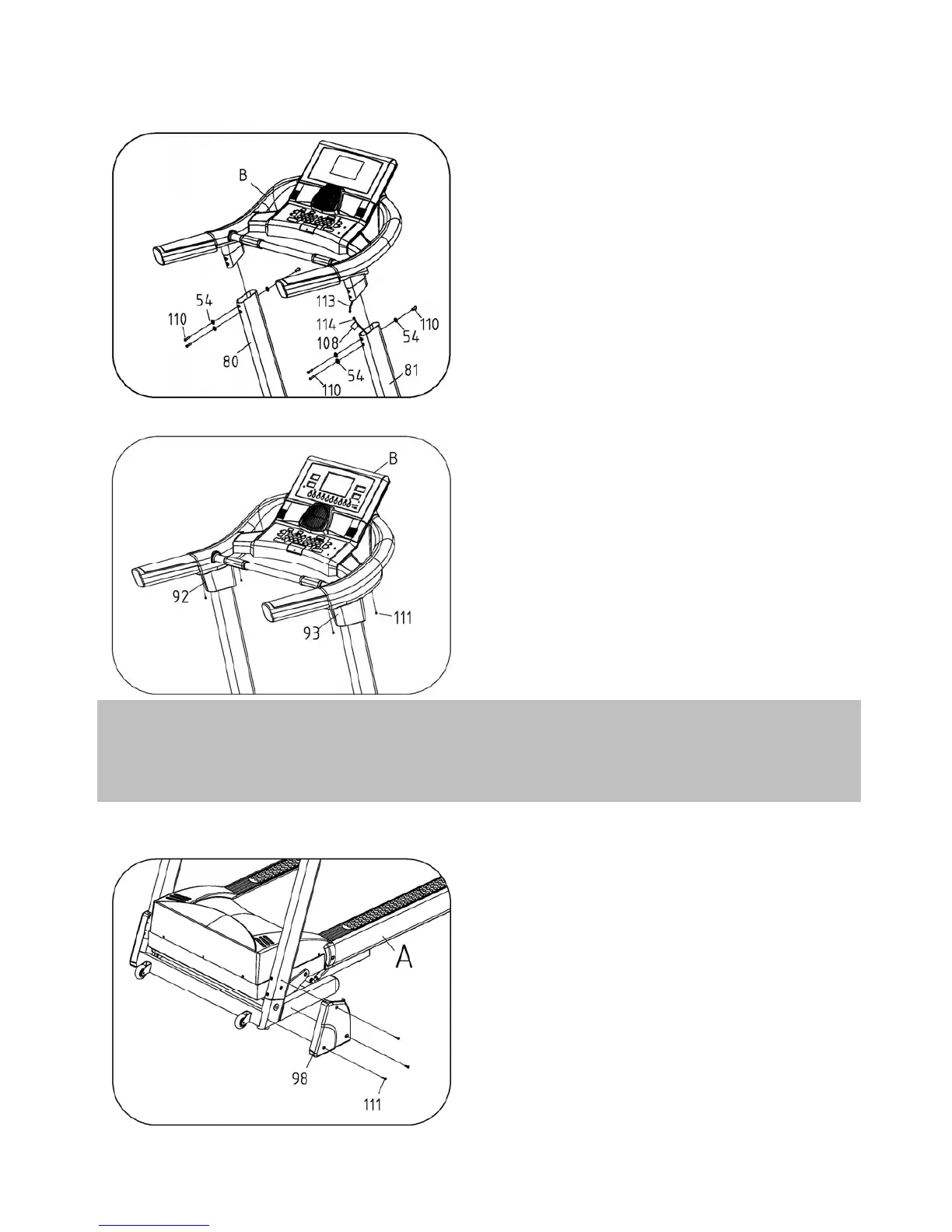
Use Allen Wrench with Screw Driver, Fasten
the Left Protection Cover (#98) onto the Base
Main Frame by the Screw (#111, ST4.2*16).
1. Use 6# Allen Wrench, Fasten the
Console Set (B) with the Left & Right Upright
(#80 & #81) by the Bolt (#110, M10*25) and
the Lock Washer (#54).
2. Connection Way: Connect the Upper Wire
(#113) of the Console Set (B) with the Middle
Wire (#114) of the Right Upright (#81)
carefully.
Use Wrench W/Screw Driver (#8), Fasten the
Left Handle Bottom Cover (#92), the Right
Handle Bottom Cover (#93) with the Console
Set (B) by the Screw (#111, ST4.2*16).



 To Next Page