3
GB
HOW TO SELECT THE BAR OR LINE
CHART FOR THE PRESSURE TREND
- To get the line chart display, press the [RESET] button at the
bottom of the unit while pressing and holding the [SET] key
in the bar chart display.
- To get the bar chart display, press the [RESET] button once.
Note: Either action will reset the unit and the previous readings/
setting will be lost.
HOW TO SELECT THE PRESSURE
UNITS OF MEASURE
The switch in the battery compartment of the weather station
selects between hPa/mb and inHg. To select hPa/mb, set the
switch to hPa/mb. To select inHg, set the switch to inHg.
LOW BATTERY SIGNAL INDICATION
If the voltage of the batteries becomes low, the " " indicator
will be displayed. Replace the batteries when the " "
indicator is displayed.
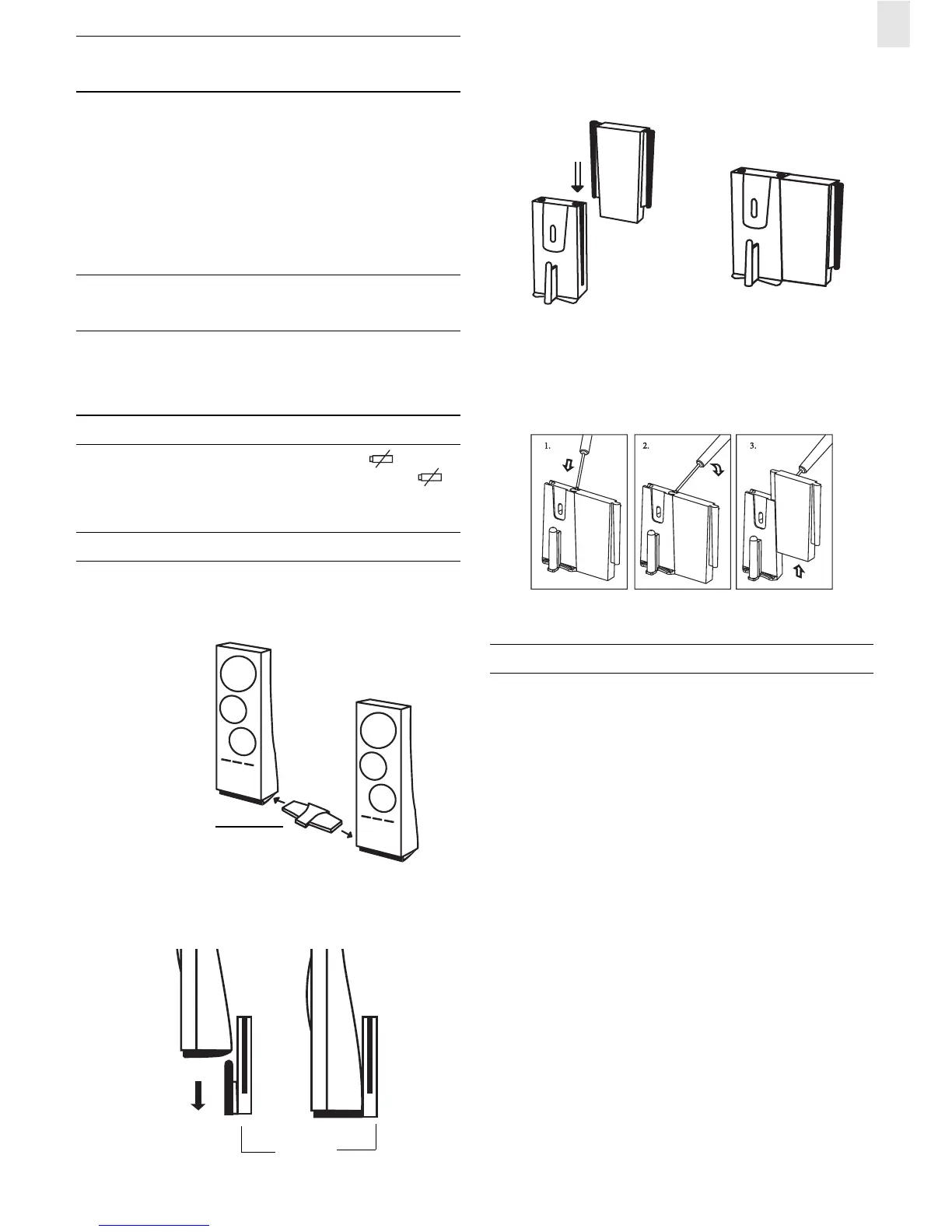
TABLE STANDING OR WALL MOUNTING
Table Standing :
Your unit comes with stand connector for connecting it to the
other modular units.
Wall-Mounting:
Connector:
Use wall-mount connector to align with other wall-mount bracket
if necessary.
Un-install the brackets:
MAINTENANCE
When handled properly, this unit is engineered to give you years
of satisfactory service. Here are a few product care instructions:
1. Do not immerse the unit in water. If the unit comes in contact
with water, dry it immediately with a soft lint-free cloth.
2. Do not clean the unit with abrasive or corrosive materials.
Abrasive cleaning agents may scratch the plastic parts and
corrode the electronic circuit.
3. Do not subject the unit to excessive: force, shock, dust,
temperature, or humidity. Such treatment may result in
malfunction, a shorter electronic life span, damaged batteries,
or distorted parts.
4. Do not tamper with the unit’s internal components. Doing so
will terminate the unit’s warranty and may cause damage.
The unit contains no user-serviceable parts.
5. Only use new batteries as specified in this instruction manual.
Do not mix new and old batteries as the old batteries may
leak.
6. Read this instruction manual thoroughly before operating the
unit.
Wall mount
bracket
CONNECTOR
STAND
CONNECTOR
Wall Mount
Bracket
Wall Mount
Connector


 To Next Page
 Loading...