This manual contains important safety
and care information, and provides step-
by-step instructions for using this product.
Read the manual thoroughly, and keep it
in a safe place in case you need to later
refer to it.
Key Features
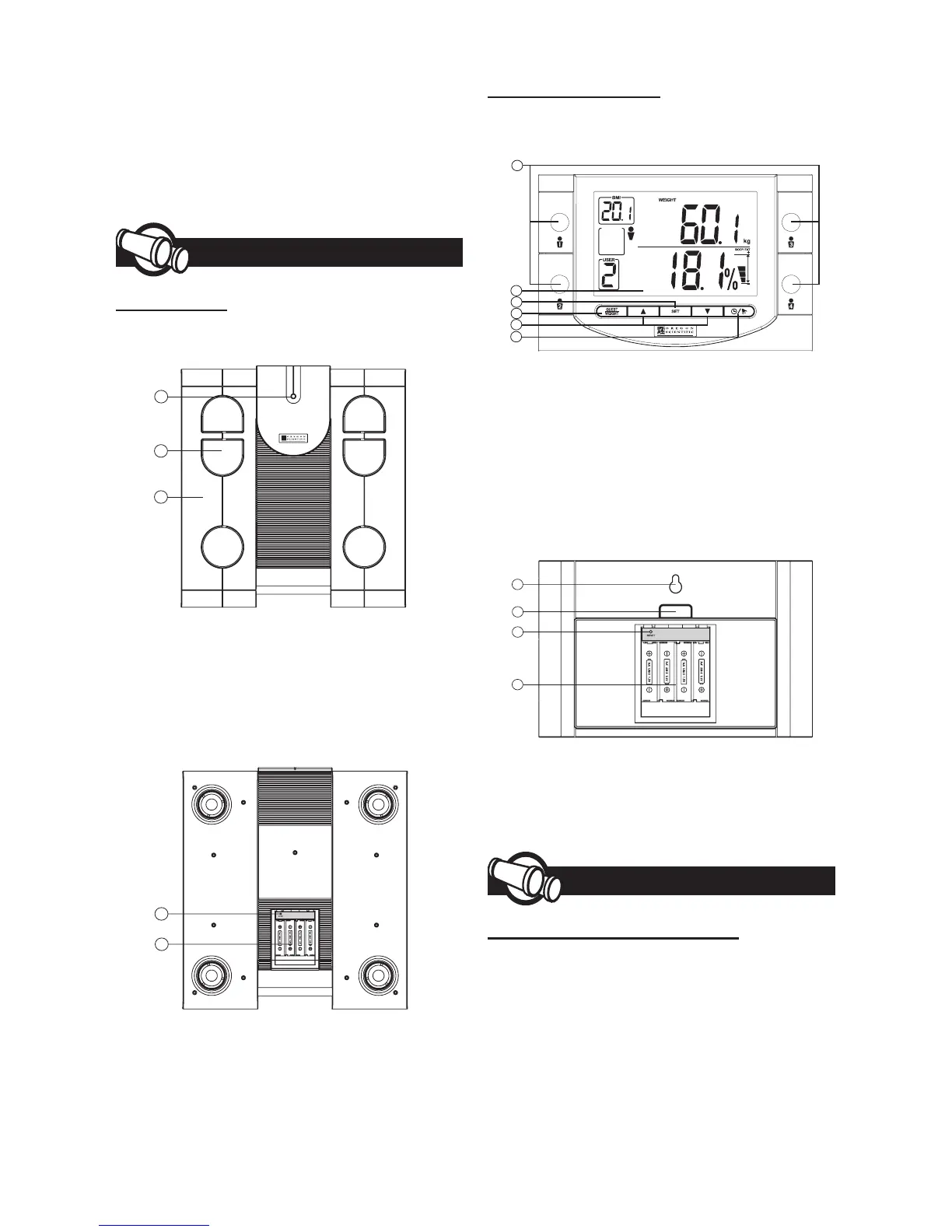
SCALE UNIT
Front View
1. LED Indicator
2. Metal Footpads
3. Scale Platform
4. Carrying Handle
Back View
5. Reset Hole
6. Battery Compartment
REMOTE MONITOR
Front View
1. User Switches
2. LCD Display
3. Set Button
4. Guest / Weight Button
5. ▲ / ▼ Buttons
6. Clock / Alarm Button
Back View
7. Wall Mount
8. Battery Compartment Button
9. Reset Hole
10. Battery Compartment
Getting Started
UNPACKING THE PRODUCT
When you unpack your product, make
sure to keep all the packing materials in
a safe place, in case you need to later
transport or return it for servicing. In the
box, you will nd:
1
2
3
4
5
6
6
5
1
2
3
7
8
9
10


 To Next Page