Need help?
Do you have a question about the Orei EX-330-KVM and is the answer not in the manual?
Details HDCP compliance, bandwidth, resolution, audio, IR frequency, compression, color, and ESD protection.
Describes input/output ports for Encoder and Decoder units.
Covers housing, dimensions, weight, power supply, consumption, and environmental limits.
Details the ports and indicators on the encoder unit.
Details the ports and indicators on the decoder unit.
Explains pin definitions for IR receiver/blaster cables and transmission notes.
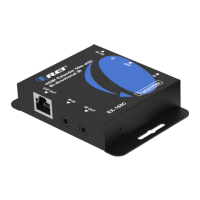
The OREI EX-330-KVM is an HDMI over IP Extender with USB KVM (Keyboard, Video, Mouse) functionality, designed to extend high-definition video and USB signals over a standard IP network. This device utilizes H.265 encoding and decoding standards, allowing for efficient transmission of HD content with configurable high quality and low bandwidth. It is capable of distributing a single HD content source to one or multiple HD display devices over a 1G network switch, extending the transmission distance up to 150 meters (492 feet) between the encoder and decoder units using a single Cat5e/6 cable. The system supports input video resolutions up to 1920×1200@60Hz and outputs video resolutions up to 1080P@60Hz. In addition to video extension, it integrates USB KVM functionality, enabling remote control of a PC, and supports one-way IR (infrared) control signal transmission for managing source devices.
The system comprises two main units: an Encoder and a Decoder. The Encoder is responsible for receiving HDMI signals from a source device, encoding them, and transmitting them over Cat5e/6 cables. It features an HDMI IN port for connecting the HDMI source, a LAN port for network connection, an IR OUT port for connecting an IR blaster cable, and a PC port (USB-B female) for connecting to a PC to enable KVM functionality. The Encoder also includes a DC 5V input for power and LED indicators for data signal (orange, flickering when transmitting) and power (green, on when powered). The Decoder unit receives the encoded signals, decodes them, and outputs HDMI signals to an HD display. It is equipped with an HDMI OUT port for connecting the display, a LAN port for network connection, an IR IN port for connecting an IR receiver cable, and two USB ports (USB-A female) for connecting a mouse and USB keyboard, facilitating the KVM function. Similar to the Encoder, the Decoder has a DC 5V input for power and LED indicators for data signal and power.
The EX-330-KVM is designed for easy and flexible installation. Its compact form factor allows for discreet placement in various environments. The device is HDCP 1.4 compliant, ensuring compatibility with a wide range of protected content. It supports 6.75Gbps video bandwidth and various HDMI audio formats, including LPCM 2.0CH at 32KHz, 44.1KHz, and 48KHz for input, and LPCM 2.0CH at 48KHz for output. The IR control functionality operates within a frequency range of 20Hz to 60KHz. The IR Blaster and Receiver cables are designed with specific pin definitions (IR Blaster Signal, Power, NC for the blaster; IR Signal, Power, Grounding for the receiver) to ensure proper one-way control. The effectiveness of IR transmission is dependent on the angle between the IR receiver and the remote control, with a transmission distance of 0-5 meters at ±45° and 0-8 meters at ±90°.
For setup, the Encoder can be directly connected to the Decoder via a single Cat5e/6 cable for a point-to-point extension. Alternatively, for distributing content to multiple displays or extending over longer distances within a network, the Encoder and Decoder(s) can be connected through a standard 1G IP switcher, router, or hub. The system supports 1 GMP and DHCP for network management. The USB KVM function allows users to control a remote PC connected to the Encoder's PC port using a mouse and keyboard connected to the Decoder's USB ports. The IR control allows users to control the source device (e.g., DVD or Blu-ray player) from the display location by sending IR signals back to the source via the IR blaster connected to the Encoder.
In terms of maintenance, the device is built with a metal enclosure for durability and includes ESD protection to safeguard against electrical spikes, surges, and lightning strikes. It is recommended to use surge protection systems to protect the sensitive electrical components and extend the service life of the equipment. The device operates within a temperature range of -10°C to 50°C (14°F to 122°F) and can be stored in temperatures from -20°C to 60°C (-4°F to 140°F), with a relative humidity range of 20-90% RH (non-condensing). The power supply units are 5V/1A, and the device has a relatively low power consumption, with the Encoder consuming 2.9W and the Decoder up to 3.65W (Max). The user manual provides detailed instructions for connecting, operating, and adjusting the product, and it is advised to keep it for future reference. Technical support is available via phone, email, or live chat for any assistance with installation or troubleshooting.
 General
| Product Type | KVM Extender |
|---|---|
| Model | EX-330-KVM |
| Connection Type | CAT5e/6 |
| USB Support | Yes |
| Audio Support | Yes |
| Power Supply | 5V DC |
| Distance | 330 ft |
| Input Ports | 1x USB |
| Output Ports | 1x USB |
| Dimensions (Transmitter) | 95 x 94 x 26 mm |
| Dimensions (Receiver) | 95 x 94 x 26 mm |

 To Next Page