10
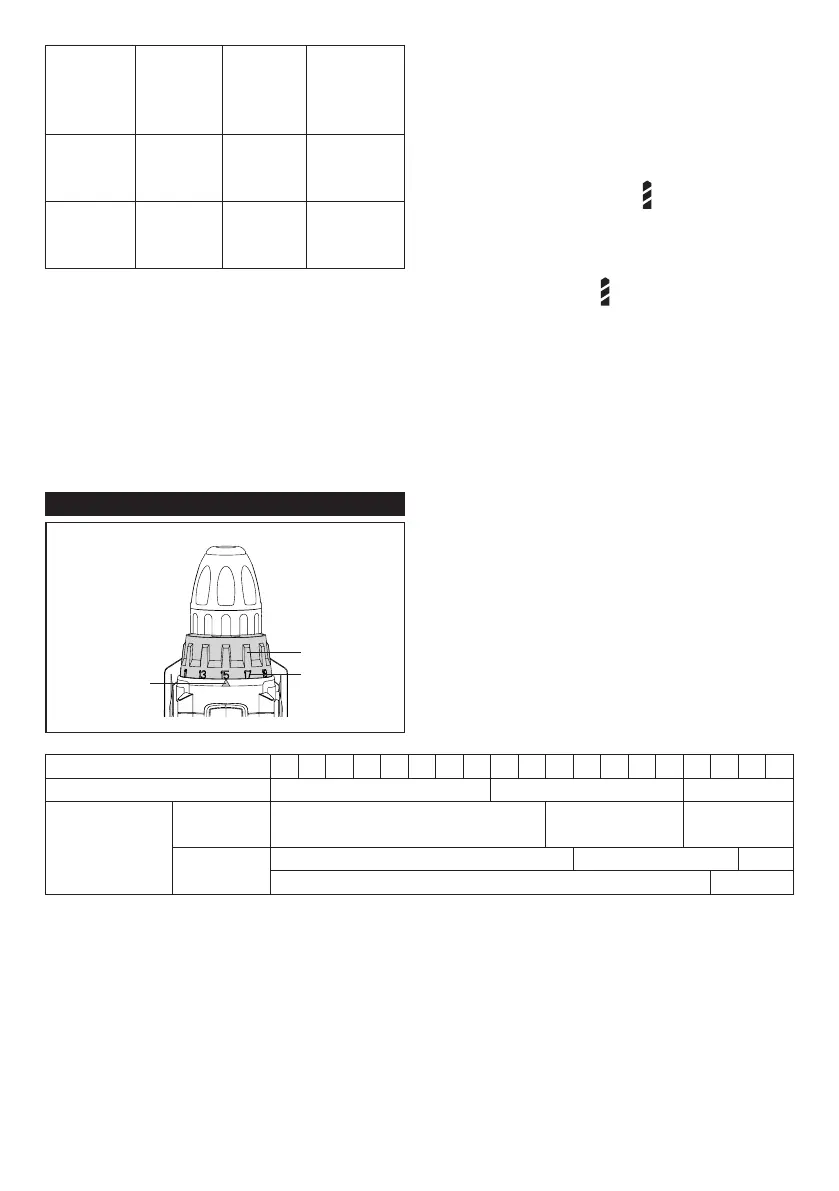
Graduation 1 2 3 4 5 6 7 8 9 10 11 12 13 14 15 16 17 18 19
Machine screw M4 M5 M6
Wood screw
Soft wood
(e.g. pine)
- ɸ3.5 x 22 ɸ4.1 x 38
Hard wood
(e.g. lauan)
- ɸ3.5 x 22 -
- ɸ4.1 x 38
Position
of speed
change
lever
Speed Torque
Applicable
operation
1 Low High
Heavy
load- ing
operation
2 High Low
Light
loading
operation
To change the speed, switch o the tool rst.
Select
the "2" side for high speed or "1" for low
speed but high torque. Be sure that the
speed change lever is set to the correct
position before operation.
If the tool speed is coming down extremely
during the operation with "2", slide the lever
to the "1" and restart the operation.
Adjusting the fastening torque
1
2
3
1. Adjusting ring 2. Graduation 3. Arrow
The fastening torque can be adjusted in 19
levels by turning the adjusting ring. Align the
graduations with the arrow on the tool body.
You can get the minimum fastening torque at
1 and maximum torque at marking.
marking.
The clutch will slip at various torque levels
when set at the number 1 to 19. The clutch
does not work at the marking.
Before actual operation, drive a trial screw
into your material or a piece of duplicate
material to determine which torque level is
required for a particular application.
The following shows the rough guide of the
relationship between the screw size and
graduation.


 To Next Page
 Loading...