9
5.2
5.2
5.2
5.2 Introduction
Introduction
Introduction
Introduction to
to
to
to Panel
Panel
Panel
Panel
5.
5.
5.
5. 2.1
2.1
2.1
2.1 Shield
Shield
Shield
Shield
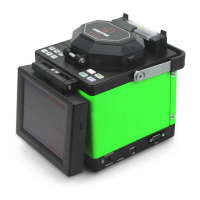
The shield is closed unless fibers are going to be put in . Close it
before any key board operation. With a viewfinder mirror and a
holding clamp for bare fiber in the V-groove, it can prevent dust
and wind and provide vertical light for the microscope.
5.2.2
5.2.2
5.2.2
5.2.2 Screen
Screen
Screen
Screen
The viewing angle of the 5.7-inch TFT-LCD can be adjusted.
But please protect its screen from hard sharp things!
5.2.3
5.2.3
5.2.3
5.2.3 Power
Power
Power
Power Supply
Supply
Supply
Supply
To provide convenience for user, the inner Li-Ion battery and
direct current was applied. The direct current was supplied by
the adapter , and the battery was charged when the adapter was
used.
5.2.4
5.2.4
5.2.4
5.2.4 Charging
Charging
Charging
Charging Indicator
Indicator
Indicator
Indicator Light
Light
Light
Light
When the adapter was plugged in, the red indicator LED was
turned on. The green led will shine after charging was
accomplished.
5.3
5.3
5.3
5.3 Introduction
Introduction
Introduction
Introduction to
to
to
to Keyboard
Keyboard
Keyboard
Keyboard
The layout of the keyboard as figure 5-2. There are two kinds
of key operation, i.e. Menu and Fusion.
POWER
,
HEAT
and
RESET
are effective in any mode, the function are listed in table 5-1.
Under Menu and Splice mode, the function of key are listed in
table 5-2, table 5-3.


 To Next Page
 Loading...