RHYTHM CONTROLS
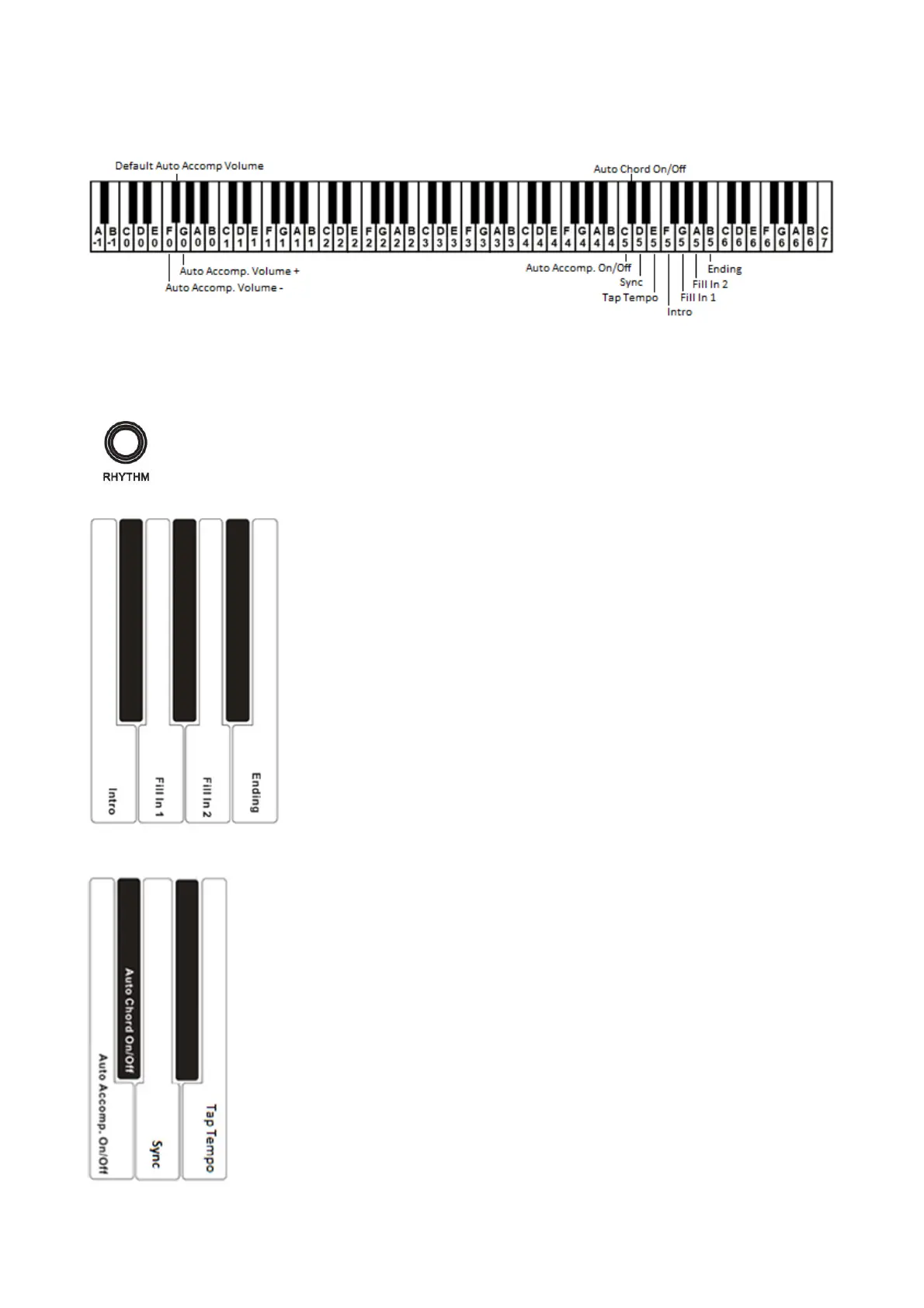
In order to have full control of the RHYTHM features, a number of features are available: Intro, Fill In 1, Fill In 2,
Ending, Tap Tempo, Sync, Auto Chord On/Off, Auto Accompaniment On/Off e Volume Auto Accompaniment.
RHYTHM - START/STOP
To start the rhythm, press the RHYTHM button, and the rhythm starts immediately.
To stop the rhythm, press the RHYTHM button again.
All the following features of the rhythm section are activated by pressing and holding the RHYTHM
button and pressing at the same time one of the designated keys in the keyboard. When pressing the
RHYTHM button and one of those keys, the selected feature is immediately activated and the RHYTHM
button can be released.
The available rhythm features are indicated in silk screening in front of the relative keyboard keys.
INTRO
To select INTRO, press and hold the RHYTHM button and select the feature by
pressing the F5 key on the keyboard.
FILL IN 1
To select FILL IN 1, press and hold the RHYTHM button and select the feature by
pressing the G5 key on the keyboard.
FILL IN 2
To select FILL IN 2, press and hold the RHYTHM button and select the feature by
pressing the A5 key on the keyboard.
ENDING
To select ENDING, press and hold the RHYTHM button and select the feature by
pressing the B5 key on the keyboard.
AUTO ACCOMP. ON/OFF
With this feature is possible to control the Auto Accompaniment (complete of auto chords and
auto bass) for the rhythm selected.
To select AUTO ACCOMP. ON/OFF, press and hold the RHYTHM button and press C5 on
the keyboard.
AUTO CHORD ON/OFF
When necessary, it is possible to switch the Auto Chord accompaniment OFF and play the
rhythm with the Auto Bass only.
To select AUTO CHORD ON/OFF, press and hold the RHYTHM button and press C#5 on the
keyboard.
SYNC – Synchro Start
When this feature is selected, SYNC will automatically start the style.
If the LEFT button is switched ON, when the first key or chord is pressed in the left part of the
keyboard, the instrument will recognise the relative chord.
If the LEFT button is switched OFF, the instrument will recognise the chord in the full length
of the keyboard (FULLKEYBOARD), but will be necessary to press at least three keys.
To select SYNC, press and hold the RHYTHM button and press D5 on the keyboard.



 To Next Page