EasyManua.ls Logo

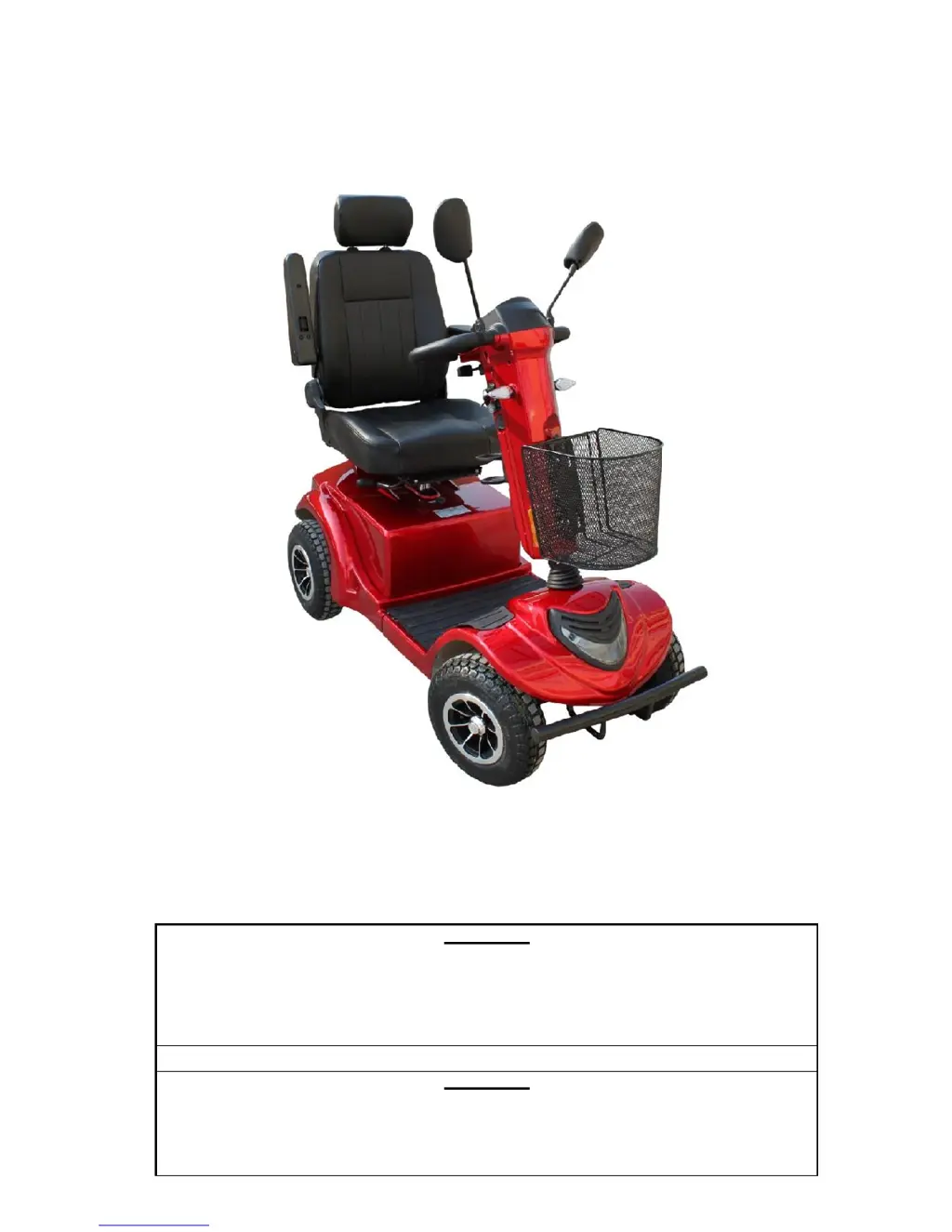
Orthoquad RZ1000 - User Manual

Orthoquad RZ1000
28 pages
Print Icon
To Next Page IconTo Next Page
Loading...
USER’S MANUAL
ORTHOQUAD RZ1000
WARNING
Read the User Manual carefully before operating the RZ1000.
If you do not fully understand any part of this manual, please contact your dealer or
any of our Service Centres.
Read this manual step by step, as injury or damage may occur from misuse!
WARNING
Electromagnetic Interference (“EMI”) can cause powered vehicles to behave
erratically, which could be dangerous to the user.
For your safety and protection, it is IMPERATIVE that you take time to read
Chapter 8 (“EMI WARNING”) before operating the RZ1000.

Questions and Answers

  • T
    Taylor PattonAug 12, 2025
    What to do if my Orthoquad Scooter RZ1000 does not move?
    • F
      fbennettAug 12, 2025
      If your Orthoquad Scooter RZ1000 doesn't move when you squeeze the throttle, first ensure the key switch is turned ON. Also, check if the charger is connected; if it is, disconnect it. If neither of these resolves the issue, it may indicate a control system failure, and you should call for technical support.
  • A
    Andrew WatkinsAug 16, 2025
    How to fix a flat tyre on Orthoquad Scooter?
    • B
      bryan84Aug 16, 2025
      If you experience a flat tire and unstable driving with your Orthoquad Scooter, it's likely due to low air pressure or a puncture. In the case of low air pressure, pump the tire to the normal pressure. If there is a puncture, repair the tire.
  • R
    rcunninghamAug 19, 2025
    What to do if the ON light doesn't come on Orthoquad Scooter?
    • C
      Corey BennettAug 20, 2025
      If the key switch is turned ON, but the ON light does not illuminate on your Orthoquad Scooter, the main fuse may have popped due to an electrical fault. Try resetting the fuse. Note: Do not reset the fuse more than twice. If the issue continues, contact your authorized dealer for support.
  • S
    Stephanie WiseAug 25, 2025
    Why does my Orthoquad Scooter have intermittent drive?
    • P
      parkerbryanAug 25, 2025
      If you are experiencing intermittent drive issues with your Orthoquad Scooter, it could be due to a few reasons. First, the battery capacity may be low, so charge the batteries for at least 18 hours. Second, there may be faulty connections. To check this, remove the battery cover and inspect the battery connections. If the terminals are corroded, clean them with a damp, clean cloth. Finally, it could be a faulty battery. If the red LEDs are still on, contact your dealer for a replacement battery.
  • N
    natalie29Aug 27, 2025
    What to do if Orthoquad Scooter RZ1000 takes too long to stop?
    • B
      Brian SpencerAug 27, 2025
      If your Orthoquad Scooter RZ1000 takes longer than 3 meters to stop after releasing the throttle control lever on a level surface, it could be due to a faulty or misadjusted controller. Call for technical support.
  • G
    georgeallenAug 31, 2025
    Why does Orthoquad Scooter slow down uphill?
    • B
      Brian BrownAug 31, 2025
      If your Orthoquad Scooter's speed reduces gradually when driving uphill or carrying heavy loads, it's likely because the controller has become overheated. Stop driving and allow the controller to cool down.
  • B
    billy60Sep 3, 2025
    How to fix headlight on Orthoquad Scooter?
    • C
      Charles GrahamSep 3, 2025
      If the headlight or rear light on your Orthoquad Scooter is not lit, it is likely due to a burnt-out LED. Replace the LED.
  • M
    Meredith BradleySep 7, 2025
    How to fix indicator light on Orthoquad Scooter?
    • M
      martha52Sep 7, 2025
      If the right or left indicator light on your Orthoquad Scooter is inoperative, it's likely due to a faulty LED light board. Replace the LED board.

Summary

Users Manual

Chapter 3: Safety Instructions for RZ1000

General Safety Precautions

General safety precautions and user responsibilities for operating the RZ1000 scooter.

Pre-Ride Safety Check

Recommends performing safety checks before each use, including tyre pressure, connections, and brakes.

Weight Limitations

Advises staying within the RZ1000's maximum weight capacity to avoid voiding warranty and ensuring safety.

Incline Navigation

Guidelines for safely navigating ramps and inclines with the RZ1000.

Braking System Explanation

Explains the RZ1000's regenerative and park braking systems.

Freewheel Mode Operation

Explanation of manual and automatic freewheel levers and their operation.

Stairs and Elevators

Prohibits use of the RZ1000 on stairs or escalators; advises using elevators.

Battery Handling Safety

Safety guidelines for handling and connecting RZ1000 batteries, including their weight.

Getting Onto and Off the RZ1000

Safety tips for mounting and dismounting the RZ1000, emphasizing balance and avoiding tipping.

EMI;RFI Interference Warning

Explains susceptibility to EMI and provides warnings to prevent unintended movements.

Chapter 4: Operating Instructions for RZ1000

Battery Status Indicator

Explains the RZ1000 battery status indicator and when to recharge.

Throttle Control Lever

How to use the throttle control lever for driving forward/backward and stopping.

Performance Check

Steps for performing a recommended performance check of the RZ1000.

Chapter 5: Charging the RZ1000 Batteries

Charging Batteries

Step-by-step instructions for charging the RZ1000 batteries using the supplied charger.

Chapter 6: Maintenance

Periodic Maintenance Procedures

Details periodic maintenance tasks like checking parts, tyre pressure, and replacing batteries.

Battery Replacement

Notes that battery replacement requires trained professionals and provides safety warnings.

Chapter 7: Troubleshooting and Repair

Chapter 8: EMI Warning

EMI;RFI Warnings

Lists warnings to prevent unintended brake release or powered vehicle movement due to EMI.

Orthoquad RZ1000 Specifications

General IconGeneral
Motor Power1000W
Max Speed45 km/h
Max Load120 kg
Tire Size10 inch
BrakesDisc brakes
SuspensionFront and rear suspension

Related product manuals