2.2 Set timer
1) Please connect your smart phone or tablet device to the same router or modem with
internet and Wi-Fi access.
2) Select “Add timer”.
3) Add timer.
4) Tap “Timer” and then click “Add a Timer”, to set 7days programmable Open/Close
timer function. A maximum of 20 programmable timing function can be set.
5) Tap “Save” when finish setting each programmable timing function.
2.3 Delete devices
1) In the settings, tap “Delete The Device”.
2) To re-add, please reset B25 to factory setting and then repeat section 3 again.
2.4 Reset factory settings
Press and hold the ON/OFF button for 6 seconds until you see a rapid flashing RED LED light,
now B25 is in factory setting mode.
3. Work with Amazon Alexa
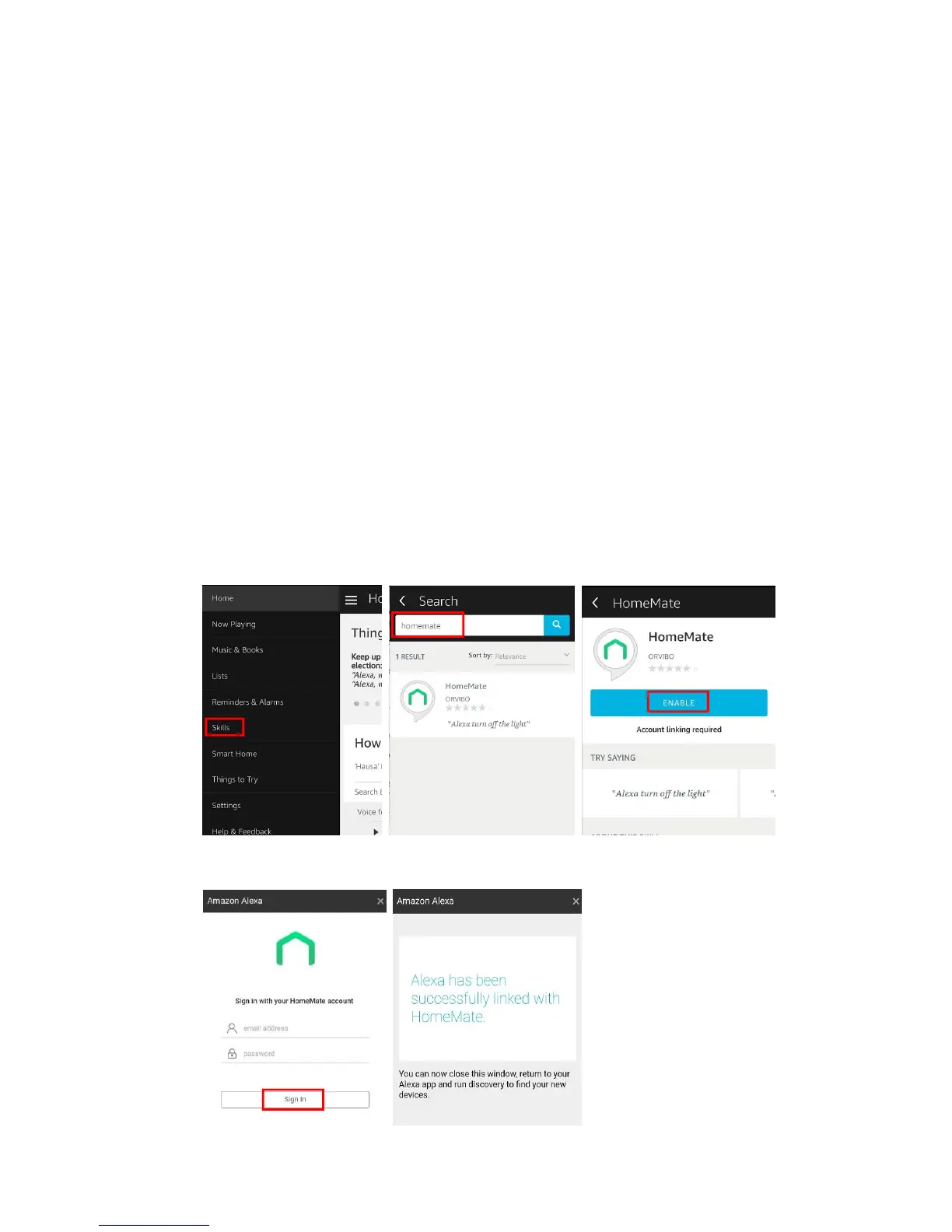
3.1 Log in Amazon Alexa App, tap the menu icon and click “ Skills”, search “ homemate” skill
and enable it.
3.2 Login with your HomeMate cloud account and connect successfully.


 To Next Page