This document describes the assembly of a corner desk, model 22110, manufactured by OS Home & Office Furniture. The desk is designed to fit into a corner, maximizing space utilization, and includes features for organizing a workspace, such as drawers, shelves, and a keyboard tray. It can also be combined with optional drawer extension units (model 22111) for increased storage, though separate instructions are provided for such combined setups.
Function Description:
The 22110 corner desk serves as a functional workstation, providing a surface for a monitor (with a dedicated monitor platform), storage for office supplies, and a pull-out keyboard tray. Its corner design makes it suitable for smaller rooms or for optimizing the layout of a larger office space. The desk's multiple shelves and drawers are intended to help keep the workspace organized and clutter-free. The inclusion of a keyboard tray is a common feature for ergonomic comfort, allowing the keyboard to be stored out of sight when not in use and positioned at a comfortable height during use. The overall structure appears to be robust, utilizing cam lock systems and wood dowels for secure assembly.
Important Technical Specifications (derived from parts list and assembly steps):
Materials:
- Wood Components: Big top shelf (A), left upright (B), right upright (C), back panels (D, N), left partition (E), right partition (F), keyboard (G), monitor platform (H), small back support rail (I), small left top shelf (J), small right top shelf (K), small left upright (L), small right upright (M), divider panels (O), left back rail (P), right back rail (Q), drawer front (R), drawer left side (S), drawer right side (T), drawer back (U), drawer bottom (V). These components are likely made of engineered wood or particle board with a laminate finish, common for home and office furniture in this category.
- Hardware:
- Fasteners:
- Big cam bolt (Y): 37 units, used for major structural connections.
- Big cam lock (Z): 37 units, mates with big cam bolts for secure, reversible connections.
- Small cam bolt (Bb): 4 units, for smaller connections, specifically within the drawers.
- Small cam lock (Cc): 4 units, mates with small cam bolts, also for drawer assembly.
- 3/4" round-head screw (X): 4 units, likely for attaching drawer pulls.
- 5/8" round-head screw (Ee): 12 units, used for attaching hanger glides to the keyboard shelf and the keyboard assembly to the big top shelf.
- 1 3/8" flat-head screw (Hh): 8 units, used for attaching drawer sides to the drawer back.
- 1/4" round-head screw (Oo): 4 units, for attaching metal plates to hanger glides.
- Dowels:
- 1 1/4" x 3/8" dia wood dowel with ridges (Aa): 48 units, for aligning and strengthening major panel connections.
- 1 1/4" x 1/4" dia wood dowel with ridges (Dd): 8 units, for aligning and strengthening drawer components.
- Glides:
- Left hanger glide (Ff): 1 unit, for the keyboard tray.
- Right hanger glide (Gg): 1 unit, for the keyboard tray.
- Other Hardware:
- Drawer pull (W): 2 units, for the drawers.
- Glue (Ii): 4 units, for permanent dowel connections and some cam bolt/lock assemblies.
- PVC cap (Jj): 14 units, likely for covering exposed screw heads or cam locks.
- Plastic cap (Kk): 25 units, similar function to PVC caps, possibly for different sized holes or aesthetic purposes.
- Screwdriver (Ll): 1 unit, provided for assembly.
- Sponge cushion (Mm): 8 units, for the underside of drawer sides, likely to reduce noise or provide smooth operation.
- Metal plate (Nn): 4 units, used with hanger glides, possibly for reinforcement or mounting.
Dimensions (implied from diagram):
The desk is a corner unit, suggesting a roughly triangular or pentagonal footprint. The presence of two drawers, multiple shelves, and a keyboard tray indicates a moderate size suitable for a home office or study. Specific dimensions are not provided in the manual but can be inferred from the relative sizes of the components shown.
Assembly System:
The primary assembly method relies on a cam lock system, complemented by wood dowels and screws. This system allows for relatively easy and reversible assembly, which is common in flat-pack furniture. Glue is used for dowels to enhance the stability and permanence of critical joints.
Usage Features:
- Corner Design: Optimizes space in a room by fitting into a corner.
- Integrated Storage: Includes two drawers for concealed storage of office supplies, documents, or personal items.
- Multiple Shelves: Provides open storage for books, decor, or additional equipment.
- Monitor Platform: A dedicated elevated surface for a computer monitor, potentially improving ergonomics.
- Pull-out Keyboard Tray: Enhances user comfort and keeps the keyboard out of sight when not in use, freeing up desk surface area.
- Expandability: Can be combined with model 22111 drawer extension units for additional storage, indicating a modular design approach.
Maintenance Features:
- Cam Lock System: Allows for disassembly and reassembly, which can be useful for moving the desk or replacing damaged parts.
- Plastic/PVC Caps: Used to cover exposed hardware, protecting them from dust and providing a cleaner aesthetic, which can simplify cleaning.
- Sponge Cushions: For drawers, these likely contribute to smoother operation and reduced wear over time, potentially minimizing maintenance needs related to drawer functionality.
- Laminate Finish (implied): Most furniture of this type uses a laminate finish, which is generally easy to clean with a damp cloth and mild cleaner, requiring minimal special maintenance.
Assembly Process Highlights:
The assembly is broken down into 15 steps, starting with the construction of the main uprights and partitions, followed by the keyboard tray assembly, the top shelf integration, the monitor platform attachment, and finally the drawer assembly.
- Step 1-3: Focus on assembling the main structural panels (uprights B, C, partitions E, F) with back panels (D) and connecting partitions E and F using cam bolts, cam locks, and dowels.
- Step 4-6: Involve assembling the keyboard tray mechanism, attaching hanger glides (Ff, Gg) to metal plates (Nn) and then to the keyboard shelf (G), and finally attaching the entire keyboard assembly to the underside of the big top shelf (A).
- Step 7: The main desk structure is formed by attaching the big top shelf (A) to the assembled base (uprights, partitions, and back panels) using cam locks and dowels.
- Step 8-10: Focus on assembling the internal shelving units (small left/right uprights L, M, back rails P, Q, divider panels O, small top shelves J, K) using cam locks, dowels, and back panels (N).
- Step 11: The assembled internal shelving units (J, K) are placed onto the big top shelf (A).
- Step 12-13: The monitor platform (H) is assembled with the back support rail (I) and then attached to the main desk structure using dowels and glue.
- Step 14-15: The two drawers are assembled (drawer front R, sides S, T, back U, bottom V) using cam bolts, cam locks, dowels, screws, and drawer pulls (W). Sponge cushions (Mm) are placed on the underside of the drawer sides for smooth operation.
The manual emphasizes following the instructions in sequence for correct assembly and provides contact information for customer service in case of missing or damaged parts. The inclusion of a screwdriver (Ll) suggests that most, if not all, necessary tools for assembly are provided.

 Need help?
 General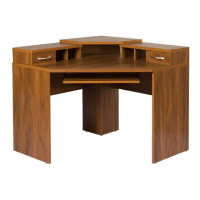

 To Next Page