OSAKA - USER MANUAL - B4U - v2 - PAG. 12
Using the parameters "1A" and "2A" it is possible to program the
action of the alarms through the regulation outputs and the alarm
outputs (buzzer included).
This allows, for example, to intervene directly by deactivating the
regulation outputs in the event of temperature alarms, as in probes
configured as “Au” (for example “anti-fog” function) or “cd” (for
example “dirty condenser function ”).
By configuring alarms with respect to the same probe, the B4U allows
managing pre-alarm signaling (for example not activating the alarm
and / or buzzer outputs) or warning alarms (activating the alarm and
/ or buzzer outputs).
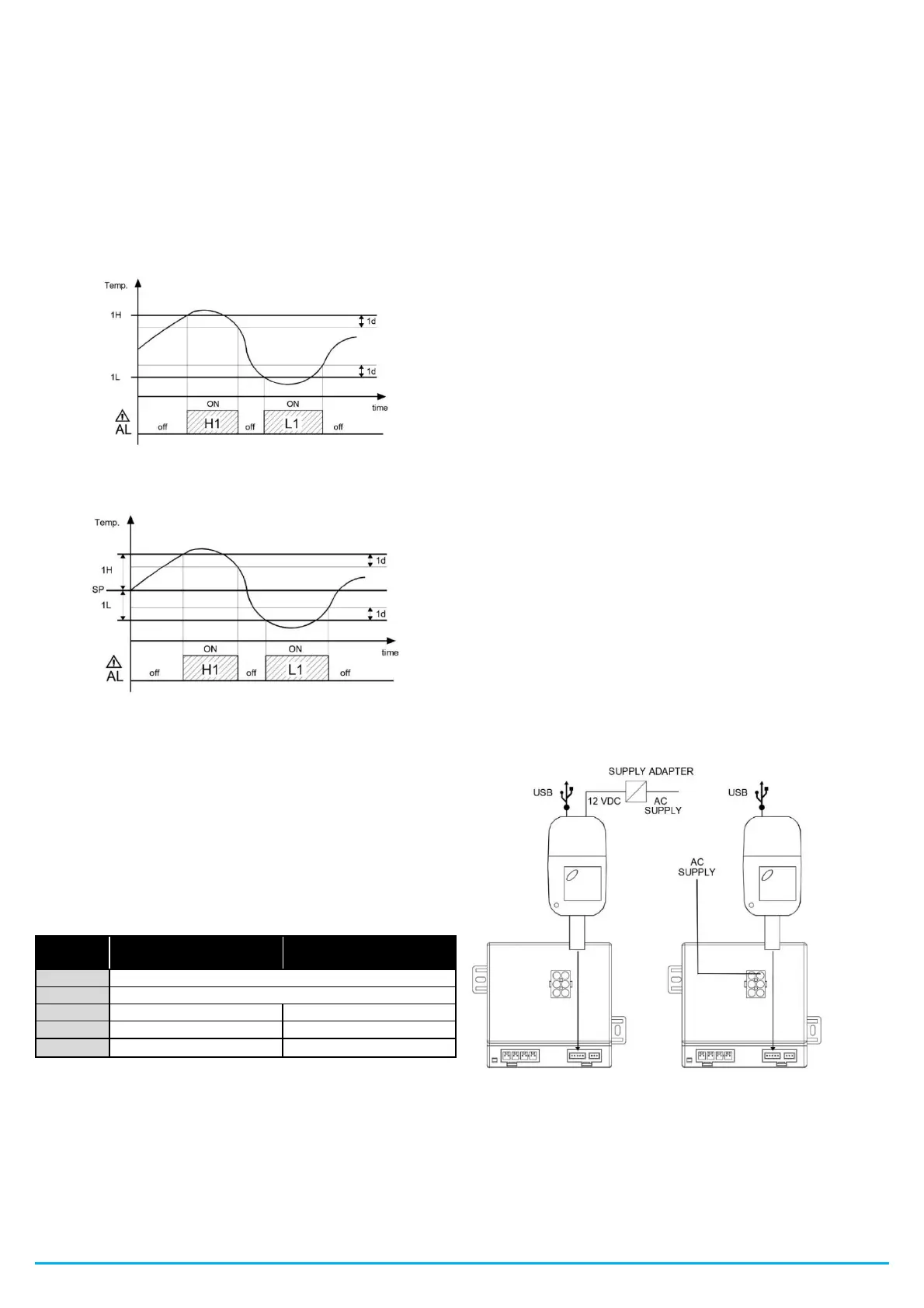
The alarm thresholds can be programmed using the parameters
"1H", "2H", "1L" and "2L" if the alarms are absolute ("1y" and "2y" =
1, 3, 5, 7, 9, 10 ).
Or through the values ["SP" + "1H", "2H"] and ["SP" + "1L", "2L"] if
the alarms are relative ("1y" and "2y" = 2, 4, 6 , 8).
The maximum and minimum temperature alarms can be disabled by
setting the parameters "1H", "2H", "1L" and "2L" = oF.
5.10.2 - EXTERNAL ALARMS OF DIGITAL INPUTS
The B4U can signal external alarms by activating one or more digital
inputs configured as "1F / 2F / 3F / 4F" = 4, 5, 12, 13, 14.
At the same time that the configured alarms (buzzer and / or outputs)
are signaled, the B4U signals the alarm by showing the alarm
acronyms (AL, Pr, HP, LP) alternately with the variable configured in
the "dS" parameter.
The mode "1F / 2F / 3F / 4F" = 4 does not perform any action on the
control outputs, while the other modes require the deactivation of the
output "ot" or of all the control outputs when the digital input is
activated .
5.10.3 - DOOR OPEN ALARM
The B4U can signal an open door alarm by activating the digital input
with function programmed as "1F / 2F / 3F / 4F" = 1, 2 or 3.
When the digital input is activated, the equipment signals that the
door is open by displaying the acronym "oP" on the display,
alternately with the variable set in the "dS" parameter.
After the delay set in the "oA" parameter, the B4U signals the open
door alarm by activating the configured devices (buzzer and / or exit),
and naturally it will continue to show the initials "oP" on the display.
When the door open alarm intervenes, the normally activated outputs
(fans or fans + compressor) are also deactivated.
5.10.4 - VOLTAGE CONTROL ALARM
The parameters related to the voltage control alarm functions are
found in the "-UA" folder.
The B4U can automatically deactivate the control outputs when the
mains voltage (measured by the B4U through its power supply) is
lower or higher than the values configured in the following
parameters:
"LU" - Low voltage alarm (expressed in Vx10).
"HU" - High voltage alarm (expressed in Vx10). When the alarm is
activated and after the delay programmed in the "Ud" parameter, the
B4U deactivates all the control outputs, signals an alarm by activating
the configured device (output and / or buzzer) and the initials "HU"
are shown on the display. (in case of high voltage alarm) or “LU” (in
case of low voltage alarm) alternately with the parameter variable
"dS".
If the function related to grid voltage alarms is enabled (parameter
"LU" or "HU" other than oF) in the variables display mode, the
variable P5 representing the grid voltage will also appear (if the value
decreased by 150 V. The mains voltage expressed in volts measured
by the B4U will be V = P5 + 150).
If the voltage measurement is not correct, it can be changed by
scrolling through the "OU" parameter.
5.11 - OPERATION OF THE "ON / OFF" AND "LIGHT" KEYS
By pressing the ON / OFF button for at least 1 second it is possible
to change the state of the B4U from on to off and vice versa.
By pressing the LIGHT button for at least 1 second it is possible to
activate / deactivate the light output (“L1”) or the auxiliary output if it
is configured as "Fo" = 2.
5.12 - ACCESSORIES
The B4U is equipped with a TTL communication port with a 5-pole
connector that allows the connection of some accessories described
below.
5.12.1 - PARAMETER CONFIGURATION BY "KEY USB"
Via the TTL port and the KEY USB device it is possible to transfer
the operating parameters to and from the B4U.
The KEY USB device is used for serial programming of controllers
that must have the same parameter settings, or to save a copy of the
controller programming for quick transfer to another.
The KEY USB has a USB connection input, which allows connection
to a PC, with which, through the Osaka Set Up configuration
software, it is possible to configure the parameters.
For more information, consult the user manual.


 To Next Page
 Loading...