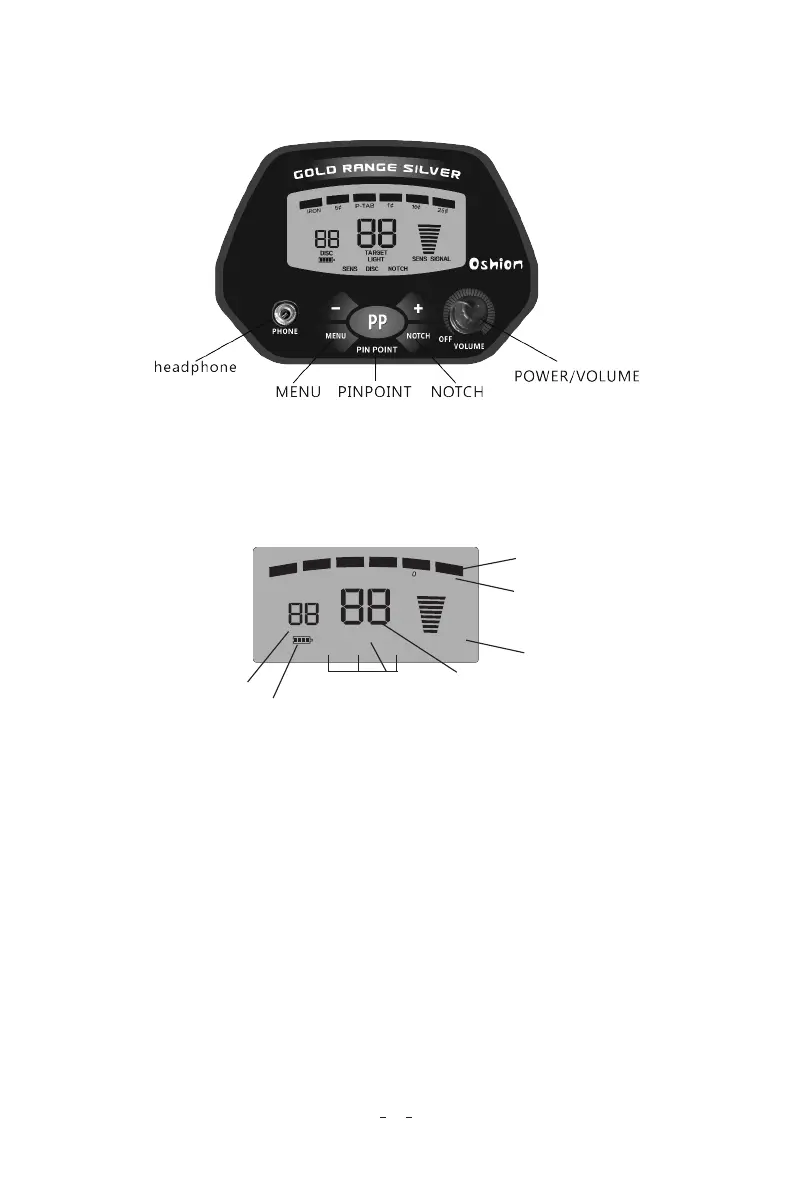
3.OPERATION (INSTRUCTIONS FOR CONTROL PANEL)
① VOLUME/POWER switch
Rotate volume control away from OFF to power on the detector.
② LCD DISPLAY
③ CONTROL BUTTONS
MENU: Press MENU, LCD will display LIGHT, SENS, DISC,
NOTCH. One of the displayed item will flash. If no button is
pressed in about 5 seconds, the flashing item will be selected.
SENS: Press MENU to select SENS. Then press + or – to adjust
the level of sensitivity. The level will be displayed on the LCD.
DISC: Discriminates the unwanted target by setting the numeric
range. Press MENU to select DISC. Then press + or – to adjust the
numeric range of discrimination. The number will be displayed on
the LCD.
4
Taraet indicator
DISC/NOTCH
indicator
SENS/SIGNAL
indicator
Target numeric indicator
DISC numeric indicator
Low BATT indicator
MENU CONTENT
P-TAB
25
¢
LIGHT
TARGET
IR
O
N
5
¢
DISC
SENS DISC
NOTCH
SENS SIGNAL
1
¢
1
¢


 To Next Page