The temperature can be set between 17
℃
and 30
℃
when the air conditioner is in COOL mode.
1. Press the MODE button until the COOL mode is selected.
2. Press the UP ARROW or DOWN ARROW buttons to select the temperature.
Note: The temperature cannot be set when the air conditioner is in wither FAN or DRY mode.
D. MODE BUTTON
Press MODE button to toggle among the operating options. The corresponding indicator will illuminate.
COOL – Cools the room to the set temperature.
DEHUM – Reduces the humidity in the room.
FAN – Circulates the air in the room without cooling.
E. POWER BUTTON
Turns ON/OFF power to the air conditioner. Turn on the unit by pressing the POWER button, the Power
indicator will illuminate.
Note: Turning off power by pressing the POWER button does not disconnect the appliance from the power
supply.
F. CONTROL PANEL DISPLAY
Displays the set temperature in degrees Fahrenheit or degrees Celsius
, or the hours remaining in a Time Delay.
The corresponding indicator light will illuminate.
.
2、Remote Control Operation
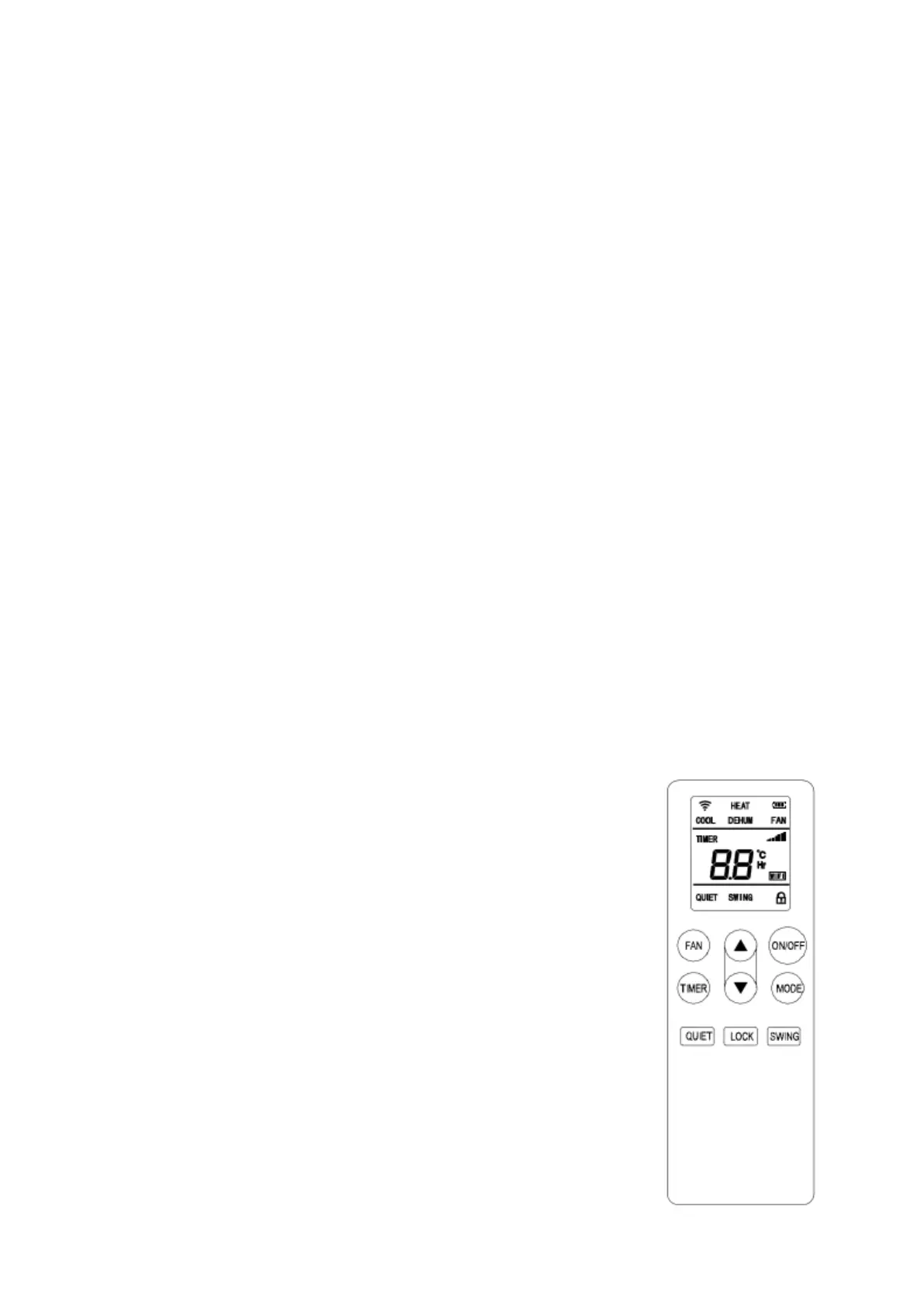
1)The operation interface of this remote controller is as follows:
1. ON/OFF button:Press this button to start unit when it is energized or stop
the unit when it is in operation;
2. Timer button:Press this button to set unit automatic on and off time;
3. Fan button: press this button to select high, medium or low speed
of fan
running (except dehumidify mode);
4. Up button: press this button to increase temperature or timer setting;
5. Down button: Press this button decrease temperature or timer setting.
6. Mode button: press this button to select Heat mode, Cool mode,
Dehumidification mode or Fan mode;
7. Mute button: whenever in which mode, press this button, fan will be low
6
H AUTO SWING
Press fan speed button and timer button at the same time to open auto swing function.


 To Next Page