5
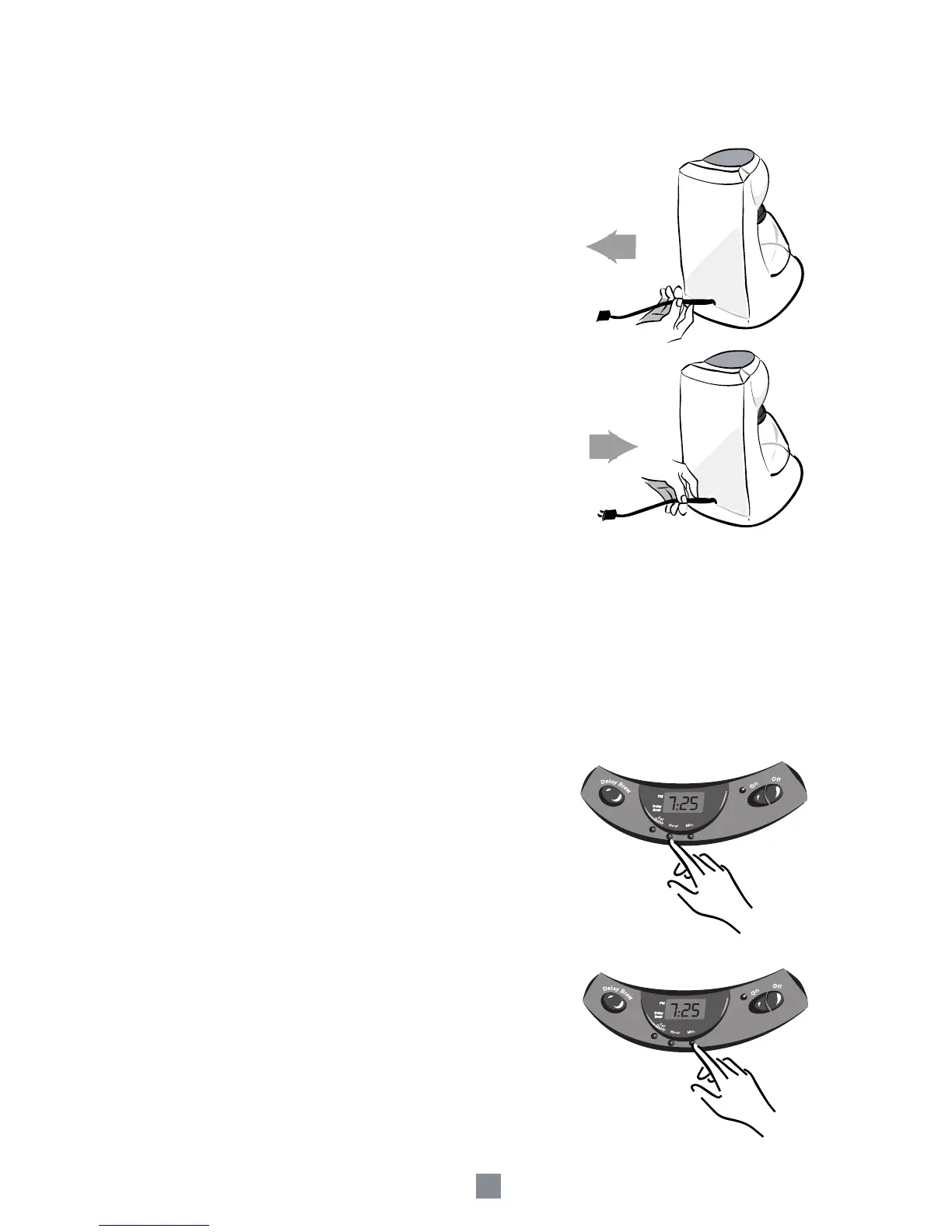
Adjusting the Power Cord Length
You can customize the length of the Power Cord so that
it is the exact length you desire.
To increase the length of the Power Cord:
Grasp the Power Cord (not the power plug)
and gently lift it out of the slot, then pull it
away from the Coffeemaker.
To decrease the length of the Power Cord:
Grasp the Power Cord, lift it out of the slot
and then feed it into the Coffeemaker.
Lock the Cord in the slot when finished.
Setting the Clock
(Model 3197 only)
The Clock flashes on the Control Panel to indicate that it has not been set.
You must set the Clock if you want to use the DELAY BREW feature.
To set the Clock:
1) Press and hold the HOUR button until the Clock
displays the correct hour (See Figure 1).
The PM Indicator will light to indicate a PM time; if
the PM Indicator is not lit, the time is AM.
2) Press and hold the MIN Button until the Clock
displays the correct minute. (See Figure 2)
The Clock is now set.
Figure 1
Figure 2


 To Next Page