English-5
SETTING THE CLOCK AND DELAY BREW TIME
To Set the Clock:
1.Plugthepowercordintoastandardelectricaloutlet.Theclockwillflashonthecontrol
panel to indicate that the time has not been set yet.
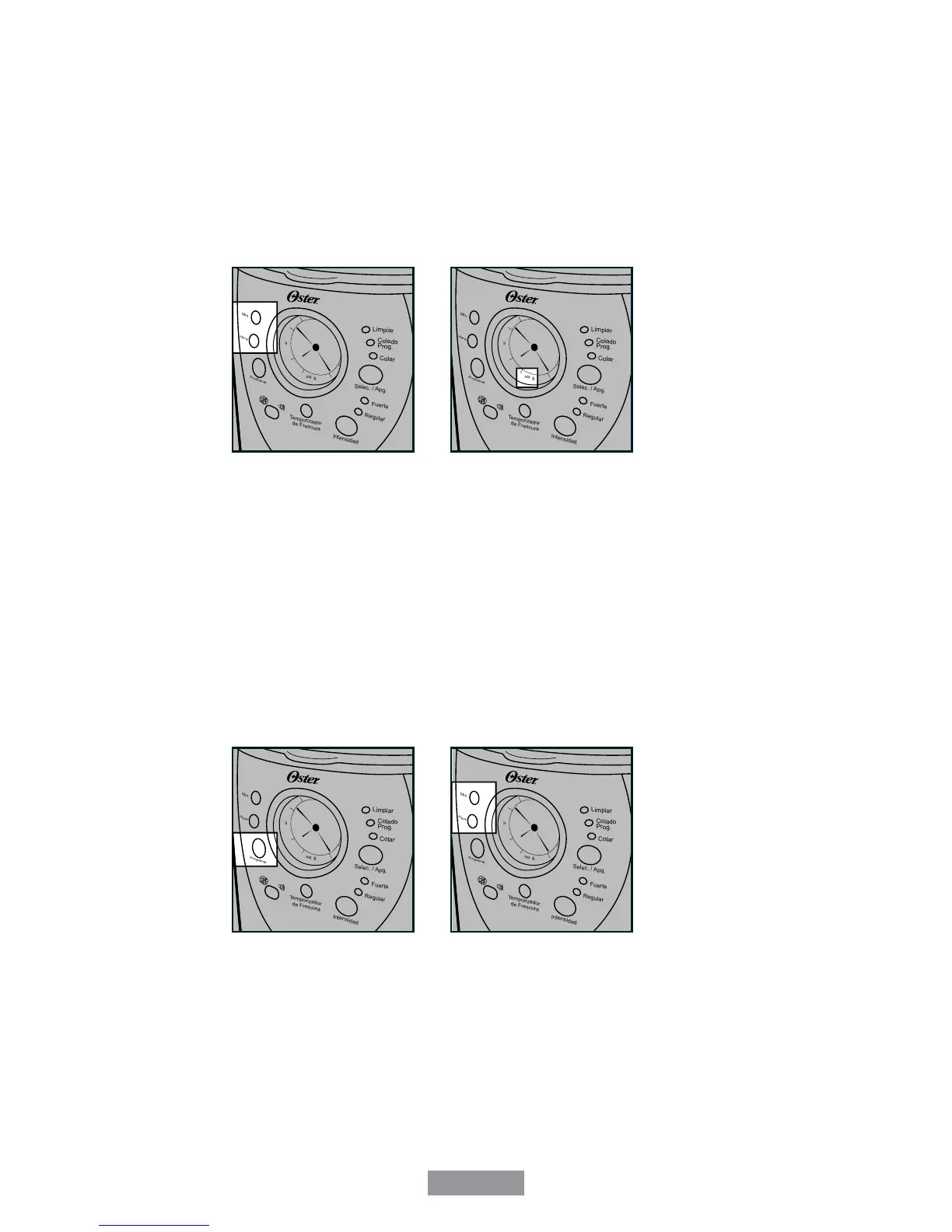
2.Pressandholdthehour(HORA)andminute(MIN.)buttonsuntilyoureachthecurrent
time.TheAMorPMindicatorwilllightatthebottomofthedisplay(Figures1and2).
Figure1 Figure2
The clock is now set!
NOTE:Pressinganybuttonbeforesettingtheclockwillcausetheclocktostartkeeping
time from 12:00 a.m. You must set the clock if you want to use the Delay Brew feature.
To Set the Delay Brew Time:
Whilethedisplayisintheclockmode,simplypresstheSetDelay(PROGRAMAR)button
(Figure3)and,whiletheDelayBrew(COLADOPROG.)yellowlightisflashingsetthe
brewtimebypressingthehour(HORA)andminute(MIN.)buttons(Figure4).TheAMor
PMindicatorwilllightatthebottomoftheclockdisplay.Withinafewsecondsthedisplay
will change to the current time.
Figure3 Figure4
The Delay Brew Time is now set!
NOTE:ToactivatetheDelayBrew(COLADOPROG.)cycle,seetheBrewing Coffee
Latersection(p.8).Tochecktheprogrammedtime,pushtheSetDelay(PROGRAMAR)
button. The display will show the time you have programmed the coffee to brew. If you
presstheSetDelay(PROGRAMAR)buttonagainorwaitafewseconds,thedisplaywill
switch back.


 To Next Page