English - 9
TROUBLESHOOTING
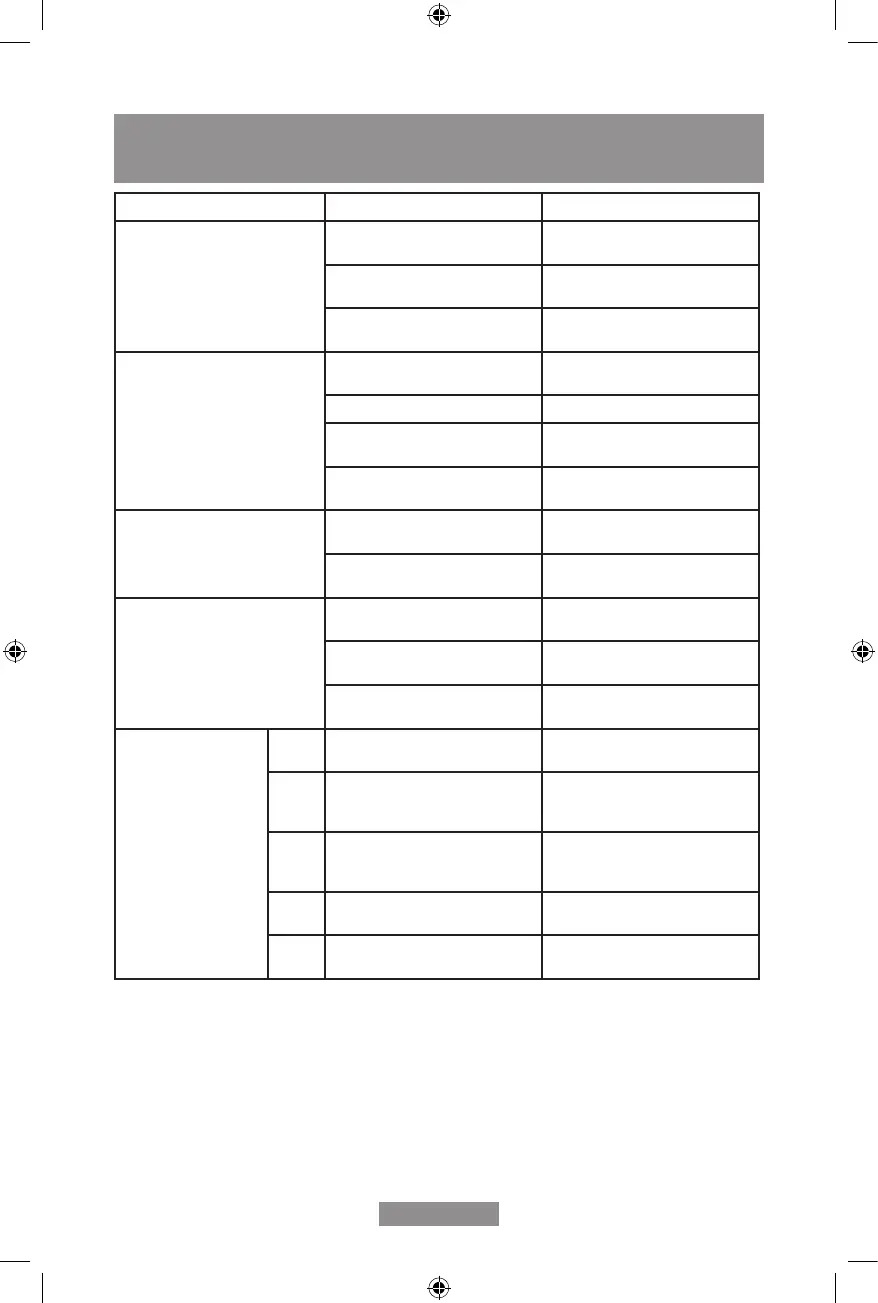
SYMPTOM INSPECTION SOLUTION
The unit is not operating. • Checkthepowerconnection
is secure.
• Insertthepowercordsecurely
into the wall outlet.
• Checkifthewaterlevel
indicator light is illuminated.
• Emptythewatertankand
reinstall correctly.
• Checktheroomtemperature. • The operating temperature
rangeis5-35°C.
There is little formation of
condensate.
• Checktheairlterfordirt. • Cleantheairlteras
necessary.
• Checkiftheairductisblocked. • Clear the obstacle
• Checkiftheroomtemperature
isbelow20°C.
• This is normal. Low humidity in
low temperature environment.
• Set humidity level is higher
than current humidity value.
• Set the humidity level below
current humidity value.
WaterLeakage • Overowwhilemovingtheunit. • Emptythewatertankbefore
transporting the unit.
• Checkifthedrainhoseis
kinkedorbent.
• Straighten the hose to avoid a
trapexisting.
ExcessiveNoise • Checkiftheunitissecurely
positioned.
• Place the unit on horizontal,
rmandatground.
• Checkforanylooseorvibrat-
ing parts.
• Secure and tighten the parts.
• Noisesoundslikewater
owing.
• Noisecomesfromowing
refrigerant. This is normal.
Error code E2 • Humidity sensor dampened or
failure.
• Clean or replace the humidity
sensor.
CL • Displayed when Room
temperatureisbelow5°C
(41°F).
• Normal. The compressor stops,
andthefankeepsrunning.
CH • Displayed when Room
temperatureisabove38°C
(100°F).
• Normal. The compressor stops,
andthefankeepsrunning.
LO • Displayed when Room relative
humidityisbelow20%RH.
• Normal. The compressor stops,
andthefankeepsrunning.
HI • Displayed when room relative
humidityisabove90%RH.
• Normal. The compressor and
thefankeeprunning.


 To Next Page