OPERATING INSTRUCTIONS
Remote Control and Control Panel
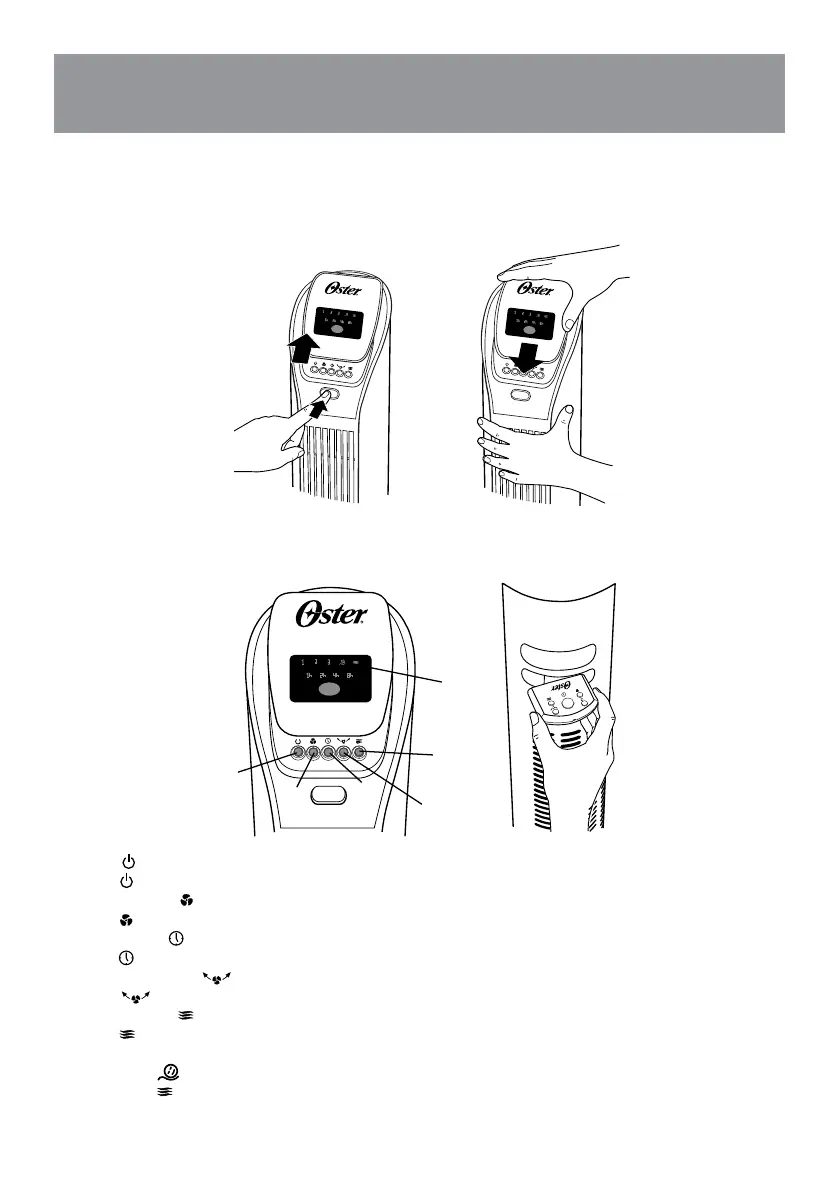
The Remote Control requires 2 AAA batteries for operation. Remove battery before discarding the
remote control. To access Remote Control Storage refer to Figure 6.
Fig. 5
A
B
C
D
E
F
Fig. 6
Fig. 4
A. Power
Press = On, Off
B. Speed Settings
Press = 1, 2, 3
C. Timer Control
Press = Turns Off in 1, 2, 4, 8 hours
D. Oscillation Control
Press = Oscillation On, Off
E. Natural Breeze
Press = Natural Breeze
Natural Breeze Mode will cycle through the fan speed settings randomly.
F. Sleep mode
Press twice = Sleep mode
This function slows the fan speed down, and when used in conjunction with the timer settings, will ultimately
turn the fan off.


 To Next Page