Page 47Page 46
900-0125-12-02 Rev A
©2017 OutBack Power Technologies. All Rights Reserved.
Prole Wizard
Notes
W-5. Using Existing Profiles
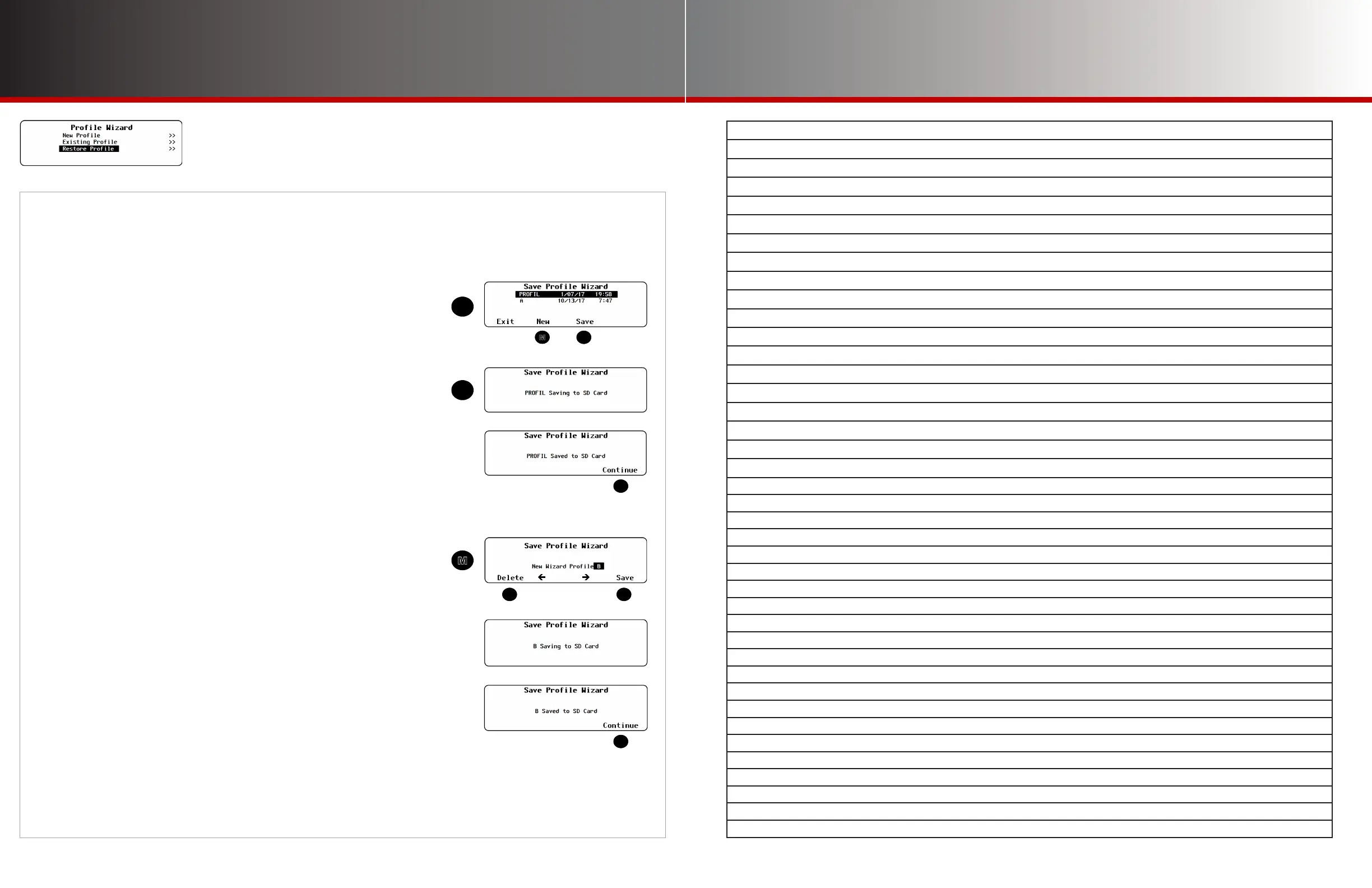
This section shows the process of saving the prole and creating names for each le. The screen
progression shown here is the same whether A is selected in the New Prole, Existing Prole, or
Restore Prole menus.
To save a prole to an SD card:
If other proles have been saved on the SD card, a list will be displayed (L).
Choose Option 1 or 2 below.
NOTE: If the SD card is empty, pressing <Save> will automatically default
to Option 2 below.
1. Select a name on the list with the control wheel. Press the <Save> soft
key (N) to save the new settings over the selected prole. Saving to SD
Card will be displayed. Proceed to 3.
OR
2. Press the <New> soft key (M) to create a new prole name.
(8 characters maximum)
● Use the control wheel to scroll through the available characters.
● Use <> or <> to move to the desired character location.
● Use <Delete> to erase characters when highlighted.
Press <Save> to save the new prole name. Saving to SD Card
will be displayed.
In either case:
3. Wait for the conrmation screen to appear. After the screen appears,
press <Continue> to return to the Setup Complete screen J.



 To Next Page