Outback S-Lite User Guide 18 PN 875-0194-000 Rev D1
Chapter 3: Using Guidance Features
Guidance Overview
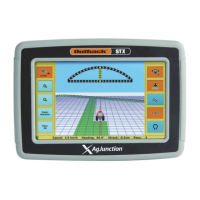
Figure 3-1 points out the features of the S-Lite console.
Figure 3-1: S-Lite console features
S-Lite provides two main guidance options:
Table 3-1 summarizes Straight and Contour guidance mode features. In addition to the
two main guidance options, you can calculate the area of a field in contour mode.
Straight guidance
Predefined parallel passes;
you can drive linear or
circular passes.
Contour guidance
Freestyle guidance; you can
drive freestyle passes relative
to any previous pass.
Note: It is important to press the STOP GUIDANCE button whenever S-Lite is not
guiding. During guidance, S-Lite records all movement. Pressing STOP GUIDANCE
tells S-Lite not to guide and not to record movement.
Table 3-1: Straight and Contour guidance summary
Item Straight Mode Contour Mode
Mode of
Operation
Predefined parallel and numbered
passes. Passes can be straight or
circular.
Freestyle. Guide relative to any
previous pass.
Work Recorded
in Memory
Yes. Although recorded work in
Straight mode is not used for
guidance, it is used if you switch
to Contour mode and then want to
make a pass along previous work.
Yes. The recorded pass defines
where the next pass is guided.
Navigate menus or toggle
between Run screen views
Activate straight or contour
guidance mode
Main Run (guidance
mode) screen
Steering Guide
centered = lined up on swath
Current
position
Select the
menu
Stop
guidance/
logging
data
Make
selections
SLite_UG_D1.book Page 18 Monday, December 23, 2013 2:14 PM


 To Next Page
 Loading...