Getting Started
11
1.
2.
3.
4.
Default Settings:
The Tablet is preconfigured with the following default settings:
• ScreenLock:None
• Sleep:NeverSleep
• Brightness:Maximum
To change these settings use the Android Settings feature explained on page 20.
Logging Out of the Autoplay Application
The iDISPLAY Tablet is preconfigured to automatically start the Autoplay iDISPLAY-
Player application when turned on. The following describes how to log out of this
application, to access the standard Android home screen.
To access the Android home screen when content is playing on the screen:
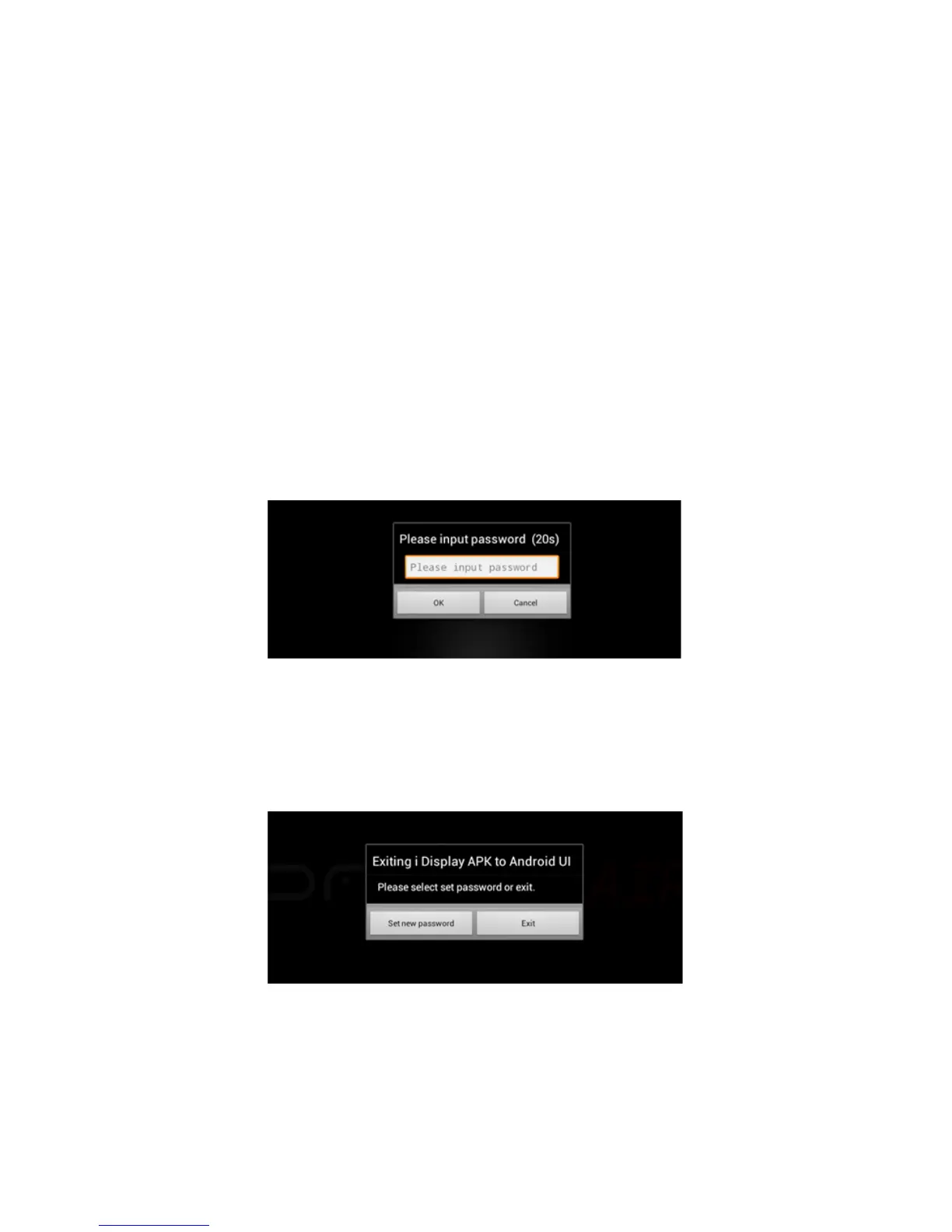
Option One: Press the On/O (Back) button (for one second). A password window is
displayed, as shown below:
Option Two: Tap the screen quickly 5 times (this is useful when the iDISPLAY Tablet is
built into a kiosk, or other enclosure and the back button cannot be accessed).
Tap in the white field to display a virtual keyboard.
Type in the password. If this is the first time you are using the iDISPLAY Tablet, the
default password is: 11223344
Tap the “Done” button and then the “OK” button. The following window is displayed
Tap the “Exit” button to exit the Autoplay application and to display the Android
home screen.


 To Next Page