13
MULTI-FUNCTIONAL DISPLAY
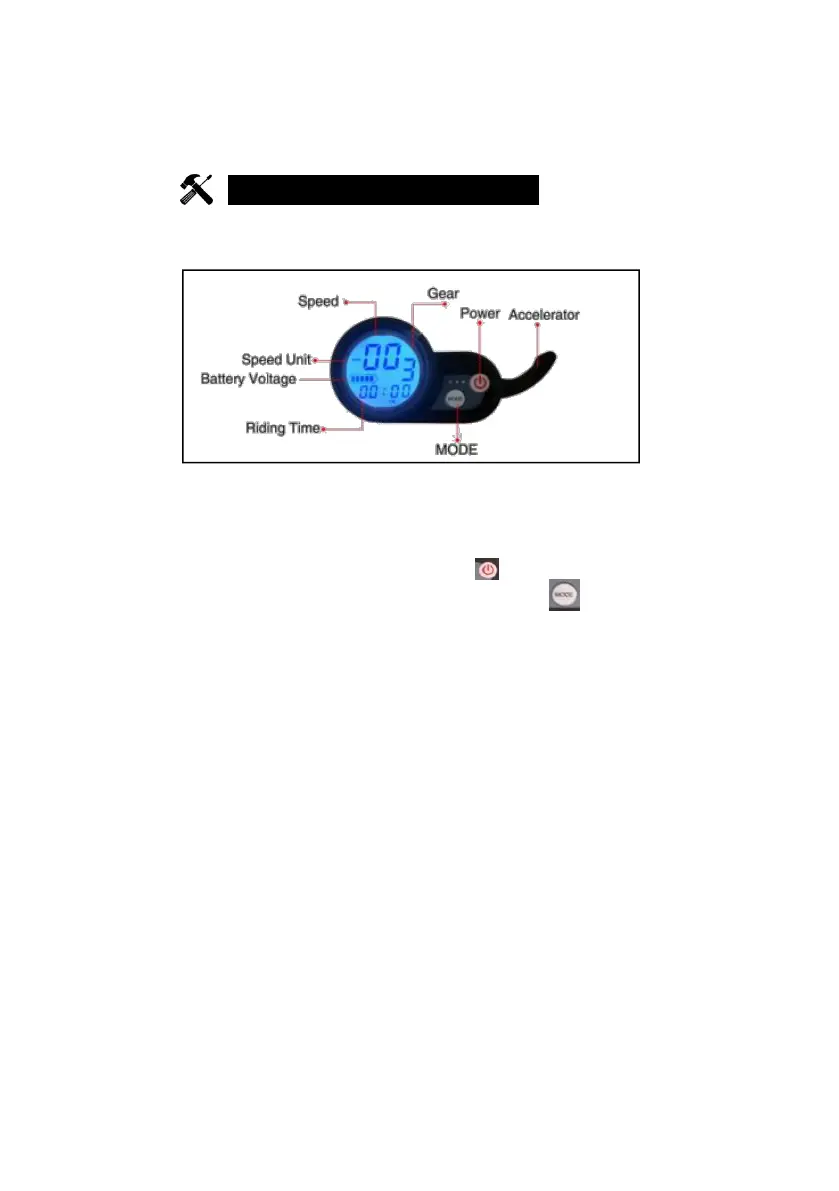
THE Y2 MULTI-FUNCTIONAL DISPLAY
POWER: Power Button (Press and Hold it for 3 seconds)
GEAR: Current Gear position (Gear: 1, 2, 3 )
SWITCH GEAR: Short press the POWER( ); the current Gear
No. will blink, then short press the MODE button ( ) to
change the gear position- Three gear position for option.
SPEED: Real time Speed SPEED UNIT: Metric unit/ Imperial unit
BATTERY VOLTAGE: Current battery Capacity
RIDEING TIME: The duration of riding time
MODE: Setting parameter button Accelerator: Throttle
NOTE
1. After the Display is turned on, if there is no operation for 2
minutes, the Meter will automatically turn off.
2. Short press the POWER button to change the display
content: TRIP, ODO, VOL etc will display respectively. When
00:00 is displayed, the time is displayed. TRIP indicates a
single mileage. ODO means the accumulated mileage. And
VOL is displayed, the battery is played.



 To Next Page