The AC211 Split A/C Control is a home automation device designed to integrate split air conditioners into a ZigBee home area network. It acts as a bridge, converting ZigBee signals from a gateway into infrared (IR) commands to control the air conditioner. The device comes with pre-installed IR codes for various mainstream split air conditioners, simplifying the setup process. Beyond basic control, the AC211 offers advanced monitoring capabilities, including the detection of room temperature and humidity, as well as the power consumption of the connected air conditioner. This information can then be displayed on a connected screen, providing users with comprehensive insights into their air conditioning usage and environment.
Technical Specifications:
- Wireless Connectivity: The AC211 utilizes ZigBee 2.4 GHz IEEE 802.15.4 for wireless communication. It also incorporates IR for controlling air conditioners.
- RF Characteristics:
- Operating frequency: 2.4 GHz
- Internal PCB Antenna
- Range outdoor/indoor: 100m/30m
- TX Power: 6~7mW (+3dBm)
- Receiver sensitivity: -102dBm
- ZigBee Profile: Home Automation Profile
- IR Specifications:
- Infrared emission and receiving
- Angle: 120° all-angle covering
- Carrier Frequency: 15kHz-85kHz
- Metering Accuracy:
- ≤ 100W within ±2W
-
100W within ±2%
- Power Supply:
- Direct plug-in: AC 100-240V (50-60 Hz)
- Rated power consumption: 4W
- Physical Dimensions:
- Dimensions: 68(L) x 122(W) x 64(H) mm
- Weight: 178 g
- Mounting Type: Direct Plug-in, with available plug types for US, EU, and UK regions.
Usage Features:
The AC211 is designed for ease of use and integration into a smart home ecosystem.
- Connectivity: To get started, users need a gateway and a mobile app. The device connects to the gateway's network by setting the gateway to permit joining, then plugging in the AC211. The LED indicator will flash, and once successfully joined, it will become solid.
- Pairing with Air Conditioner: Pairing the AC211 with an air conditioner is done through the mobile app. Users navigate to the "Comfort" page, tap "Pair" next to the AC icon, and follow on-screen instructions. A "verify" function allows users to confirm successful pairing. If only the on/off button works but temperature and other functions are not controllable, users are advised to try other pairing codes.
- ON/OFF Button: The device features an ON/OFF button. Pressing and holding this button for approximately ten seconds until the screen displays "rst" will reset the device to its default factory settings.
- LED Indicator: The LED indicator provides visual feedback on the device's status:
- LED flashing: Device has not joined a network.
- LED solid: Device has joined a network.
- Green LED: Device is ON.
- Red LED: Device is OFF.
Maintenance Features and Safety Handling:
To ensure safe and optimal operation of the AC211, users must adhere to specific safety guidelines:
- Environmental Conditions: Avoid exposing the device to high humidity or extreme temperatures. It should also be protected from long exposure to direct sunlight or strong ultraviolet light.
- Physical Handling: Do not drop the unit or expose it to intense vibration.
- Repairs and Modifications: Users are strictly advised not to disassemble or attempt to repair the unit on their own. Unauthorized modifications can lead to malfunctions or safety hazards.
- Hazardous Materials: Keep the unit and its accessories away from flammable liquids, gases, or other explosives to prevent fire or other dangerous incidents.
Following these safety notices is crucial to prevent fire, electric shock, injuries, or damage to the Split AC Control and other property.

 Need help?
 General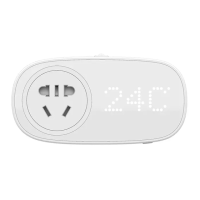

 To Next Page