
 Need help?
Do you have a question about the Owon SEG-X5 ZigBee and is the answer not in the manual?
Details about LED indicators for cloud connection and sub-devices status.
Explains the functions of the ZigBee and Wi-Fi buttons on the gateway.
Instructions for resetting the gateway to factory default settings.
Describes the buzzer sounds and their meanings for gateway status.
Steps for physically installing and connecting the gateway.
Guide on how to pair sub-devices with the gateway.
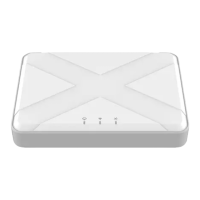
The SEG-X5 ZigBee Gateway serves as a central platform for your smart home system, facilitating the integration and management of ZigBee devices. This gateway enhances your Internet of Things (IoT) experience by enabling automatic control, scheduling, scene creation, and remote monitoring and control for all connected ZigBee devices. It acts as the ZigBee coordinator for your home area network, ensuring a stable and reliable ZigBee connection throughout your smart home ecosystem.
The primary function of the SEG-X5 ZigBee Gateway is to bridge your ZigBee-enabled smart devices with your broader home network and the cloud, allowing for seamless interaction and control. It supports ZigBee 3.0, the latest standard, which ensures broad compatibility with a wide range of ZigBee devices from various manufacturers. The gateway establishes a robust ZigBee network, acting as the central hub to which all your sub-devices connect.
One of the core capabilities of the gateway is its ability to facilitate local linkage, scenes, and schedules. This means you can configure your smart devices to interact with each other directly through the gateway, even without an active internet connection. For instance, you can set up a scene where turning on a light also triggers a smart plug, or create schedules for your devices to operate at specific times of the day. This local processing capability enhances responsiveness and reliability, as commands don't need to travel to the cloud and back.
The gateway also supports remote monitoring and control. Once connected to the cloud, you can manage your ZigBee devices from anywhere using a dedicated mobile application. This allows you to check the status of your devices, adjust settings, and activate scenes even when you're away from home, providing convenience and peace of mind.
A built-in buzzer provides auditory feedback for various operations, such as successful device pairing or system status changes, making it easier to understand the gateway's current state without constantly checking visual indicators.
Setting up and using the SEG-X5 ZigBee Gateway is designed to be straightforward. The initial installation involves providing power via a micro-USB cable and connecting the gateway to your router's LAN port using a network cable. Once powered on and connected to the internet, the cloud connection indicator will turn green, signaling a successful connection to the cloud. From there, you can use the accompanying mobile application to add the gateway to your smart home system and begin integrating your ZigBee sub-devices.
Adding sub-devices is an interactive process. The gateway features a dedicated ZigBee button. Pressing and holding this button for 2 seconds initiates a "permit join" mode, indicated by the sub-devices indicator flashing rapidly. This mode allows new ZigBee devices to join the gateway's network and lasts for 2 minutes, providing ample time to put your sub-device into pairing mode. A successful join is confirmed by the buzzer beeping twice evenly, offering clear auditory feedback. If you need to exit the permit join mode prematurely, you can hold the ZigBee button again for 2 seconds.
The gateway also includes a Wi-Fi button, though its primary internet connection is via Ethernet. This suggests potential for future Wi-Fi connectivity options or specific use cases not detailed in the provided information.
Visual indicators on the gateway provide immediate feedback on its operational status. The cloud connection indicator, for example, glows green when successfully connected to the cloud, flashes slowly if it fails to connect, and remains always-on when in configuration mode. Similarly, the sub-devices indicator flashes rapidly when it's allowing new devices to join, providing a clear visual cue for the pairing process.
The SEG-X5 ZigBee Gateway incorporates several features to ensure its longevity and ease of maintenance. Firmware upgrades are a crucial aspect of device maintenance, ensuring the gateway remains secure, compatible with new devices, and benefits from performance enhancements. During a firmware upgrade, both the cloud connection indicator and the Wi-Fi/sub-devices indicator will flash slowly, providing a visual indication that the update process is underway.
For troubleshooting or to reset the device to its original state, the gateway includes a reset button. Pressing and holding this button for 10 seconds will restore the gateway to its default factory settings, a process confirmed by a long beep from the buzzer. This feature is invaluable for resolving complex issues or preparing the gateway for a new setup.
The gateway also supports backup and transfer functionalities, which are essential for seamless system management. This allows users to back up their configurations and transfer them to a replacement gateway, minimizing downtime and effort when upgrading or replacing hardware. This feature ensures that your smart home setup can be easily migrated without having to reconfigure every device from scratch.
Safety handling guidelines emphasize the importance of proper environmental conditions for the gateway's operation. It is designed for indoor use only and should be kept away from high humidity, extreme temperatures, direct sunlight, and strong ultraviolet light. Users are advised against dropping the unit, exposing it to intense vibration, or attempting to disassemble or repair it themselves. These precautions help prevent damage to the gateway and ensure its safe and reliable operation. Cleaning should be done without harsh chemicals or strong detergents, further contributing to the device's longevity.
 General
| Model | SEG-X5 |
|---|---|
| Category | Gateway |
| ZigBee Version | ZigBee 3.0 |
| Operating Temperature | -10°C to 55°C |
| Brand | Owon |
| Wireless Protocol | ZigBee |
| Connectivity | Ethernet |

 To Next Page