User Manual - LIPS 16 V1.1 11/2017 6/12
NOTE: Whenever you want to adjust the start address, press Up key or Down key to shift the
start address setting mode. In this case, you may change the start address temporarily. You
can control the 16 continual DMX channels from the beginning of the starting address. The
start address must be 1 ~ 512. And the overflowing channels will not be proceeded.
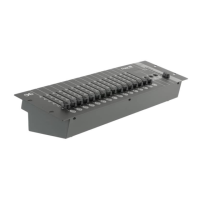
3. Pushing the channel fader, one of the 16 channels faders, can allow you to adjust the
relative channel value. The LED will display the value temporarily with the default mode of
decimal ( 0 ~ 255 ) when sliding the fader. For percent display mode, you can press the
MODE key.
In this case, the indicating LED of right lower corner will be out in the display window and
the indicating LED of right higher corner will be lit up. After you have set the 16 channels
values, waiting about 10 seconds, the LED window will automatically show the start address.
4. Master fader
Pushing the Master fader can control the output values of all the 512 channels.
The output value can be set to 0 ~ 255 by the Master fader. There are also two display mo-
des,
including decimal and percent mode. The default mode is decimal mode. And you can shift
between these two modes by pressing the mode key
5. Technical data
DMX Out 3 pin female XLR connectors
Power requirement 9VDC, 300 mA ( Including an AC~ DC adaptor )
Dimension 482 x 132 x 80 mm
Weight 2.30 kg


 To Next Page