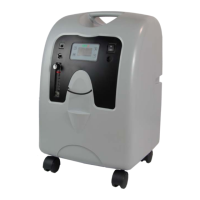
The OX-A Series Oxygen Concentrator is a medical device designed to provide supplemental low-flow oxygen therapy in various settings, including homes, nursing homes, and patient care facilities. It operates by separating oxygen from room air, delivering high-purity oxygen through an oxygen outlet. The concentrator is electrically operated and is available in two models: OX-10A and OX-5A, offering different oxygen delivery rates.
Function Description
The primary function of the OX-A Series Oxygen Concentrator is to supply a continuous flow of oxygen to individuals who require supplemental oxygen due to respiratory or heart conditions. It achieves this by drawing in ambient air, filtering it, and then concentrating the oxygen before delivering it to the user via a nasal cannula, catheter, or face mask. The device is intended to improve symptoms such as headaches, drowsiness, confusion, fatigue, or increased irritability caused by insufficient oxygen intake from room air alone.
Important Technical Specifications
Models: OX-10A and OX-5A
Delivery Rate:
- OX-10A: 2 to 10 LPM (Liters Per Minute)
- OX-5A: 0.5 to 5 LPM
Outlet Pressure: 8.5-13 psi (68.5-90 kPa)
Electrical Rating:
- OX-10A: 230 V, 50 Hz, 3.4A (Max.)
- OX-5A: 230 V, 50 Hz, 1.4A (Max.)
Oxygen Percentage:
- OX-10A: 2-9 LPM 93%±3%, 10 LPM 90%±3%
- OX-5A: 0.5-5 LPM 93%±3%
- Average oxygen concentration at 2 l/min: 93%±3%
Operating Environment Range:
- Temperature: 10°C to 40°C
- Humidity: 15% to 95%
- Atmospheric pressure: 50-106 kPa (7.3-15.4 psi)
Weight:
- OX-10A: 18.9 kg
- OX-5A: 14.9 kg
Sound Level (ISO 8359:1996 from front):
- OX-10A: ≤55 dBA
- OX-5A: ≤43 dBA
Dimensions: 342mm (L) x 368mm (W) x 572mm (H)
Operating System: Time Cycle / Pressure Swing
Storage Conditions:
- Temperature: -40°C to 70°C
- Humidity: 10% to 100%
- Atmospheric pressure: 50-106 kPa (7.3-15.4 psi)
Equipment Class and Type:
- Protection against electric shock: Class II
- Degree of protection against electric shock: TYPE B Applied part
Pressure Relief Valve: 276 kPa ± 34.5 kPa
Lifetime: 3 Years
Warranty Period Limit:
- OX-10A: 1 Year
- OX-5A: 3 Years
Usage Features
Front View Components:
- Power Switch (I=ON, O=OFF): Controls the unit's power.
- Circuit Breaker: Resets the unit after an electrical overload shutdown (on selected units).
- Humidifier Holder: Secures the humidifier bottle.
- Oxygen Outlet: The port from which oxygen is dispersed.
- Flow Meter Control Button ("M"): Adjusts oxygen flow rate in 0.5 LPM increments.
- Timing Setting ("+" / "-"): Adjusts operating time in 30-minute steps.
- Monitor: Displays oxygen purity status and hour meter.
- Green Power Light: Illuminates when the concentrator is operating.
- Normal Oxygen (Green) Light (Optional): Indicates normal oxygen concentration.
- Low Oxygen (Yellow) Light (Optional): Indicates low oxygen output concentration (82%+/-3%).
- Red Service Required Light: Illuminates when service is needed, prompting contact with the OXTM provider.
- Castors: For mobility of the unit.
Back View Components:
- Air Filter: Prevents dirt, dust, and lint from entering the unit.
- Product Specification Label: Contains model and serial information.
- Exhaust: Releases processed air.
- Power Cord and/or IEC Power Connector: Connects the unit to an electrical outlet.
Operation:
- Placement: Position the unit near an electrical outlet, at least 6 inches (16 cm) from walls, draperies, or other objects to ensure proper airflow. Keep it at least 5 feet (1.6 m) away from hot, sparking objects or open flames.
- Oxygen Tubing Connection: Attach oxygen tubing directly to the connector or to a humidifier bottle if prescribed.
- Humidification (if prescribed): Fill the humidifier bottle with distilled water (do not overfill) and attach oxygen tubing to its outlet fitting.
- Power On: Press the power switch to "On." The Power light will illuminate, and the Service Required light and audible alarm will briefly activate.
- Flow Rate Check: Ensure the flow meter ball is centered on the line corresponding to the prescribed flow rate. Adjust with the flow meter knob (clockwise to decrease, counterclockwise to increase).
- Oxygen Purity Monitoring: The device includes an oxygen monitoring system.
- Green LED: Indicates acceptable oxygen concentration (≥82%).
- Yellow LED: Indicates low oxygen concentration (82%~70%). If this light illuminates, switch to a reserve oxygen system and contact your OXTM provider.
- An intermittent audible signal will alarm if oxygen purity continues to drop.
Safety Features:
- DANGER - NO SMOKING: Oxygen causes rapid burning. Smoking is prohibited near the concentrator or a person using oxygen therapy.
- WARNING: Oxygen therapy can be hazardous; medical advice is recommended before use.
- Circuit Breaker: Protects against electrical overload.
- Patient Alert System: Sounds an alarm if the unit loses electrical power or malfunctions, signaling the user to switch to a reserve oxygen system.
Maintenance Features
General Care:
- No Lubricants: Do not use lubricants, oils, or grease on the unit.
- Power Off: Always turn the unit "off" before performing any cleaning procedures.
Oxygen Humidifier (Reusable Bottles):
- Daily Cleaning: If humidification is prescribed, clean the humidifier bottle daily.
- Cleaning Procedure:
- Wash with hot water and dishwashing detergent.
- Soak in a solution of one part white vinegar to three parts hot water for 30 minutes for germicidal action.
- Rinse thoroughly with warm tap water and refill with distilled water. Do not overfill.
Cannula, Mask, and Tubing:
- Clean and replace as instructed by your OXTM provider.
Air Filter and Oxygen Outlet Connector:
- Weekly Cleaning: Clean the oxygen outlet connector at least once a week.
- Cleaning Procedure:
- Remove the oxygen outlet connector (if used).
- Wash in a solution of warm water and dishwashing detergent.
- Rinse thoroughly with warm tap water and towel dry.
- Ensure the filter is completely dry before reinstalling.
- Filter Replacement: The air filter needs to be replaced after approximately 3000 hours of device operation. It is disposable. Failure to replace it regularly will affect concentration performance.
- CAUTION: Do not operate the unit without the air filter or if it is damp, to prevent product damage.
Exterior Cabinet:
- Cleaning: Clean the exterior cabinet using a damp cloth or sponge with a mild household cleaner and wipe it dry.
- WARNING: Do not remove the concentrator cabinet (only qualified OXTM technicians should do so) or apply liquid directly to it, or use petroleum-based solvents or cleaning agents, to avoid electric shock.
Periodic Maintenance:
- Air Filter Cleaning: At least once a week.
- Inlet Pre-Filter Felt Change: At least once every half year.
- Open the Important Safeguard.
- Pull out the Inlet Pre-Filter.
- Remove old felts from both sides of the Inlet Pre-Filter.
- Insert new felts into each side.
- Reinsert the Inlet Pre-Filter and close the Important Safeguard.
- Bacterial Filter Change: At least once a year. This must be performed by your OXTM Medical provider.
Troubleshooting:
- A "Minor Troubleshooting" chart is provided in the manual to assist users in identifying and resolving common issues such as the unit not operating, blocked filters, or low oxygen purity. Users are advised to contact their OXTM provider if issues persist.


 To Next Page
 General