The Oysta Rio is a compact personal safety device designed for emergency support, location tracking, and communication. It is a small, black, rectangular device with rounded edges, featuring several buttons and LED indicators.
Function Description:
The Oysta Rio serves as a personal alarm and communication device. Its primary function is to provide emergency assistance through an SOS button, allowing users to quickly dial for help. It also enables outgoing calls to a preset number and offers location tracking via GPS. The device is designed to be user-friendly, with clear visual and auditory feedback for its operations.
Important Technical Specifications:
- Connectivity: Mobile signal for communication and data, GPS for location tracking, Bluetooth for optional accessories.
- Battery: Requires daily charging for at least 3 hours. A low battery warning is sent when charge falls below 20%.
- LED Indicators:
- Cradle LED (Red): Glows when charging, solid when fully charged. Blinks quickly for low battery, blinks slowly when charging.
- Device LEDs (Red, Green, Blue):
- All LEDs: Flash rapidly when the device is turned on.
- Green LED: Single flash every 3 seconds indicates a stable mobile signal. Double flash every 3 seconds indicates a data connection.
- Blue LED: Single flash every 3 seconds indicates no GPS location fix. Double flash every 3 seconds indicates an acquired GPS location fix.
- Audio: Voice prompts for SOS activation ("Please wait, dialing for assistance"), and a beep sound when making a call.
- Dimensions: Small enough to be held comfortably in one hand.
Usage Features:
- Turning On: Press the CALL button for 1 second. All LEDs will flash rapidly to indicate it's on.
- Setting Up & Daily Charging: Connect the USB cable to the charging cradle, plug into an AC adaptor, and place the device in the cradle with the SOS button facing forward. The cradle LED will glow while charging and turn solid when fully charged. It is recommended to charge the device daily for at least 3 hours.
- Establishing Mobile Signal: The green LED indicates mobile signal status. A single flash every 3 seconds means a stable mobile signal, while a double flash every 3 seconds means the device has a data connection.
- Getting a GPS Location Fix: For a GPS fix, the device should be taken outside or near a window. The blue LED indicates GPS status. A single flash every 3 seconds means no location fix, and a double flash every 3 seconds means a location fix has been acquired.
- Activating SOS for Emergency Support: Press the SOS button for 3-4 seconds. A voice will say, "Please wait, dialing for assistance," indicating an SOS alarm is being raised.
- Stopping an SOS: If help is not needed, press the SOS button again once within 10 seconds to cancel the SOS call.
- Making a Call: Press the CALL button for 3 seconds. The device will beep as it dials a preset number.
- Ending a Call: Press the SOS button once to end an ongoing call.
- Volume Control: The device has buttons to turn the volume up and down.
- Lanyard Hole: A dedicated hole for attaching a lanyard, allowing for easy carrying.
- Microphone: Integrated for communication during calls.
- Silent Mode Button: A dedicated button for activating silent mode.
Maintenance Features:
- Charging: Keep the device charged daily. For first-time use, fully charge the battery for at least 3 hours.
- Cleaning: Keep the device clean by wiping it with a dry cloth. Avoid using chemicals or detergents.
- Carrying: It is recommended to carry the device with you to ensure full access to its care features.
Optional Accessories:
- OystaCare Button: An optional Bluetooth-connected button that can activate an SOS alert if pressed within 50 meters of the Oysta Rio device. This is ideal for users who prefer not to carry the main device around the home but still want access to emergency support.
- OystaCare App: An easy-to-install app for Android phones (soon available on iOS) that offers SOS functionality, location updates, activity pattern monitoring, and welfare check messages. The optional wearable OystaCare button pairs with this app.
The Oysta Rio is designed to provide peace of mind and immediate assistance for users, with a focus on ease of use and reliable performance.

 Need help?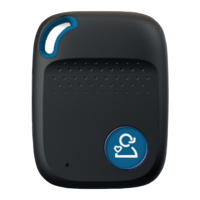

 To Next Page

 General