LCD-5000
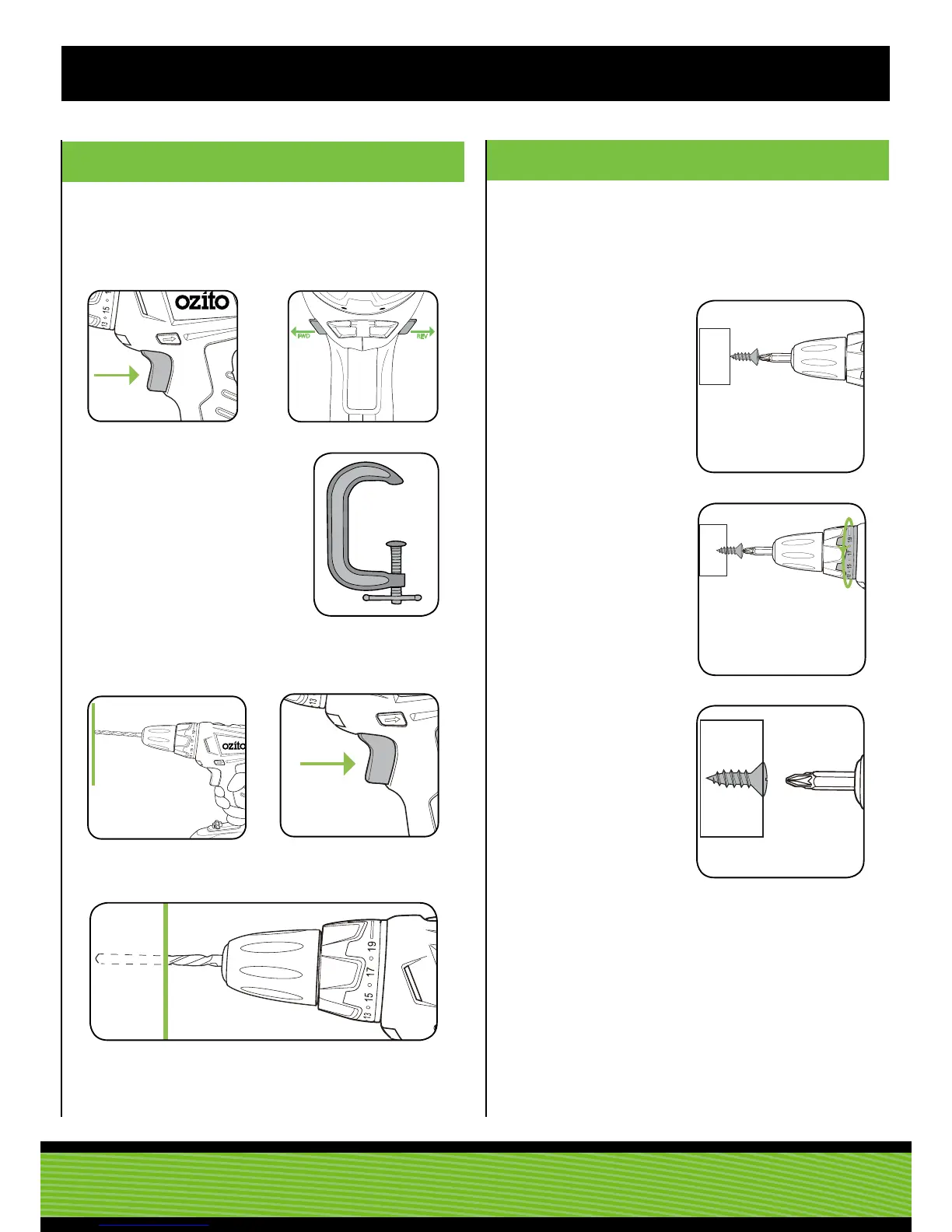
4. DRILLING
5.
HELPFUL TIPS
1. Depress and release the
variable speed trigger to
ensure it is not locked on.
3. Secure the
material to be
drilled in a vice
or clamp to stop
it turning whilst
drilling.
5. Hold the drill rmly and
place the bit at the point to
be drilled.
2. Check the forward/reverse
lever is on desired setting.
6. Depress the variable speed
trigger to start the drill.
7. Move the drill bit into the workpiece.
Note: Do not force the drill or apply side pressure to elongate the
hole. Let the drill do the work.
When drilling hard, smooth surfaces, use a centre punch to mark
the desired hole location. This measure will prevent the drill bit
from slipping off centre as you start the hole. However, the variable
speed feature allows you to start holes without centre punching. To
accomplish this, operate the drill at a low speed until you start the
hole.
When drilling metals, use light oil on the drill bit to keep it from
overheating. The oil will prolong the life of the bit and increase
drilling action.
If the bit jams in the work piece or if the drill stalls, stop the tool
immediately. Remove the bit from the work piece and determine the
reason for jamming.
Drilling to a pre-set depth - Torque Settings
Torque settings can alter the depth to which you can drill or drive
into a surface. To determine the torque setting required to drive a
screw perfectly ush to the work surface, follow the below steps.
1. Set the torque collar to
lowest setting and tighten
the rst screw.
2. If the clutch rachets and
makes a clicking sound
before screw is ush,
increase the collar setting
and continue tightening.
3. Repeat until you reach the
correct setting/ screw depth.
Use this setting for the
remaining screws.
Before starting to drill, perform a few simple checks.



 To Next Page