Attaching The LED Collar
The LED collar can be attached to provide additional direct lighting on
your workpiece during detailed, precision work.
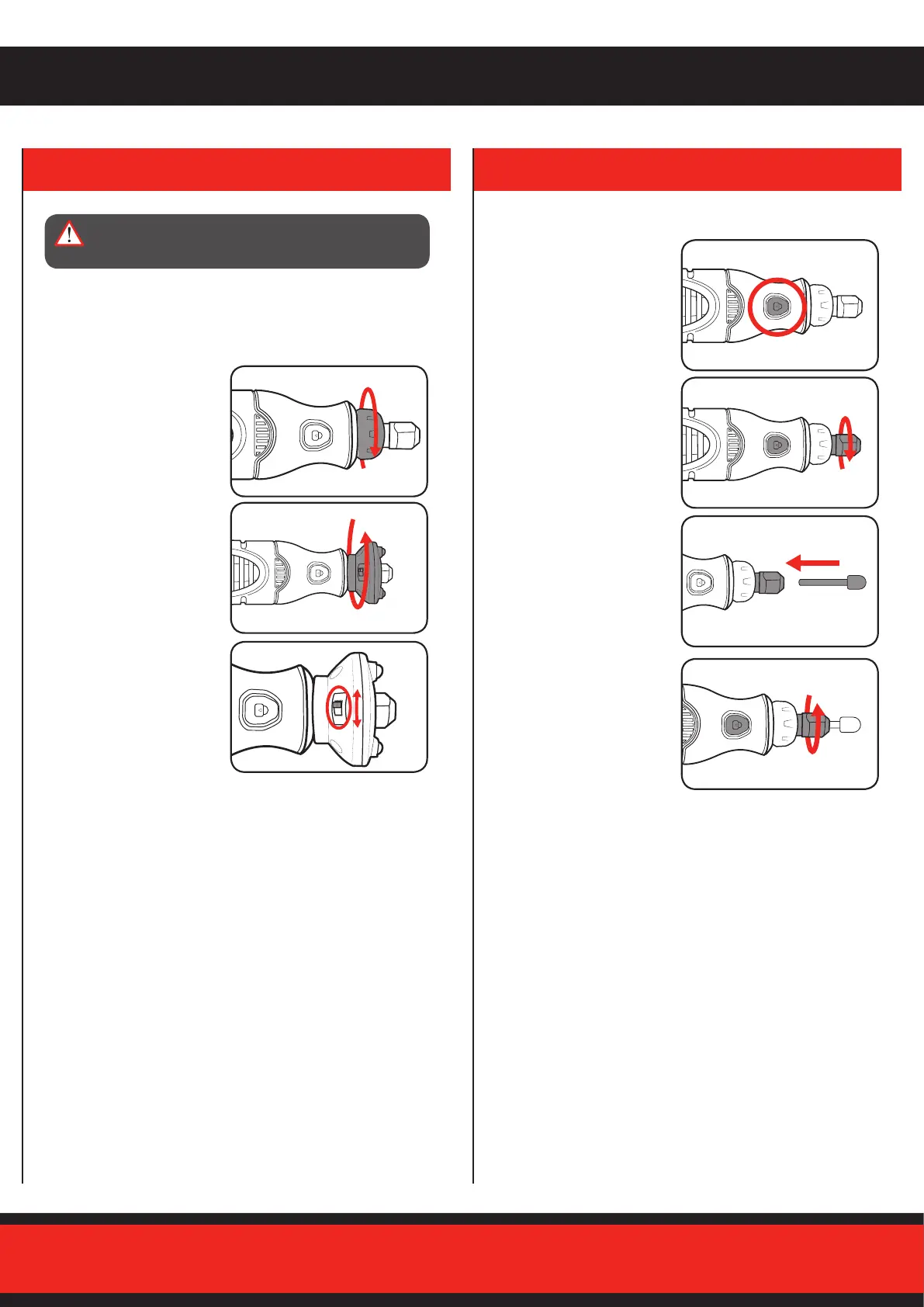
1. Turn the shaft collar anti-
clockwise to loosen and
remove it.
2. Slide the LED collar onto the
shaft and turn it clockwise to
tighten it into place.
3. Flip the lever on the back
of the LED collar to the ‘I’
position to turn it on.
4. To turn o the LED collar, ip
the lever to the ‘0’ position.
Attaching Accessories
1. Press and hold the spindle
lock button.
2. Using the supplied wrench,
slightly loosen the collet nut.
3. Insert the shaft of the
accessory into the collet.
4. With the spindle lock button
engaged, nger tighten the
collet nut until the accessory
shank is rmly gripped by the
collet.
Note: Avoid excessive tightening of the collet nut when no accessory
is inserted, as this may cause the collet to get stuck in the collet nut.
If this happens, push the shank of an accessory into the hole of the
collet nut.
2. INSTALLING ACCESSORIES
WARNING! ENSURE THAT THE TOOL IS SWITCHED
OFF BEFORE PERFORMING ANY OF THE
FOLLOWING OPERATIONS.


 To Next Page