Need help?
Do you have a question about the Ozito PLR-2000 and is the answer not in the manual?
Attaching and securing the guide fence to the planer for accurate cuts.
Steps for creating a rebate using the guide fence for guidance.
Instructions for loosening screws, removing old blades, and installing new ones.
Information on wear, replacement, and potential issues caused by worn brushes.
Guidelines for selecting and using extension leads safely with the tool.
Details on the product's guarantee period, terms, and conditions.
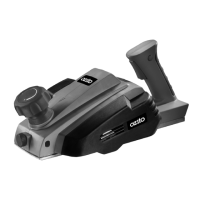
The Ozito Planer is a 400W power tool designed for various woodworking tasks, including planing, rebating, and chamfering. It is equipped with 82mm HSS blades and offers adjustable planing and rebate depths. The tool is designed for ease of use and features a robust construction for durability.
The planer's primary function is to smooth and shape wood surfaces by removing thin layers of material. It achieves this through a rotating drum fitted with two sharp HSS blades. The depth of cut can be precisely adjusted, allowing for fine control over the material removal process.
Planing: This involves running the planer across a wood surface to create a smooth, flat finish. The adjustable depth setting allows users to control how much material is removed with each pass, from 0 to 1mm.
Rebating: The planer can create rebates, which are rectangular grooves cut along the edge of a workpiece. This is achieved by using the included guide fence to control the width and depth of the cut. The rebate depth can be adjusted from 0 to 2mm.
Chamfering: The planer features a precision-machined groove in its front shoe, specifically designed for planing along the corner of a workpiece to create a chamfered edge. This allows for decorative or functional angled cuts.
The Ozito Planer is designed with several features to enhance user experience and safety.
On/Off Switch with Lock-Off Button: To operate the planer, the user must first press and hold the lock-off button, then press the on/off switch. Releasing the lock-off button allows the planer to run continuously. To turn off the tool, simply release the on/off switch. This two-step activation helps prevent accidental starts. It is crucial to wait until the blade stops completely before setting the planer down to prevent damage to the blades or the workpiece, and to ensure user safety.
Depth Adjustment Knob: The planing depth is easily adjusted using a knob located on the front of the tool. Rotating the knob allows the user to increase or decrease the cutting depth. The knob is marked with numbers corresponding to the planing depth in millimeters, providing clear visual feedback. It is always recommended to test the desired depth on a scrap workpiece first to ensure accuracy.
Guide Fence for Rebating: For rebating tasks, the planer comes with a guide fence. This accessory is inserted into a slot on the planer and secured with a fence securing knob. The guide fence helps maintain a consistent cutting line and depth for rebates. Users can mark out the area for the rebate, adjust the guide fence to the required depth, and then plane along the workpiece using the fence as a guide. Multiple cuts may be necessary to complete deeper rebates.
Chamfering Groove: The front shoe of the planer includes a V-shaped groove. This feature allows the user to accurately chamfer edges by aligning the groove with the corner of the workpiece and then planing along the edge. The depth of the chamfer is controlled by the overall planing depth setting.
Blade Changing Mechanism: The planer uses 82mm HSS blades, and the drum is fitted with two separate blades. Both blades must be reversed or replaced at the same time. To change blades, the user must first disconnect the power cord. Then, the three hex head screws securing the blade are loosened using the provided spanner. The used blade can then be pushed out through a slot in the motor housing using a screwdriver, taking care to keep fingers away from the sharp blade. New blades are then installed, and the screws are tightened. Blades are reversible, meaning they can be flipped over to expose a fresh cutting edge when the original edge becomes dull.
Safety Recommendations: The tool is recommended for use with a residual current device (RCD) with a rated residual current of 30mA or less to enhance electrical safety. Users are advised to hold the power tool by insulated gripping surfaces, especially when there's a possibility of the cutting accessory contacting hidden wiring or its own cord, to prevent electric shock. Clamps or other practical methods should be used to secure the workpiece to a stable platform, as holding it by hand can lead to instability and loss of control.
Proper maintenance is essential for the longevity and safe operation of the Ozito Planer.
Ventilation Vents: It is crucial to keep the ventilation vents clean at all times to prevent foreign matter from entering and to ensure proper motor cooling. After each use, blowing air through the planer housing helps remove dust particles that could otherwise build up, leading to overheating and potential failure.
Cleaning: If the planer's enclosure requires cleaning, a moist soft cloth should be used. Solvents should be avoided, and no liquid should ever enter or immerse any part of the planer.
Carbon Brushes: The carbon brushes are a wearing component of the planer. When they wear out, the planer may start sparking excessively or stop operating. It is important to discontinue use immediately if this occurs and have them replaced by a qualified electrician or power tool repairer. Both carbon brushes must be replaced at the same time. Continuing to use the planer with worn carbon brushes can cause permanent damage to the tool.
Blade Maintenance: The HSS blades are reversible, offering a fresh cutting edge when the first side becomes dull. Regular inspection and timely replacement or reversal of blades ensure optimal cutting performance and safety. Always ensure the power cord is disconnected before performing any blade maintenance.
General Tool Care: The instruction manual emphasizes maintaining the tool with care, following instructions for lubricating and changing accessories. The planer should be stored in a clean, dry place after disconnecting it from the power source. Air vents should remain unobstructed for proper motor cooling. It is important not to lay the tool down on its shoe when the blades are exposed, as this can chip the blades. The side dust extraction port should also be kept unobstructed. Users should never reach under the tool unless it is turned off and unplugged, as the blades are extremely sharp.
Wood Preservatives Warning: The manual includes a warning about wood containing preservatives like copper chromium arsenate (CCA), which can be toxic. When working with such materials, extra care should be taken to avoid inhalation and minimize skin contact, highlighting the importance of personal protective equipment.
 General
| Power | 2000W |
|---|---|
| Planing Depth | 3mm |
| Maximum Material Removal (Planing) | 3mm |
| Maximum Material Removal (Thicknessing) | 2mm |
| Feed Rate | 8m/min |
| No Load Speed | 8000rpm |


 To Next Page