TROUBLESHOOTING
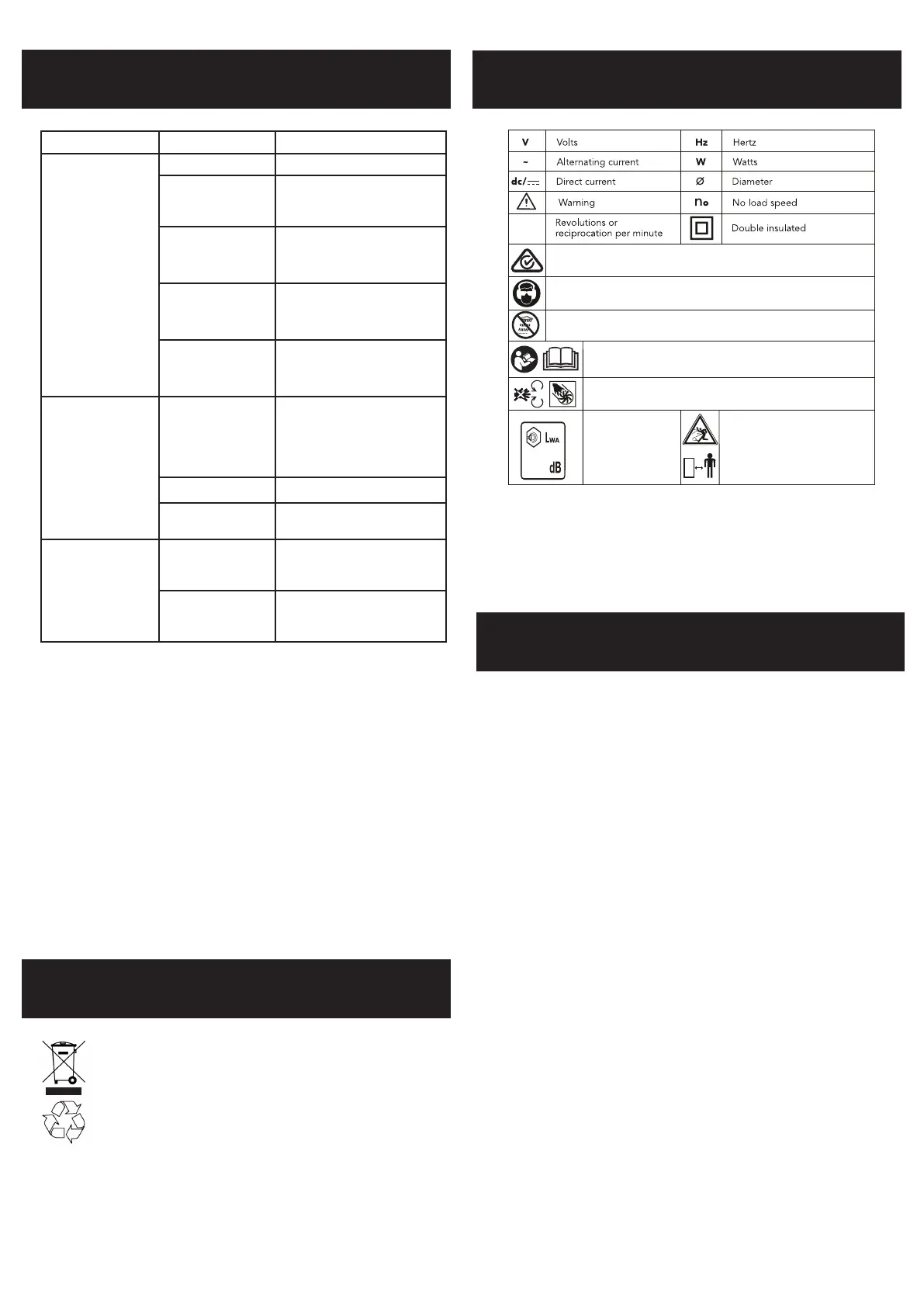
Read instruction manual
Do not use in the rain or leave the blower vac outdoors while raining.
Keep bystanders away.
Do not operate whilst people
especially children or pets are in
the area.
Wear suitable eye and ear protection.
Regulator compliance mark RCM
Keep hands out of the openings while the tool is running
Sound power level
103
/min
CARING FOR THE ENVIRONMENT
Battery protection system
The tool is equipped with the battery protection system, which helps to ensure a long service
life.
The output power automatically cuts off during operation when the tool and/or battery are
placed under the following situations:
• When the tool is overloaded:
If this occurs, turn off and remove causes of overload, then turn on again to restart.
• When the remaining battery capacity becomes low:
Recharge the battery pack.
Note: The battery protection system does not in any way damage the tool.
Note: The indicated capacity may be lower than the actual level during use or immediately
after using the tool.
Power tools that are no longer usable should not be disposed of with household waste
but in an environmentally friendly way. Please recycle where facilities exist. Check
with your local council authority for recycling advice.
Recycling packaging reduces the need for landll and raw materials. Reuse of recycled
material decreases pollution in the environment. Please recycle packaging where
facilities exist. Check with your local council authority for recycling advice.
SPARE PARTS
Spare parts can be ordered from the Special Orders
Desk at your local Bunnings Warehouse.
For further information, or any parts not listed
here,visit www.ozito.com.au or contact Ozito
Customer Service:
Australia 1800 069 486
New Zealand 0508 069 486
E-mail: enquiries@ozito.com.au
DESCRIPTION OF SYMBOLS
Problem Cause Remedy
Poor suction Collection bag full Empty the collection bag.
Clogged suction tubes Remove any debris or built up
within the upper and lower tubes.
Clogged collection bag
connector
Remove the collection bag, remove
build up of debris from connector
& outlet in the housing.
Low speed setting Turn up variable speed dial.
Clogged impeller Remove any debris or built up in
the impeller
Blower is not starting Blower air tube not
secure in place.
A micro switch prevents the
blower from operating if blower
air tube is not secured to motor
housing, it will click in place when
fully inserted.
Battery low in charge Charge battery
Batteries not inserted
correctly.
Insert both battery packs correctly.
Vacuum doesn’t start Loose thumb screw or
collection bag not fully
connected.
Tighten thumb screw and ensure
the collection bag is pushed fully
onto the housing.
Collection bag is not
pushed fully onto the
motor housing
Push the collection bag fully onto
the motor housing


 To Next Page