3. BATTERY & CHARGING
Charging your lithium ion battery
The tools battery has been shipped in a low charge condition, and
requires charging prior to use. Allow several cycles of charging and
discharging (through use of the tool) for the battery to reach its optimum
performance / runtime.
CAUTION: THE CHARGER FOR THIS PRODUCT SHOULD
BE PROTECTED BY A RESIDUAL CURRENT DEVICE
(RATED AT 30MA OR LESS).
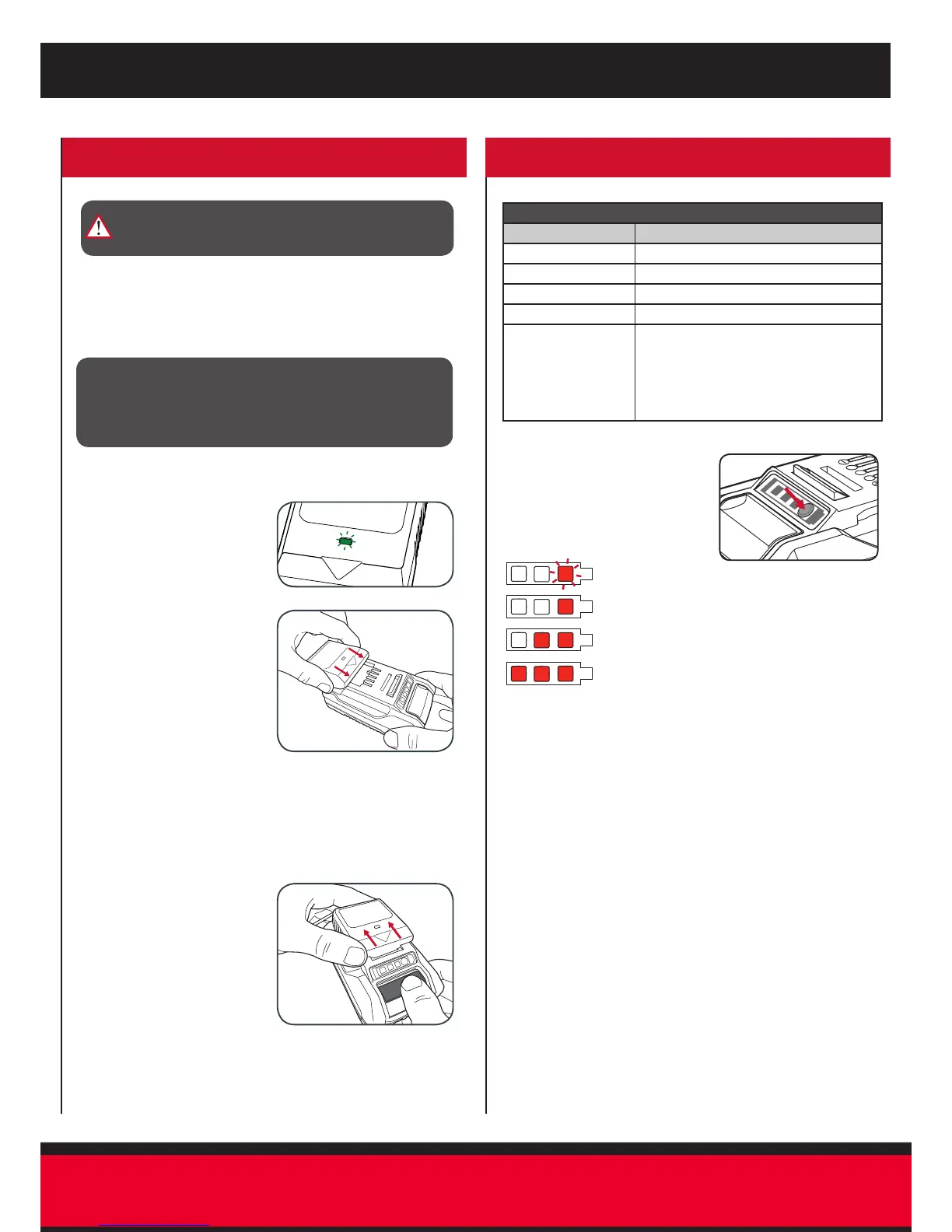
1 Connect the charger into a mains power outlet.
4 The charger LED will illuminate red signifying that the battery
is charging.
5 When removing the charger
from the battery, rst press
the battery release tab, then
slide the charger from its
position.
Note: The battery will not develop a memory, it does not have to
be fully discharged before recharging
2 The charger LED will ash
green showing power
is being supplied to the
charger.
3 With the battery sitting on a
at surface, align the raised
ribs on the battery with
the recess in the charger
and slide onto the battery
ensuring a rm connection.
CAUTION! IF THE BATTERY IS TOO HOT OR TOO COLD
WHEN INSERTED INTO THE CHARGER, THE LED WILL
FLASH RED AND GREEN. REMOVE BATTERY FROM
CHARGER AND STORE AT ROOM TEMPERATURE 20ºC
BEFORE CHARGING.
Battery Charge Indicator
The purchased battery is equipped
with a battery charge indicator to
show the state of the battery charge.
Press the charge indicator button and
look to see which LED lights.
Battery requires immediate charging
Low state of charge, requires charging soon.
Mid state of charge
Full state of charge.
Note: The battery needs to be removed from the tool to check the state
of charge.
Battery protection system
The tool is equipped with the battery protection system, which helps to
ensure a long service life.
The output power automatically cuts off during operation when the tool
and/or battery are placed under the following situations:
• When the tool is overloaded:
If this occurs, release the trigger switch and remove causes of
overload, then pull the switch trigger again to restart.
• When the remaining battery capacity becomes low:
Recharge the battery pack.
Note: The battery protection system does not in any way damage the
tool.
Note: The indicated capacity may be lower than the actual level during
use or immediately after using the tool.
Charger LED Indicator
LED Indicator Situation
GREEN (Flashing) Stand By (no battery pack is inserted)
RED (Illuminated) Battery is charging (low charge)
GREEN (Illuminated) Battery is fully charged
RED (Flashing) Battery or Charger fault
RED & GREEN
(Flashing)
Battery pack is too hot or too cold (remove
battery from charger and store at room
temperature 20ºC. Insert battery again when
at correct charging temperature). If this
happens again, the battery is defective and
needs to be replaced.


 To Next Page