ONLINE MANUAL
Scan this QR Code with your
mobile device to take you to
the online manual.
KNOW YOUR PRODUCT SETUP & PREPARATION
1. ASSEMBLY
CORDLESS IMPACT DRIVER
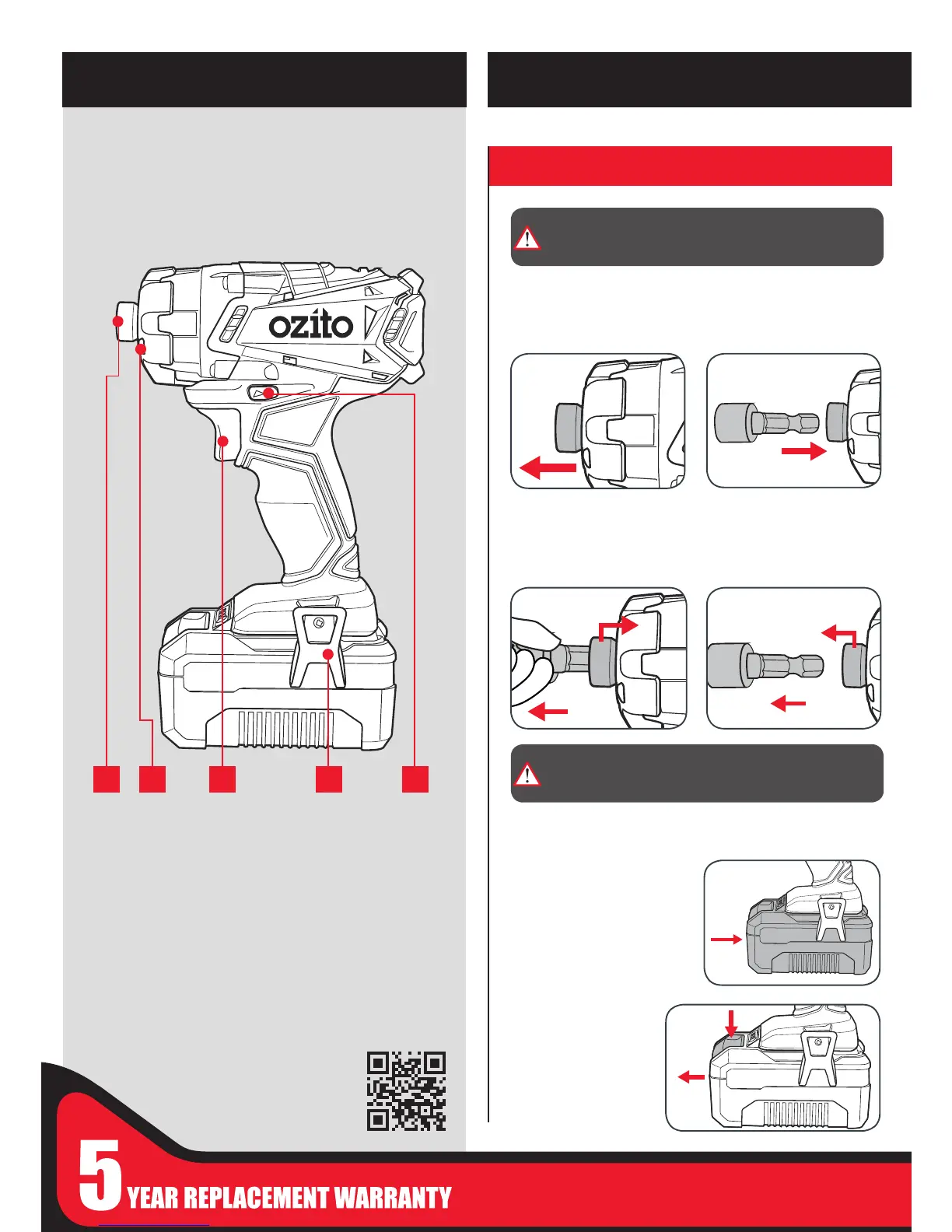
1 2 3 4 5
1 Drive Bit Retaining Ring
2 Tri-Beam LED Light
3 Variable Speed Trigger
4 Belt Hook
5 Forward/ Reverse Lever
BATTERY & CHARGER (sold separately)
Compatible chargers
Eco charger PXCSCH-120
“ “ PXCG-120
Fast charger PXCFCH-030
“ “ PXCG-030
Compatible battery packs
1.5Ah PXCBAT-015
“ PXBP-150
3.0Ah PXCBAT-030
“ PXBP-300
5.2Ah PXCBAT-052
“ PXBP-520
Inserting & Removing the Battery (not included)
1 Align the ribs of the battery
with the recess at the base
of the driver hanlde and
push in until it clicks into
place.
2 To remove, press
and hold the battery
release tab and
then slide out.
1 Pull the drive retaining ring
forward.
3 Release the drive bit
retaining ring then pull on
the bit to ensure it is rmly
in place.
4 To remove, pull the drive
retaining ring forward &
remove the driving bit.
2 Insert the hex shank of the
appropriate (1/4”) driver
bit.
WARNING! ENSURE THE TOOL IS SWITCHED OFF AND
THE BATTERY IS REMOVED BEFORE PERFORMING ANY
OF THE FOLLOWING TASKS.
CAUTION! DO NOT HANDLE ACCESSORIES WITHOUT
GLOVES AS THEY ARE SHARP AND CAN BECOME HOT
AFTER USE, POTENTIALLY CAUSING PERSONAL INJURY.


 To Next Page