4 5
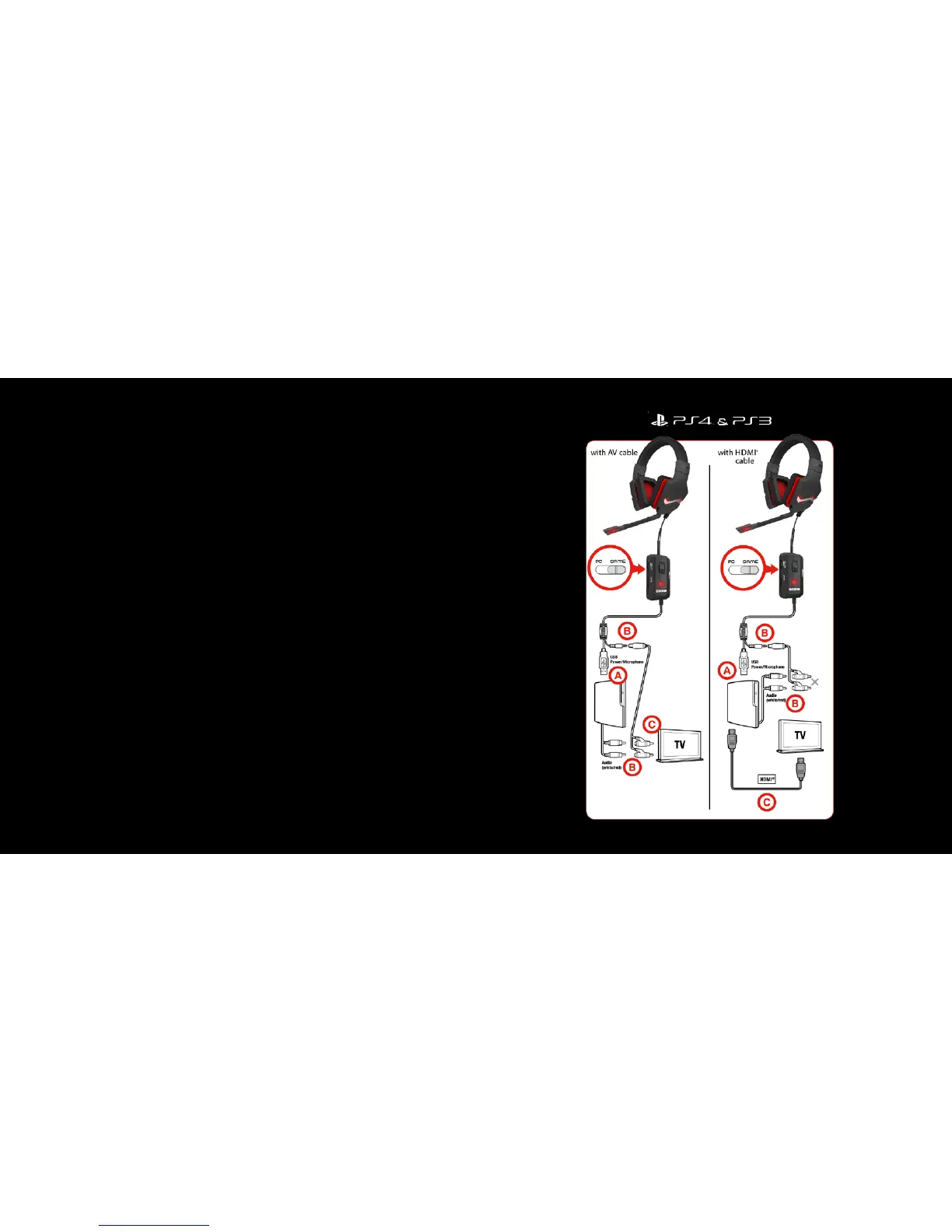
4. With PS3® / PS4®
A) Plug the headset’s USB connector into any free USB port on your
console.
B) Use the accompanying phono/RCA adapter cable to connect the
headset’s 3.5mm connector to the phono/RCA audio outputs on the AV
cable (supplied with the PS3®).
C) If you’d like to simultaneously playback audio via the TV using HDMI®,
enable the “Audio Multi- Output” option under the “Sound Settings” option.
For simultaneous audio playback via the TV using the AV Cable, plug the
adapter cable’s phono/RCA plugs into the TV’s audio input sockets.
In the console menu, select “AV MULTI” (“Sound Settings” – “Audio Output
Settings”) as the audio output device for gaming audio, and then select
“System Default Device” as the chat output device and “USB Headphone
Set” as the audio input device (both under “Accessory Settings” – “Audio
Device Settings”).



 To Next Page