PAC
®
| Ph. 866-931-8021 | support@pac-audio.com
©2017 PAC | PAC is a Power Brand of AAMP Global
www.pac-audio.com
Rev. 020717
Page 3
Pacific Accessory Corporation
Advanced Amplier Interface for
Chrysler / Dodge / Jeep
AP4-CH21
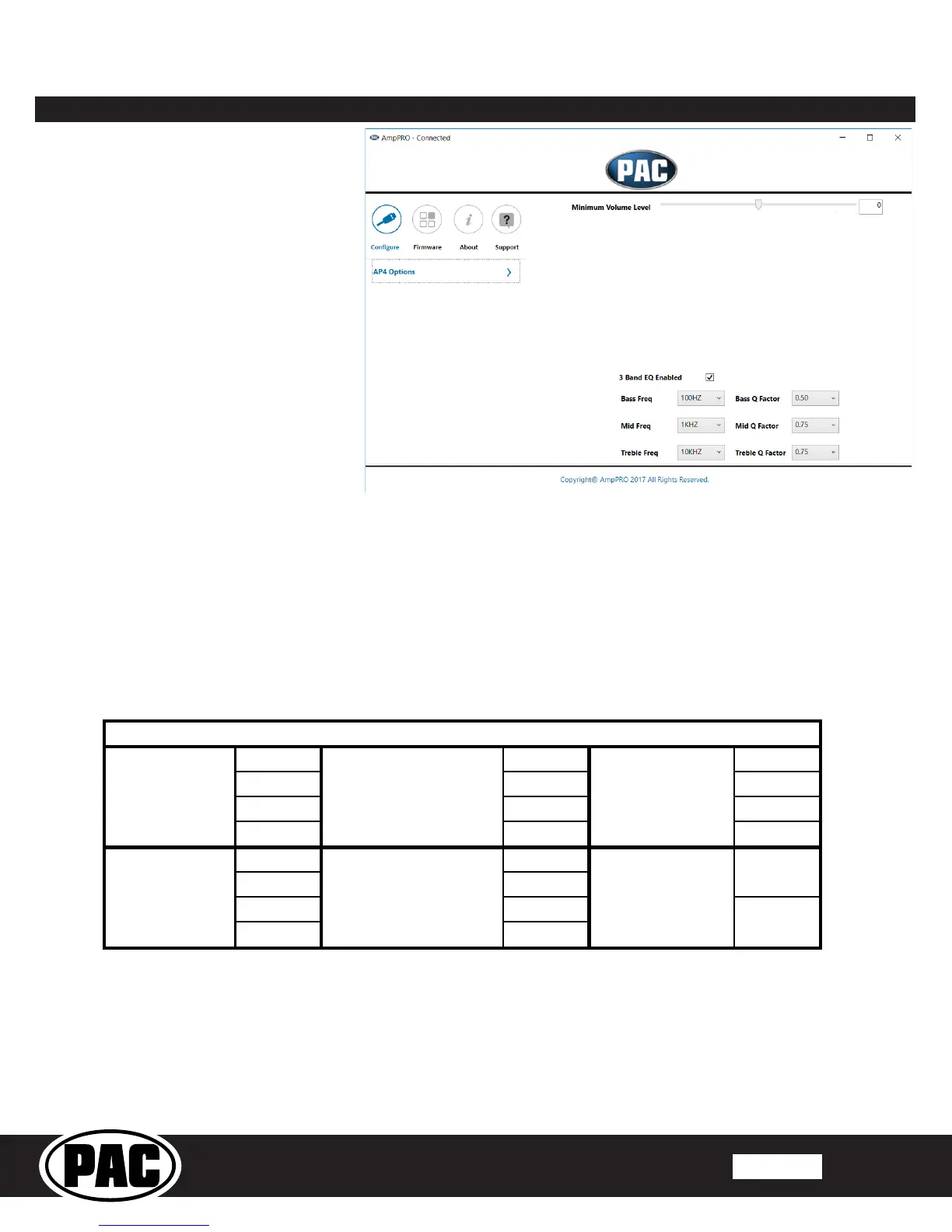
AmpPRO PC App
Use of the AmpPRO PC App allows
you to do the following:
• Congure User Interface Options such as:
• Minimum Volume Level
• Enable / Disable factory EQ
• Set Bass / Mid / Treble center
frequencies and Q factor
• Update Product Firmware
• Read Firmware / Hardware Versions
• You can download the AmpPRO app at :
http://aampglobal.com/appdownloads
PLEASE NOTE: These settings can be adjusted with the module installed in the vehicle or on the bench. However, it is
recommended to make the adjustments with the module installed, and the factory radio on so that the changes can be
heard.
Minimum Volume Level - This allows you to set the minimum volume level of the factory radio (factory radio volume level 1)
3 Band EQ Enabled - This allows you to enable / disable the 3 band factory EQ.
Bass / Mid / Treble Freq / Q Factor - This allows you to set the center frequency that will be adjusted when setting the 3 band
factory EQ, as well as the Q Factor for each frequency. The Q Factor determines how many of the adjacent frequencies will be
affected when adjusting the selected frequency. The lower the Q Factor, the more frequencies will be affected.
60HZ 500HZ 7.5KHZ
80HZ 1KHZ 10KHZ
100HZ 1.5KHZ 12.5KHZ
120HZ 2.5KHZ 15KHZ
0.50 0.75
1.00 1.00
1.50 1.25
2.00 1.50
Bass Frequency Mid Frequency Treble Frequency
Available Frequencies and Q Factors
Bass Q Factor Mid Q Factor Treble Q Factor
0.75
1.25


 To Next Page
 Loading...