- - - - - - - - - - - - - - - - - - - - - - - - - - - - - - - - - - - - - - - - - - - - - - - - - - ▲ INSTRUCTION MANUAL
3601 E. 34th St. Tucson, AZ 85713 USA Tel. +1 520-882-6598 Fax +1 520-882-6599 email: pace@metallographic.com Web: http://www.metallographic.com
Please read this instruction manual carefully and follow all installation, operating and safety guidelines.
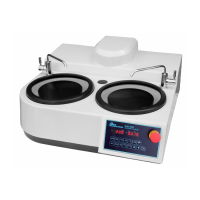
NANO 2000T Polisher
9.3 Full Programming Parameters
44
NANO 1000T/2000T and 1200T with 20 rpm increments
(1 and 1.5 hp motor)
Note:
Do not start or run the motor before the correct input voltage is programmed;
RESET DEFAULT BEFORE REPROGRAMMING
Go to dF → Enter → -def → Enter
Steps to set converter input voltage and frequency response:
Go into Program “U” (Password:0253) → Enter → input “1001” →Enter → input “2020” → Enter →
input “3030” →Enter→ input “4170” →Display “OVER” →Enter
Go into Program “U” (Password:0253) → Enter → input “1030” →Enter → input “2170” → Enter →
input “3050” →Enter→ input “4255” →Display “OVER” →Enter
Go into Program “U” (Password:0253) → Enter → input “1050” →Enter → input “2225” → Enter →
input “3120” →Enter→ input “4255” →Display “OVER” →Enter
2. Go into Program “nS” (Password:0253) → Enter → input “2” → Enter
3. Go into Program “Sr” (Password:0253) → Enter → input “1.4” → Enter
Steps to set converter input voltage and frequency response:
FOR 110V
Go into Program “U” (Password:0253) → Enter → input “1001” →Enter → input “2025” → Enter →
input “3050” →Enter→ input “4255” →Display “OVER” →Enter
Go into Program “U” (Password:0253) → Enter → input “1050” →Enter → input “2255” → Enter →
input “3120” →Enter→ input “4255” →Display “OVER” →Enter
FOR 220V
Go into Program “U” (Password:0253) → Enter → input “1001” →Enter → input “2025” → Enter →
input “3050” →Enter→ input “4225” →Display “OVER” →Enter
Go into Program “U” (Password:0253) → Enter → input “1050” →Enter → input “2225” → Enter →
input “3120” →Enter→ input “4225” →Display “OVER” →Enter
2. Go into Program “nS” (Password:0253) → Enter → input “2” → Enter
3. Go into Program “Sr” (Password:0253) → Enter → input “1.4” → Enter


 To Next Page
 Loading...