9
15
10
13
14
8
12
Assembly (cont’d)
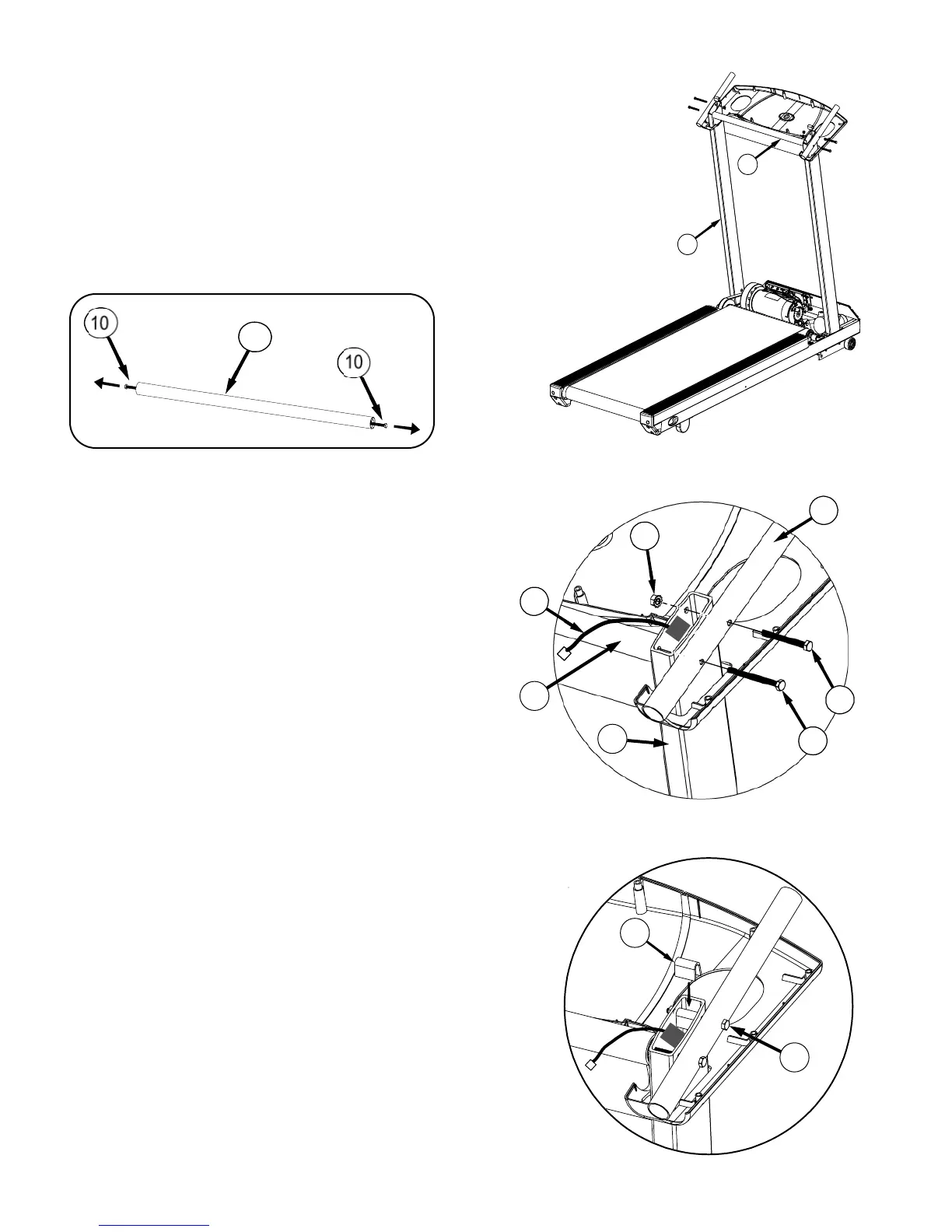
Step Four:
A. Remove the 3.5” Hex bolts (10) from both ends of handle bar (11). See
FIG. A1. Place the Handle Bar (11) between the uprights (2) as shown in FIG.
A2.
B. Using the 3.5” Hex bolt (10), loosely screw together the
panel support tube (12), the upright (2), and the handle
bar(11). See FIG. B. Follow the same procedure on the opposite side.
Using the 3” hex bolt (13) and a ¼-20 kep nut (14) loosely screw together
the panel support tube (12) and the upright(2). See FIG. B. Follow the
same procedure on the opposite side.
Make sure wire harness (8) is routed between bolts (10) and (13). See
FIG. B.
C. Place spacer (15) in the upright on top of bolt (13) on both sides. See FIG C.
Proceed to securely tighten all 4 bolts.
NOTE: If spacer (15) is dropped into the upright (2) then upright must be
removed in order to retrieve the spacer. If spacer is not retrieved it will make
noise when machine is in use.
2
11
1
1
Fi
. A1
Fi
. A2
Fig. C
11
Fig. B
15
13
2


 To Next Page