28
PERSONAL TRAINER WORKOUTS (cont’d)
If a problem should occur, the treadmill can be stopped quickly by pulling on the magnetic safety cord to dislodge the key from the Control
Panel. The treadmill will stop a bit more abruptly, but still gently enough to prevent you from being injured. This is an emergency
procedure only and should not be used as the normal stopping procedure.
CUSTOM WORKOUTS (P4 through P6)
The CUSTOM WORKOUTS offer three options:
• You can USE the factory set Body For Life recommended cardio interval workouts. (These programs can be recorded over
and be recovered at any time.)
• You can PROGRAM a custom workout in advance of beginning your workout.
• You can RECORD a custom program as you workout.
To be certain you are receiving the maximum benefit from your workout, wear your wireless chest strap transmitter and activate the
HeartSmart™ Pulse Monitoring System. The heart rate training zone in which you are currently exercising will be displayed on the Heart
Rate Zone bar in the PROFILE display window. For details, refer to the HEARTSMART™ PULSE MONITORING SYSTEM section in this
manual.
To begin using P4 through P6 Body For Life recommended factory set programs:
Step One:
Stand on the running belt and attach the garment clip on the end of the magnetic safety key to your clothing. Insert the safety key into its
recess on the control panel.
TIP: If you have selected your user ID, go to Step Three.
Step Two:
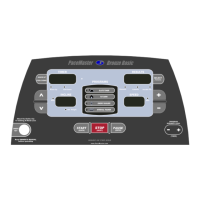
Press the Incline
buttons to set your weight and the Speed buttons to set your age, then press the
(ENTER)
button.
Step Three:
Press the
button to select the desired program, P4, P5 or P6. Press the
(USER ID)
button to add a warm up and/or cool
down.
Step Four:
Press the
(QUICK)
button to begin your program.
TIP: You can pause your workout by pressing the PAUSE
(ENTER)
button. This feature is not available in cool down or heart rate control.
To resume, press the START
(QUICK)
button.
If a problem should occur, the treadmill can be stopped quickly by pulling on the magnetic safety cord to dislodge the key from the Control
Panel. The treadmill will stop a bit more abruptly, but still gently enough to prevent you from being injured. This is an emergency
procedure only and should not be used as the normal stopping procedure.
To restore a Body For Life recommended cardio workout after it has been Programmed or Recorded over:
Step One:
Press the button to select the program position you want to recover, P4, P5 or P6. Press and hold the
(RESET)
button until rst
(restore) appears in the RIGHT DATA DISPLAY window. The original program has now been restored.


 To Next Page
 Loading...