29
PERSONAL TRAINER WORKOUTS (cont’d)
To PROGRAM your own CUSTOM workout in advance of beginning your workout:
Step One:
Stand on the running belt and attach the garment clip on the end of the magnetic safety key to your clothing. Insert the safety key into its
recess on the control panel.
TIP: If you have selected your user ID, go to Step Three.
Step Two:
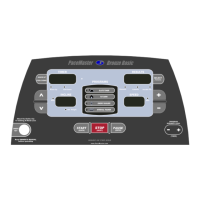
Press the Incline
buttons to set your weight and the Speed buttons to set your age, then press the
(ENTER)
button.
Step Three:
Press the
button to select the desired program position to create your workout, P4, P5 or P6. Press and hold the
(ENTER)
button until Prog appears in the PROFILE display window. 1:00 minute appears in the TIMER display window, 0.0% appears in the
INCLINE display window and 1.0 mph appears in the SPEED display window. St 1 (step one) appears in the RIGHT DATA DISPLAY
window. The LEFT DATA DISPLAY window will display cumulative workout time.
Step Four:
Adjust the desired step time by press the
TIMER buttons, speed by pressing the Speed buttons and incline by
the Incline
buttons for Step 1, then press the
(ENTER)
button. St 2 will then appear in the RIGHT DATA DISPLAY window.
Continue to enter the time, speed and incline and
(ENTER)
for the desired number of steps. You can program up to 50 steps or segments.
Step Five:
After the workout data has been entered for all of the desired steps, press and hold the
(ENTER)
button until Stor briefly appears in the
RIGHT DATA DISPLAY window. The program profile will be displayed in the PROFILE display window, the total program time will be
displayed in the TIMER display window and the program’s maximum speed and incline will appear in the INCLINE and SPEED display
windows. Press the
(QUICK)
button to begin your program.
NOTE: The current distance will be displayed in the LEFT DATA DISPLAY window.
Your workout will end when the timer has counted down to zero or the
(RESET)
button has been pressed. Do not end your workout by
removing the safety magnetic or your program will not be recorded. The treadmill will display the total workout time, distance,
calories, Aerobic Points and average speed. Your current heart rate will also be displayed, along with a graphic depiction of the Time
Spent In Zone in the PROFILE display window, if the HeartSmart™ monitoring system was activated and the chest strap transmitter was
worn.
If a problem should occur, the treadmill can be stopped quickly by pulling on the magnetic safety cord to dislodge the key from the Control
Panel. The treadmill will stop a bit more abruptly, but still gently enough to prevent you from being injured. This is an emergency
procedure only and should not be used as the normal stopping procedure.


 To Next Page
 Loading...