17
WORKOUTS (cont’d)
USING P2, P3, P4, P5, and P7: Each of these programmed Workouts offers 9 different levels of intensity. Additionally,
workout time can be set from 20 to 60 minutes in 5 minute increments.
Step One:
Stand on the running belt and attach the garment clip on the end of the magnetic safety key to your clothing. Insert the safety key into its
recess on the control panel.
Step Two:
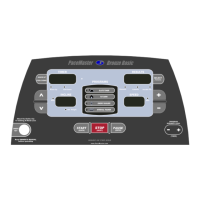
Press the Incline
buttons to set your weight and the Speed buttons to set your age, then press the
(ENTER)
button.
Step Three:
Press the
button to select the desired program, P2, P3, P4, P5 or P7.
Step Four:
The default workout time of 30:00 minutes will be flashing in the TIMER display. Use the WORKOUT INTENSITY LEVEL (TIMER)
buttons to adjust your total workout time. Total workout time can be set from 20 to 60 minutes, this includes a warm up &
cool down.
TIP: Warm up and cool down periods are automatically added to all the programmed Workouts. If you wish to remove the warm up and/or
cool down phases, press the
until the corresponding indicator light is no longer illuminated.
Step Five:
Press the PAUSE (ENTER)
(ENTER)
button to enter your workout time.
Step Six:
Press the WORKOUT INTENSITY LEVEL (TIMER)
button to adjust the level of intensity. The level will be displayed in the
RESULTS display window preceded with the letter “L”. The maximum incline for that level will be displayed in the INCLINE display and the
maximum speed for that level will be displayed in the SPEED display and the MAX indicator lights will also be illuminated. You can adjust
the level of intensity at any time during your workout by pressing the
buttons.
Step Seven:
Press the START
(QUICK)
button and your PaceMaster will gradually accelerate. Your workout will end when the timer has counted down
to zero or the STOP button is pressed. Total time, distance, calories, and Aerobic Points will be displayed.
TIP: You can pause your workout by pressing the PAUSE
(ENTER)
button. This feature is not available in cool down or heart rate control.
To resume, press the START
(QUICK)
button.
If a problem should occur, your PaceMaster can be stopped quickly by pulling on the magnetic safety cord to dislodge the key from the
Control Panel. The treadmill will stop a bit more abruptly, but still gently enough to prevent you from being injured. This is an emergency
procedure only and should not be used as the normal stopping procedure.


 To Next Page
 Loading...