19
WORKOUTS (cont’d)
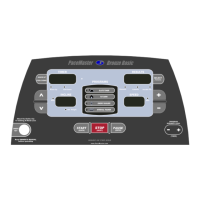
TIP: You can pause your workout by pressing the PAUSE
(ENTER)
button. This feature is not available in warm up or heart rate control.
To resume, press the START
(QUICK)
button.
To restore a Body for Life recommended cardio workout after it has been Recorded over:
Step One:
Press the button to select the program position you want to recover, P8 or P9. Press and hold the
(RESET)
button until
rst (restore) appears in the RESULTS window.
To RECORD a CUSTOM program in P8 or P9:
Step One:
Stand on the running belt and attach the garment clip on the end of the magnetic safety key to your clothing. Insert the safety key into its
recess on the control panel.
Step Two:
Press the Incline
buttons to set your weight and the Speed buttons to set your age, then press the
(ENTER)
button.
TIP: To monitor your heart rate, put on the chest strap transmitter and press the HEART RATE button. H1 will appear in the RESULTS
display window. This activates the HeartSmart™ monitoring system.
Step Three:
Press
button to select the desired program position to record your workout, P8 or P9. Press the
(ENTER)
button. Rec will
appear in the PROFILE display window.
Step Four:
To set the starting speed and incline, press the Speed
buttons and the Incline buttons until the desired settings
appear in the corresponding display windows.
Step Five:
Press the
(QUICK)
button to begin your workout.
Step Six:
You can make a maximum of 50 changes for each workout by pressing the Speed
buttons and the Incline
buttons. Each time a change is made,
re( will appear in the RESULTS window indicating that the treadmill’s computer is recording the
change. As soon as the change has been recorded,
re( will disappear and another change can be made. Speed changes can be also
be made by using the buttons. For details, refer to Using WALK, JOG, and Run buttons in this manual.
Your workout will end when the
(RESET)
button has been pressed. Stor will appear in the RESULTS display window, indicating that
you have successfully recorded your custom program. Do not end your workout by removing the safety magnetic or your program
will not be recorded.
Note: The current distance will be displayed the RESULTS display window. To lock onto distance, calories, or Aerobic Points, press the
(PREVIEW)
button. An LED light will be illuminated next to the data currently appearing in the RESULTS display window. To scan your


 To Next Page
 Loading...