BOSS 4.5, RF, P3 & P4 OWNERS MANUAL 29
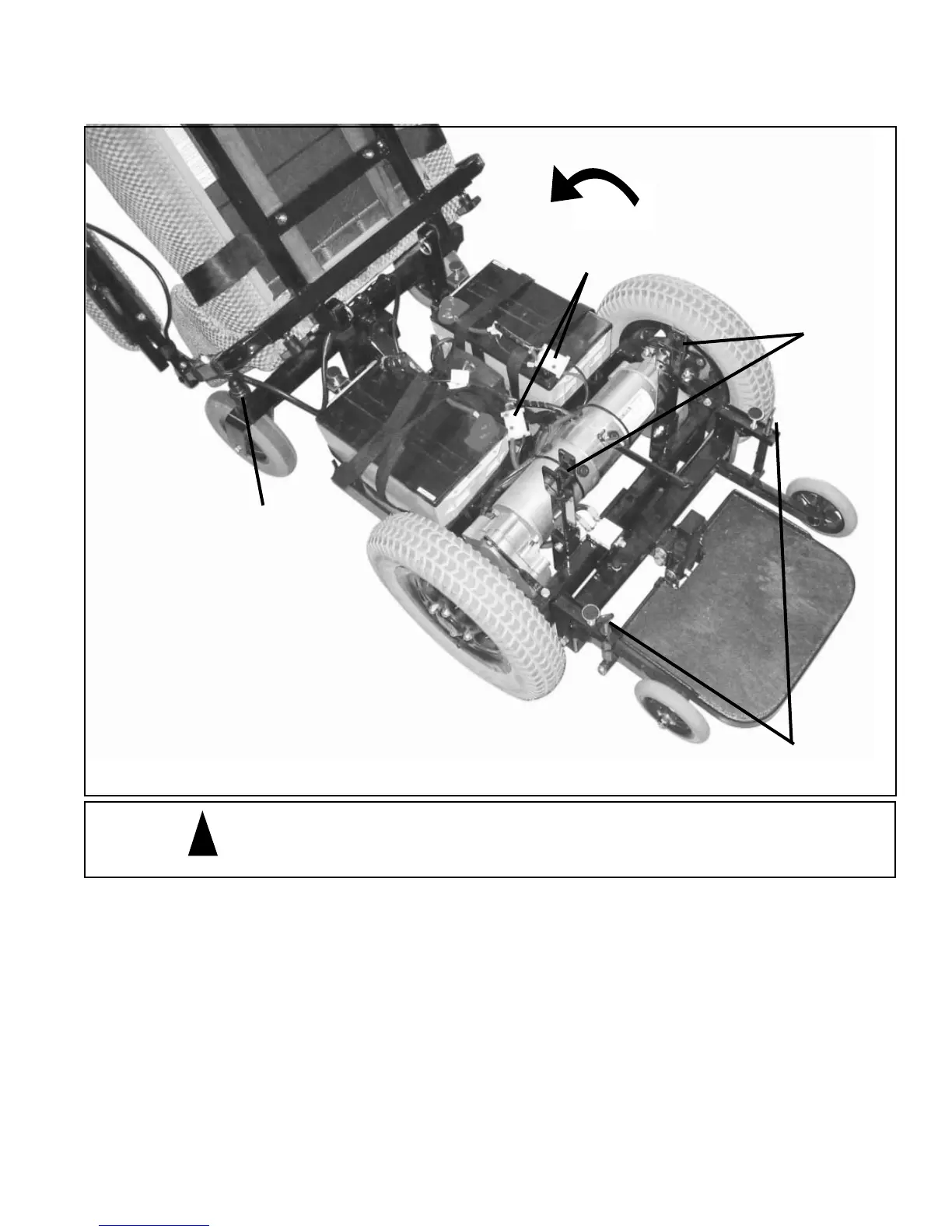
Battery Removal From Unit
1. Turn power off to controller.
2. Disconnect controller cable at back of seat
3. Remove the pull pins from the front of the seat.
4. Tilt seat rearward until seat back supports rest on the top of the casters.
CAUTION: Hold on to the joystick and the front of the seat while you tilt the seat back. Failure to do so
could result in the joystick fl opping backwards and striking the fl oor as you lower the seat resulting in dam-
age to the joystick.
5. Remove plastic shroud from unit. Be sure not to damage the controller cable.
6. Disconnect the battery connectors.
7. Remove batteries.
CAUTION - Failure to unplug cable from back of joystick before tilting
seat back may result in damage to the joystick and cable.
Top of
Caster
Pull Pins
Battery
Connectors
Anti-Tip
Adjustment
FIGURE 1
NOTE: The Boss 4.5 is shown in the
photo. Batteries are removed from
the Scout RF-P3 & P4 in the same
manner.
!


 To Next Page