3. Connect
a Device to the
CPS
Procedure
1. Determine
the type of Ethernet
client being used. If the unit
js
a Media
or
l\'Iulticast
device, or if it rvill for
other reasons have hrghest
pronq-
in the Home
Local Årea Nctrvork,
choose any port from 1 to
4
(For
the
CPS 218C, 1
to 3). C)thenvise Lrse ore
of the ports 5 to 8 (for the
CPS
218C
4 to 7)
2.
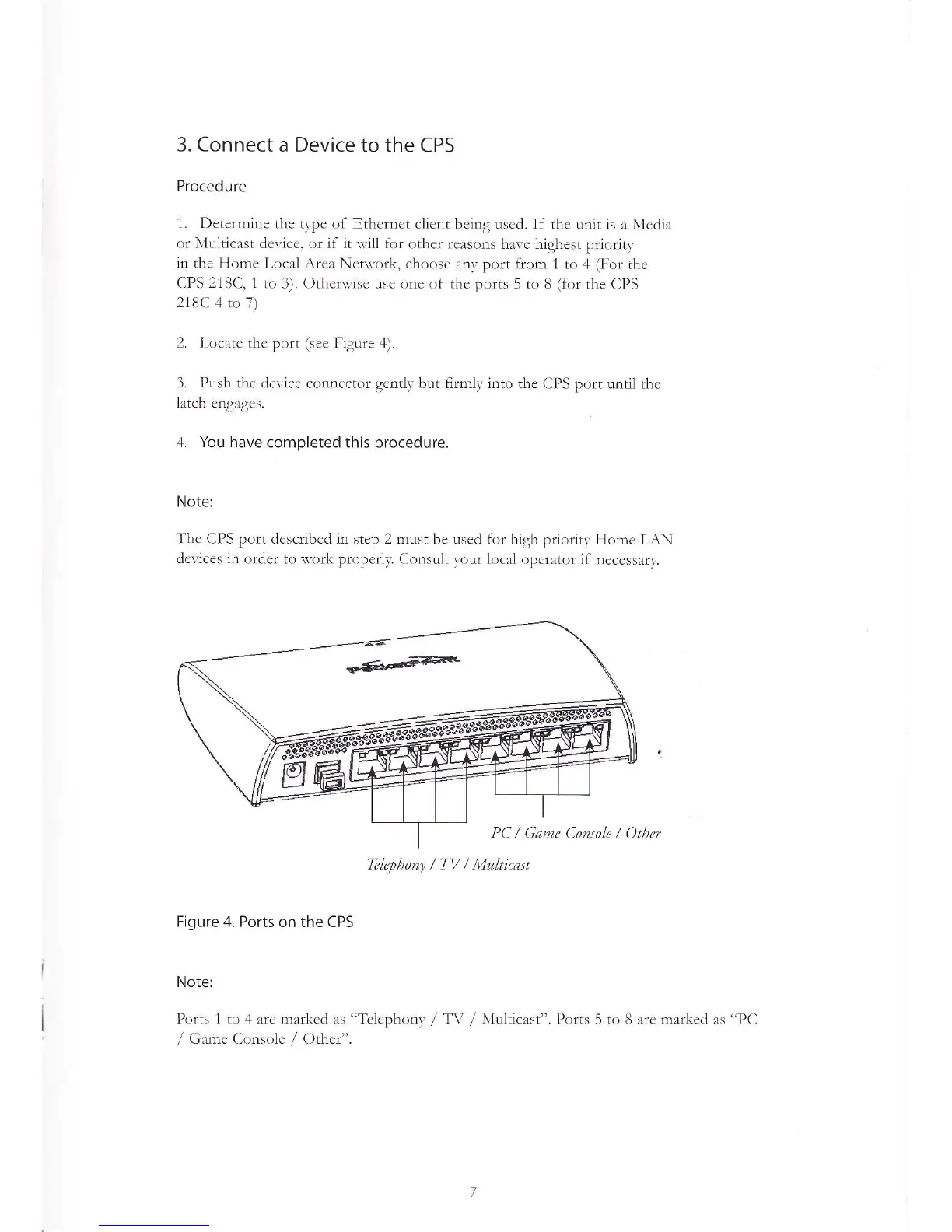
Locatc the port (see Figure
z[).
3.
Push
the device connector
gcndy
but firmly into
the CPS port until the
latch
engages.
,1,
You
have completed this
procedure.
Note:
The CPS port descdbed in step 2 must
be used for Lugh
pnoritv Home LÅN
deyices
in
order to u«rrk
propetll,. Consult
1.our
iocal operator if
necessarv
Figure 4.
Ports on the CPS
Note:
Ports 1 to 4 arc markcd as "Telephonl.
/
TV
/
I\{ulticast". Ports
5 to 8 are
marked
as "PC
/
Game
(ionsolc
/
()ther".
PC /
Game Console / Other
Telephony / TV / Muhicast


 To Next Page
 Loading...