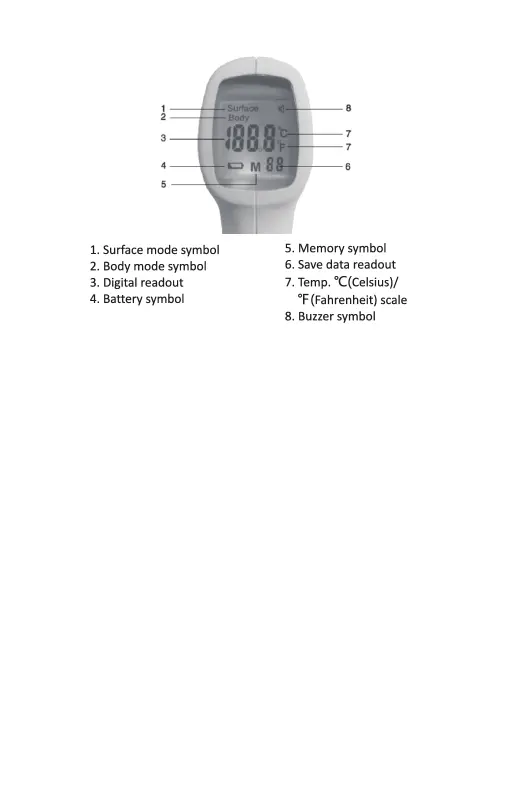
【LCD display description】
7. Operation Instruction
【Preparation】
1) Check battery
Replace the batteries to ensure power supply if there is low voltage
icon for the thermometer.
2) Check sensor
If have pollution and spray, please clean it. (The cleaning method
see the chapter 8 Care and Cleaning for detailed.)
If the sensor’s lens is damaged, please stop using.
3) Check thermometer
When you press the [Power/Scan] button, the system will have self
testing of software and hardware. If there are problems, LCD will
display "Err" symbol. Check if the sensor laser is dirty, damaged
phenomenon.
4) In order to make the accurate measuring result, put the
thermometer in the measurement environment for 30 minutes.
5) Accuracy of unexpected fluctuations in ambient temperature
may decrease the measurement results. When the thermometer at
the same measurement position display at different ambient
temperature, or test temperature in front of the air conditioner, it
will not be able to obtain accurate results.
6) If you want measure forehead temperature, clean forehead and
arrange hair, make sure the forehead is naked and clean, in order to
ensure the accuracy of measurement.
- 6 -


 To Next Page