Need help?
Do you have a question about the pagertec Smart Stack EVO and is the answer not in the manual?
The Smart Stack EVO is a wireless paging system designed to enhance efficiency in various service-oriented environments, such as restaurants, healthcare facilities, or retail stores, by alerting waiting customers or staff. The system primarily consists of a transmitter unit and rechargeable guest pagers, which are organized in a charging stack.
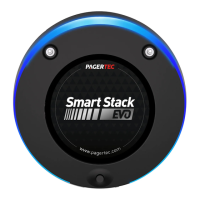
The core function of the Smart Stack EVO is to provide a reliable and efficient method for notifying individuals when their service is ready or when they need to return to a specific location. When a guest arrives, a pager is removed from the charging stack and assigned to them. The pager briefly lights up for 3 seconds upon removal, indicating it's active. The pager's unique number is then recorded and handed to the guest. When it's time to page the guest, their assigned number is entered into the transmitter unit. The Smart Stack EVO Coaster Pagers will then alert the guest by flashing or vibrating, depending on the alert mode configured in the transmitter. It's important to note that even in "beep" modes, the pagers will still flash and vibrate, but without an audible beep. The transmitter also allows for predefined time limits for each pager alert mode, offering flexibility in how long the pager alerts.
The installation of the Smart Stack EVO system involves setting up both the transmitter and the charging base for the pagers. For the transmitter, convenience and signal integrity are key considerations. It should be placed in a central location within the paging area, ensuring it's readily accessible. Care must be taken to avoid obstructions like walls, pipes, ducts, mirrored glass, or metal structures, as these can weaken or block the paging signal. Safety is also paramount; the unit should be securely mounted away from liquids, extreme heat, and potential physical damage. The transmitter requires a 110V AC power outlet, and it's crucial to attach the antenna before applying power to prevent damage. An optional molded plastic cover is available for purchase to protect the transmitter, especially in areas prone to spills. For optimal performance, the transmitter antenna should always be vertical. If a central location isn't feasible, range testing at different spots might be necessary to achieve the desired performance. Once the transmitter and antenna are installed, the power adapter is plugged in. Upon powering up, the transmitter will display "Enter Number," indicating it's ready to send a page. Using a surge suppressor on the power supply is recommended for protection, as power surges are not covered under the system warranty.
The charging base installation is straightforward. The charging base should be installed according to the directions provided with the charger kits. Before initial use, the pagers must be charged for 24 hours. A crucial note for maintenance is to keep rechargeable pagers on charge even during extended periods of inactivity to maintain battery health. There are important warnings regarding the charging base: do not stack more than 15 guest pagers on a single charging base, and do not connect more than 3 charger base plates to a single power supply. Only the power supply that came with the charger should be used. Damage resulting from improper electrical connections, including the use of an incorrect power supply, is not covered under the standard warranty. If there's any uncertainty about which power supply to use, contacting customer support is advised.
Maintenance of the Smart Stack EVO pagers includes cleaning and battery replacement. Pagertec pagers are constructed from industrial-strength polycarbonate material. However, this material can be susceptible to hairline cracking if non-approved cleaners are used. For cleaning, only ETHYL ALCOHOL (ethanol) or ISOPROPYL ALCOHOL-BASED CLEANERS are recommended. Extensive testing has shown no issues with these two types of alcohol. All other cleaners are not recommended. To clean the equipment, a clean cloth should be wetted with an isopropyl-alcohol based cleaner, and then used to wipe down the pagers or equipment. Once dry, rechargeable pagers should be placed back on charge.
Battery replacement is a periodic maintenance task. The rechargeable nickel metal hydride (NiMH) batteries typically last between one to three years, depending on usage. To replace the battery pack, a small Phillips head screwdriver is needed to remove the back screw from the rear of the pager. The back door can then be lifted from the bottom to open. It's important to keep the door and set screw in a safe place for reclosure. If a low-profile belt-clip is in use, it should be temporarily removed to facilitate battery replacement. The old batteries are carefully removed, and new replacement batteries (2 AAA NiMH batteries) are inserted. Finally, the battery door is replaced and re-secured with the Phillips head set screw.
The system also offers various programming features accessible through the transmitter. To enter programming mode, the "SETUP" button on the transmitter is pressed, followed by entering the password "4545" and then "enter." If the password is correct, the display will show "Menu Option Up Down." The "↑" and "↓" keys are used to scroll through menu options, or "CANCEL" can be pressed to exit.
One programming feature is "SET TIME," which allows the user to set the current time in the transmitter. The hour is set using the number keys, and then "↑" or "↓" is used to set AM/PM. After setting the correct time, "ENTER" is pressed.
Another important feature is "SET ALERT MODE," which allows changing the alert type of the pagers. To program this, all pagers should be placed on the charger, and the power supply to the charger should be disconnected and then reconnected to the wall outlet. There is a three-minute window to program the Set Alert Mode. At the "Set Alert mode" menu, "ENTER" is pressed. One of six alert modes (LED, LED / Vibe, LED / Beep, LED / Vibe / Beep, Vibe, Beep) is selected using the "↑" or "↓" keys, and then "SEND" is pressed. Pagers that successfully receive the change alert mode message will blink all LED lights, indicating that all pagers in the system should now alert with the selected mode. Pressing "C" exits to the main menu.
"SET ALERT TIME" allows setting how long the pager alerts when it receives a signal from the transmitter. Similar to "SET ALERT MODE," all pagers should be placed on the charger, and the power supply disconnected and reconnected, providing a three-minute window for programming. At the "Set Alert Time" menu, "Enter" is pressed. The "↑" or "↓" keys are used to scroll through nine different alert times (2 SEC, 5 SEC, 10 SEC, 15 SEC, 30 SEC, 60 SEC, 90 SEC, 120 SEC, Continuance). After selecting the desired time, "SEND" is pressed. The pagers will then respond with the new selected alert time mode. All pagers should be returned to the charger base or have their power supply plugged in. Pressing "C" exits to the main menu.
The "SET PAGER OFF" feature provides an option to turn off pagers to save battery. To use this, all pagers are removed from the chargers. At the "set pager off" menu, "ENTER" is pressed. "Pager off?" will appear on the display. Pressing "Send" will cause all pagers that received the signal to blink for 2 seconds, indicating they have been turned off.
The "OUT OF RANGE" feature (factory default: OFF) causes the coasters to beep when they are taken out of range of the transmitter. This informs the guest that they are too far away and might miss their page. The beeping automatically stops when they return within range. Before performing this procedure, ensure all pagers are present. To turn "OUT OF RANGE" ON, all pagers are removed from the charging unit, or the power supply connected to the first charging base is unplugged. At the "Set Out of Range" menu, "ENTER" is pressed to select ON or OFF. Pressing "ENTER" again sends the signal, and all coasters will light up once to confirm they received the new code. "CANCEL" exits the system programming menu.
The "FIELD TEST" feature (factory default: OFF) helps determine the transmitter's coverage distance. A couple of coasters are removed from the charging stack. At the Field Test menu, "ENTER" is pressed to turn Field Test "ON" and start the range test. Once activated, the coasters will flash once every 30 seconds. The user walks around the property, and when the coasters no longer flash consistently, that indicates the maximum range. If an increase in power level is desired, the user should exit the range test and contact Pagertec. To stop the range test, "CANCEL" is pressed. Pressing "CANCEL" again exits the system programming menu. The transmitter has an auto shut-off feature that will stop the Field Test after 15 minutes.
Finally, the "SET KEY TONE" feature allows turning the beeping sound of the transmitter buttons ON or OFF. To change this option, "ENTER" is pressed, and the up and down arrows are used to select the desired choice. Then, "ENTER" is pressed again.
 General
| Display | Yes |
|---|---|
| Alphanumeric Paging | Yes |
| Vibration Alert | Yes |
| Charging Time | 2-3 hours |
| Frequencies | 400-470 MHz |
| Supported Networks | POCSAG |

 To Next Page