EasyManua.ls Logo

pagertec Simple Alert - User Manual

pagertec Simple Alert
9 pages
Print Icon
To Next Page IconTo Next Page
Loading...
Simple Alert Paging System
USER MANUAL
Question and Answer IconNeed help?

Do you have a question about the pagertec Simple Alert and is the answer not in the manual?

Summary

Transmitter Installation and Placement

Pager Charging and System Operation

Pager Charging Procedures

Instructions for charging guest pagers, including initial charging and maintenance.

System Usage and Guest Paging

Steps for using the paging system, from receiving a pager to alerting guests.

Pager Alert Configuration

Setting Pager Alert Modes

How to configure pagers to vibrate, flash, or beep for alerts.

Setting Pager Alert Times

Procedure to customize the duration of pager alerts from 15 to 90 seconds.

Pager Management and Features

Turning Pager Off

Instructions on how to power down the guest pagers.

Group Paging Functionality

Explanation of setting multiple pagers to the same call number.

Canceling an Active Page

Methods for cancelling an active page, either via the transmitter or the charging base.

Pager Synchronization

FCC Compliance and Safety Information

Overview

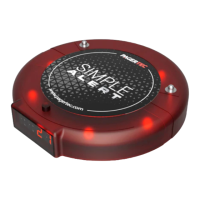
The Pagertec Simple Alert Paging System is a wireless paging solution designed for various environments where efficient guest or staff notification is required. The system comprises a transmitter and multiple guest pagers, facilitating communication through alerts.

Function Description:

The primary function of the Pagertec Simple Alert Paging System is to enable a host or staff member to discreetly notify guests or other staff members when their attention is required. This is achieved by sending a page from the transmitter to a specific pager, which then alerts the recipient through a combination of visual, auditory, and tactile signals. The system is designed to improve customer service and operational efficiency by reducing wait times and streamlining communication.
Important Technical Specifications:

  • Power Requirements: The transmitting unit requires a 110V-220V AC power outlet.
  • Pager Charging: Pagers are rechargeable and are charged on a dedicated charging base. A single charging base can accommodate up to 10 guest pagers. Only one charger base should be connected to a single power supply, and only the power supply provided with the system should be used.
  • Antenna: The transmitter requires an antenna to be attached prior to applying power to prevent damage. For optimal performance, the antenna should be vertical, and the transmitter should be centrally located within the paging area.
  • Battery Life Indicator: Pagers display "LOBT" when the battery level is low, indicating approximately 20 minutes of remaining operation before shutdown. A green light on the pager signifies a full charge.
  • Paging Range: The effective paging range is influenced by obstructions such as walls, pipes, ducts, mirrored glass, and metal construction, which can weaken or block signals. Range testing at different locations may be necessary to achieve desired performance.
  • Pager Capacity: The system supports pagers numbered from 1 to 99.

Usage Features:

  • Transmitter Operation:
    • Paging: To page a pager, the user enters the pager's number (1-99) using the number keys on the transmitter, then presses the "ENTER" key to send the call.
    • Canceling a Page: A page can be canceled in two ways:
      1. By pressing the pager's number followed by the "CANCEL" key on the transmitter.
      2. By placing the pager back on its charging base, which automatically cancels the page.
  • Pager Alert Modes: Pagers can be programmed with one, two, or all three of the following alert types:
    • Vibrate (S): The pager vibrates.
    • Flash (F): The pager flashes visually.
    • Beep (B): The pager emits an audible beep.
    • Combinations: Pagers can be set to combine these alerts, such as Flash and Beep (FB), Flash and Vibrate (FS), Beep and Vibrate (BS), or Flash, Beep, and Vibrate (FBS).
    • Setting Alert Mode: To set the alert mode, turn the pager around, press the "MODE" button, then repeatedly press the "LEARN" button until the desired mode (F, B, S, FB, FS, BS, FBS) is displayed. Finally, press the "STOP" button to save the selection.
  • Alert Duration: The duration of the pager alert can be set to 15, 30, 45, 60, or 90 seconds.
    • Setting Alert Time: To set the alert time, turn the pager around, press the "TIME" button, and continue pressing it until the desired duration is reached.
  • Turning Pager Off: To turn a pager off, simultaneously press the "MODE" and "STOP" buttons.
  • Group Paging: The system supports group paging, allowing multiple pagers to be assigned the same number. This feature enables simultaneous notification of a group of individuals.
  • Syncing Pagers to a Transmitter: When expanding the system with new pagers, they need to be synced to the transmitter.
    1. Turn the pager around and press the "LEARN" button; the pager will display "----".
    2. Use the number keys on the transmitter to enter the desired pager number.
    3. Press the "ENTER" button on the transmitter to confirm and save the changes.
    4. The pager will then display the newly assigned number.

Maintenance Features:

  • Charging: Pagers should be charged for 24 hours prior to first use. It is recommended to keep rechargeable pagers on charge even during long periods of inactivity to maintain battery health.
  • Transmitter Placement: The transmitter should be securely mounted in a central, accessible location, away from liquids, extreme heat, and potential physical damage.
  • Power Supply: Only the power supply provided with the system should be used. Damage from improper electrical connections, including incorrect power supply usage, is not covered under the standard warranty.
  • Optional Accessories: An optional molded plastic cover is available for the transmitter to protect it from spills, particularly in environments where this is a concern.
  • FCC Compliance: The device complies with FCC rules (Part 15) and is designed to minimize harmful interference. Users are advised to reorient the receiving antenna, increase separation between equipment and receiver, connect equipment to different circuit outlets, or consult a technician if interference occurs. A shielded power cord and shielded cables are required for compliance. Any unauthorized changes or modifications to the equipment may void the user's authority to operate it.

pagertec Simple Alert Specifications

General IconGeneral
Brandpagertec
ModelSimple Alert
CategoryPager
LanguageEnglish

Related product manuals