n
r
sp
o
q
n
r
sp
o
q
n
r
sp
o
q
n
r
sp
o
q
¿J
¿J
¿J
¿J
¿J
ENGLISH
2 PRELIMINARY
OPERATIONS
2.1 LOADING THE PELLETS
)LUVWRIDOO\RXPXVW¿OOWKHKRSSHUXVLQJDVXLWDEOHVFRRS
'R QRW HPSW\ WKH EDJ GLUHFWO\ LQWR WKH FRQWDLQHU WR
DYRLG VSLOODJH DQG DOVR WKH SUHVHQFH RI VDZGXVW RU
other undesirable elements in the system, which could
compromise the functionality of the stove.
3OHDVHHQVXUHWKDW\RX VHFXUHWKHKRSSHUOLG¿UPO\DIWHU
ORDGLQJ$VDIHW\VHQVRURQO\VXSSOLHGZLWKVRPHPRGHOV
determines whether the lid is secure and will switch on an
alarm if the cover remains open for more than a minute when
the stove is operational.
2.2 ELECTRICITY SUPPLY
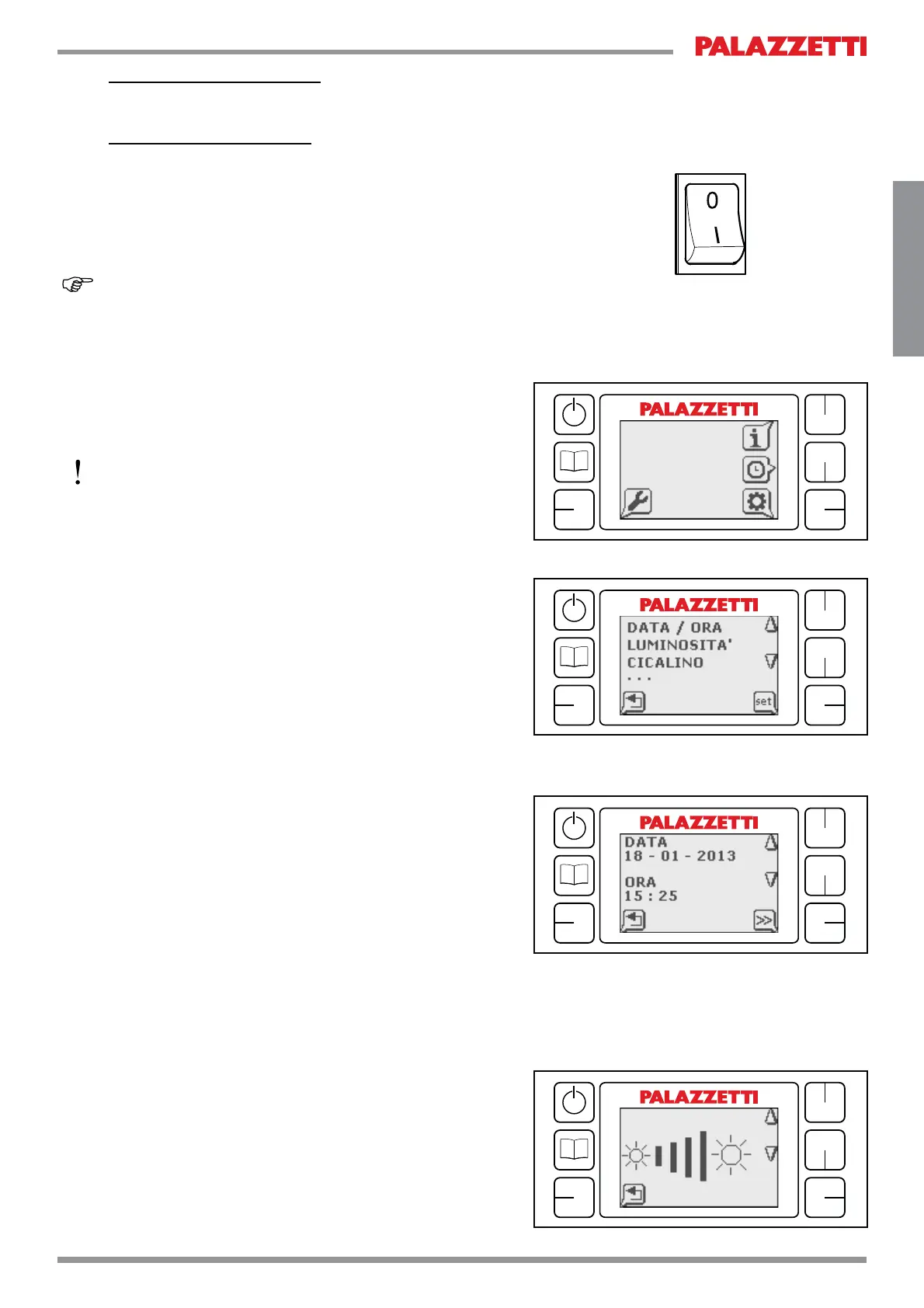
3OXJWKHVWRYHLQWRWKHPDLQVDQGPRYHWKHVWDUWLQJVZLWFK
DWWKHEDFNRIWKHXQLWWRWKH21,SRVLWLRQ¿JWKH
VWRYHZLOOWKHQHPLWDQDFRXVWLFVLJQDOEHHSDQGWKH/&'
ZLOOOLJKWXS
,I WKH VWRYH LV OHIW LGOH IRU ORQJ SHULRGV RI WLPH LW LV
recommended that you move the switch at the back of the
unit to the OFF (O) position.
2.3 INITIAL SETTINGS
Before initial start-up it is recommended that you adjust
WKH LQLWLDO VHWWLQJV E\ DFFHVVLQJ WKH UHOHYDQW RQVFUHHQ
menu:
3UHVVWKH0HQXNH\¿J
o)
3UHVVWKHNH\QH[WWRWKHVHWWLQJVV\PERO¿J
s)
7KH6HWWLQJV0HQXZLOODSSHDURQWKHVFUHHQ¿J
2.4 DATE AND TIME SETTINGS
2SHQWKH6HWWLQJV0HQX¿J
Scroll the menu with “up” and “down” buttons (
q-r)
XQWLO\RX¿QG³'$7(7,0(´
Press the button next to the “set” symbol (
s)
$GMXVWWLPHDQGGDWHXVLQJWKH³XS´DQG³GRZQ´EXWWRQV
(
q-r SUHVV WKH ´!!´ NH\ s) to jump between the
YDULRXVHQWULHV¿J
The “back” button (
p) allows you return to the previous
screen and save your data
2.5 ADJUSTING THE BRIGHTNESS OF THE “IN
STAND-BY” SCREEN
7KHIXQFWLRQDOORZV\RXWRDGMXVWWKHGHJUHHRIEULJKWQHVV
of the screen in Stand-By mode.
2SHQWKH6HWWLQJV0HQX¿J
Scroll the menu with “up” and “down” buttons (
q-r)
XQWLO\RX¿QG³%5,*+71(66´
Press the button next to the “set” symbol (
s)
$GMXVWWKHYDOXHVXVLQJ³XS´DQG³GRZQ´EXWWRQV¿J
q-r
The “back” button (
p) allows you return to the previous
screen and save your data


 To Next Page
 Loading...